
Samsung · Filed May 27, 2026 · Published Oct 15, 2026

Samsung Files Patent for Dragging One Recent App Onto Another to Split Your Screen

Samsung's patent application turns your recent apps screen into a drop zone. Drag one app card onto another, and where you let go decides how the two share your screen.
A phone screen lets a user drag one recent app onto another to launch both side by side in split-screen mode. Drawing from patent filing US 2026/0319816 A1.
A phone screen lets a user drag one recent app onto another to launch both side by side in split-screen mode.
See all 49 drawings from this filing ↓
Publication number US 2026/0319816 A1 US20260319816A1
Applicant SAMSUNG ELECTRONICS CO., LTD.
Filing date May 27, 2026
Publication date Oct 15, 2026
Inventors Munhwi KIM, Hyunjung KIM, Heelim HAN, Dongjoo KO, Hyun KIM, Guhyun YANG, Ilku CHANG
US classification 715/788
Status when we published Waiting for an examiner (Jul 29, 2026)
Parent application is a Continuation of PCTKR2024019917 (filed 2024-12-06)
Document 19 claims

What Samsung's drag-to-split gesture actually does

A phone has a chat, a map and a recipe all open in the background. The owner wants two of them side by side, and has to dig through menus to make that happen.

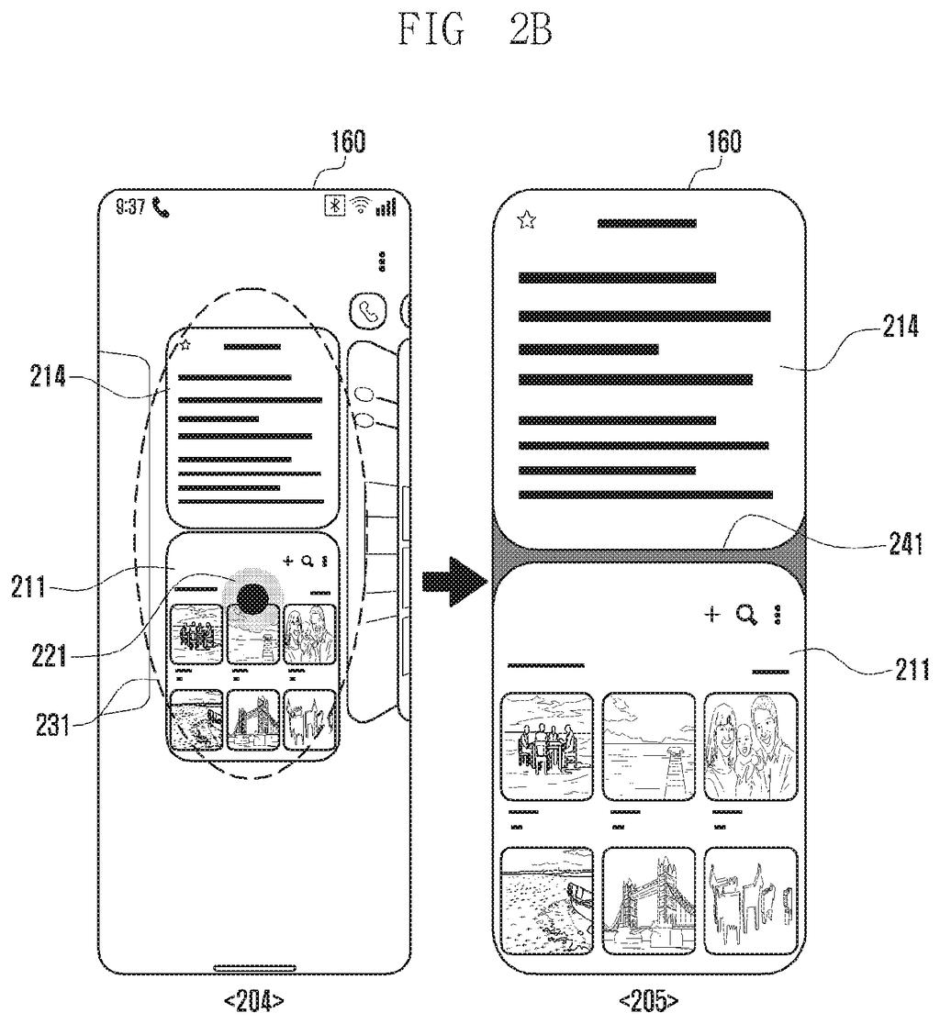
Samsung's patent application tries to shrink that job to a single gesture. In the recent apps view, you press and hold one app card and drag it over another. A preview shows how the two would share the screen. Hover over the bottom of the other card and yours slots in underneath. Hover over the top and it flips. Hover over the middle and your app floats on top as a small pop-up window.

When you let go, the preview becomes the real thing. If you change your mind, you can drag the card to a home or cancel spot and nothing changes.

From the filing · CLAIM 1
display a user interface of a recent screen view, enabling browsing a plurality of recently used screens, on the display by executing the recent screen view, based on a first input, each of the plurality of recently used screens indicating an execution screen of an application previously executed or currently being executed in the electronic device; …

Translation: Users open an app switcher screen to browse through their active and past applications.

How the drop spot picks your split-screen layout

The filing starts from the recent screen view, the row of app cards you see after swiping the display or tapping a button. Pressing and holding one card puts the device into a multi-window preview mode. The other cards tilt back in perspective, and the card you are holding shrinks so you can drag it.

As you drag over a target card, a preview of the split layout appears. Where you hover matters:

  • Bottom stretch (roughly the lowest 30%): your card goes in the lower half, the target on top.
  • Top stretch (roughly the highest 30%): the order flips.
  • Middle band: the target fills the screen and yours floats as a pop-up, which can sit in one of nine grid positions.
  • Left or right edge: the pairing is released and your card is matched with the previous or next card.

Letting go turns the preview into real windows, with a draggable bar between them to change the size ratio. Dropping the card on a home card, home button or cancel button ends the mode.

The dependent claims add extras. The device can recommend apps to pair, judged by your learned multi-window history, how related two apps are, their categories and usage time. Touching a card with more than one finger can open a split with your most recent app, and a layout can be built automatically when your history shows a pattern.

From the filing · THE ABSTRACT
… while the second input is maintained in the multi-window preview mode, when the first recently used screen is moved to a specific position for a target recently used screen, according to the second input, displaying, as a preview image, a layout of a multi-window in which the first recently used screen and the target recently used screen can be displayed together; …

Translation: Dragging one app over another while holding down generates a live preview of a split screen layout.

Why recents-screen splitting matters on big screens

If you already juggle apps on a big phone or tablet, this puts split-screen setup inside the screen you use to switch apps anyway. You would build a pair by dragging, see the result before it happens, and fix a mistake just by moving your finger.

The filing's background is simple: displays keep growing, so showing several apps at once is becoming normal. The recommended-app and automatic-layout claims point toward a device that learns your usual pairings. It is a patent application, so nothing in it says this will ship.

Samsung's 1481st filing we've tracked since May in our Samsung coverage follows keeping AI chatbots fast under load and a behavior-reading ad blocker.

Editorial take

Splitting a phone or tablet screen is something plenty of people want and few bother with, because setting it up can feel fiddly. The cost of that problem is small each time, but you hit it every day you multitask. A single drag with a visible preview is a sensible size of fix for it.

The preview is the best part. Seeing the layout before you let go means fewer accidental splits and fewer do-overs. The recommended-app and auto-layout pieces could feel pushy if they guess wrong, so their value depends on how well they learn your habits.

The filing covers a screen gesture, so expect a tidy interface refinement. You will notice it only if it ships and you already use split screen.

Get our take in your Top Stories

Liked this breakdown? Add Patentlyze as a preferred source on Google, and our plain-English take shows up more often in your Top Stories the next time Samsung patent news breaks.

There are more where this came from

We read every patent application Big Tech publishes and send you the ones worth knowing. Plain English, free, every week.

The drawings

49 drawing sheets from US 2026/0319816 A1 · click any drawing to enlarge

Smartphone internal parts and connections, drawing sheet 1 from US 2026/0319816 A1
Sheet 1 Smartphone internal parts and connections
Dragging apps in recent tasks, drawing sheet 2 from US 2026/0319816 A1
Sheet 2 Dragging apps in recent tasks
Snapping apps into split screen, drawing sheet 3 from US 2026/0319816 A1
Sheet 3 Snapping apps into split screen
Selecting apps from task switcher, drawing sheet 4 from US 2026/0319816 A1
Sheet 4 Selecting apps from task switcher
Split-screen setup steps, drawing sheet 5 from US 2026/0319816 A1
Sheet 5 Split-screen setup steps
Opening app switch recommendations, drawing sheet 6 from US 2026/0319816 A1
Sheet 6 Opening app switch recommendations
App suggestions in task view, drawing sheet 7 from US 2026/0319816 A1
Sheet 7 App suggestions in task view
App recommendation check steps, drawing sheet 8 from US 2026/0319816 A1
Sheet 8 App recommendation check steps
Show the other 41 sheets
Samsung Files Patent for Dragging One Recent App Onto Another to Split Your Screen patent drawing, sheet 9
Sheet 9
Samsung Files Patent for Dragging One Recent App Onto Another to Split Your Screen patent drawing, sheet 10
Sheet 10
Samsung Files Patent for Dragging One Recent App Onto Another to Split Your Screen patent drawing, sheet 11
Sheet 11
Samsung Files Patent for Dragging One Recent App Onto Another to Split Your Screen patent drawing, sheet 12
Sheet 12
Samsung Files Patent for Dragging One Recent App Onto Another to Split Your Screen patent drawing, sheet 13
Sheet 13
Samsung Files Patent for Dragging One Recent App Onto Another to Split Your Screen patent drawing, sheet 14
Sheet 14
Samsung Files Patent for Dragging One Recent App Onto Another to Split Your Screen patent drawing, sheet 15
Sheet 15
Samsung Files Patent for Dragging One Recent App Onto Another to Split Your Screen patent drawing, sheet 16
Sheet 16
Samsung Files Patent for Dragging One Recent App Onto Another to Split Your Screen patent drawing, sheet 17
Sheet 17
Samsung Files Patent for Dragging One Recent App Onto Another to Split Your Screen patent drawing, sheet 18
Sheet 18
Samsung Files Patent for Dragging One Recent App Onto Another to Split Your Screen patent drawing, sheet 19
Sheet 19
Samsung Files Patent for Dragging One Recent App Onto Another to Split Your Screen patent drawing, sheet 20
Sheet 20
Samsung Files Patent for Dragging One Recent App Onto Another to Split Your Screen patent drawing, sheet 21
Sheet 21
Samsung Files Patent for Dragging One Recent App Onto Another to Split Your Screen patent drawing, sheet 22
Sheet 22
Samsung Files Patent for Dragging One Recent App Onto Another to Split Your Screen patent drawing, sheet 23
Sheet 23
Samsung Files Patent for Dragging One Recent App Onto Another to Split Your Screen patent drawing, sheet 24
Sheet 24
Samsung Files Patent for Dragging One Recent App Onto Another to Split Your Screen patent drawing, sheet 25
Sheet 25
Samsung Files Patent for Dragging One Recent App Onto Another to Split Your Screen patent drawing, sheet 26
Sheet 26
Samsung Files Patent for Dragging One Recent App Onto Another to Split Your Screen patent drawing, sheet 27
Sheet 27
Samsung Files Patent for Dragging One Recent App Onto Another to Split Your Screen patent drawing, sheet 28
Sheet 28
Samsung Files Patent for Dragging One Recent App Onto Another to Split Your Screen patent drawing, sheet 29
Sheet 29
Samsung Files Patent for Dragging One Recent App Onto Another to Split Your Screen patent drawing, sheet 30
Sheet 30
Samsung Files Patent for Dragging One Recent App Onto Another to Split Your Screen patent drawing, sheet 31
Sheet 31
Samsung Files Patent for Dragging One Recent App Onto Another to Split Your Screen patent drawing, sheet 32
Sheet 32
Samsung Files Patent for Dragging One Recent App Onto Another to Split Your Screen patent drawing, sheet 33
Sheet 33
Samsung Files Patent for Dragging One Recent App Onto Another to Split Your Screen patent drawing, sheet 34
Sheet 34
Samsung Files Patent for Dragging One Recent App Onto Another to Split Your Screen patent drawing, sheet 35
Sheet 35
Samsung Files Patent for Dragging One Recent App Onto Another to Split Your Screen patent drawing, sheet 36
Sheet 36
Samsung Files Patent for Dragging One Recent App Onto Another to Split Your Screen patent drawing, sheet 37
Sheet 37
Samsung Files Patent for Dragging One Recent App Onto Another to Split Your Screen patent drawing, sheet 38
Sheet 38
Samsung Files Patent for Dragging One Recent App Onto Another to Split Your Screen patent drawing, sheet 39
Sheet 39
Samsung Files Patent for Dragging One Recent App Onto Another to Split Your Screen patent drawing, sheet 40
Sheet 40
Samsung Files Patent for Dragging One Recent App Onto Another to Split Your Screen patent drawing, sheet 41
Sheet 41
Samsung Files Patent for Dragging One Recent App Onto Another to Split Your Screen patent drawing, sheet 42
Sheet 42
Samsung Files Patent for Dragging One Recent App Onto Another to Split Your Screen patent drawing, sheet 43
Sheet 43
Samsung Files Patent for Dragging One Recent App Onto Another to Split Your Screen patent drawing, sheet 44
Sheet 44
Samsung Files Patent for Dragging One Recent App Onto Another to Split Your Screen patent drawing, sheet 45
Sheet 45
Samsung Files Patent for Dragging One Recent App Onto Another to Split Your Screen patent drawing, sheet 46
Sheet 46
Samsung Files Patent for Dragging One Recent App Onto Another to Split Your Screen patent drawing, sheet 47
Sheet 47
Samsung Files Patent for Dragging One Recent App Onto Another to Split Your Screen patent drawing, sheet 48
Sheet 48
Samsung Files Patent for Dragging One Recent App Onto Another to Split Your Screen patent drawing, sheet 49
Sheet 49
Browse all the drawings 49 drawing sheets
Patent filing page

Source. Full patent text and figures from the official USPTO publication PDF.
Reader comments

Be the first to weigh in

Start the discussion

Real name or a handle, either is fine. Comments are read by a person before they appear, so allow a little time. Keep it about the filing.