
Samsung Files Patent for a TV Game Menu That Only Shows What Works
When you open a game menu on your TV, the picture behind it often changes, and some of the menu's buttons stop making sense. Samsung's patent has the TV check what happened and hide the options that can't work.
What Samsung's cloud-game quick panel does
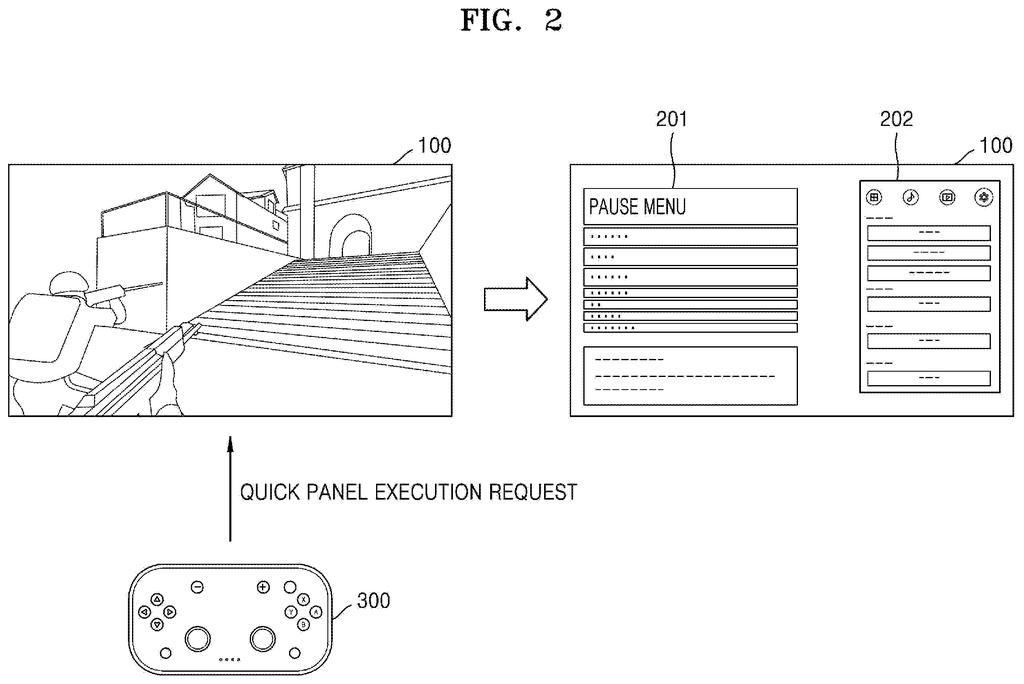
You're playing a cloud game on your Samsung TV and you press the button for the quick menu. The game freezes, dims, or gets covered by its own pause screen. You tap "show mini map," and nothing happens, because the mini map is no longer visible.
This patent has the TV notice that change. It compares a snapshot from just before you opened the menu with what's on screen now, then works out which tools can still do their job. If the whole screen is just a pause menu, the gameplay tools are left out entirely.
The TV also remembers what it learned about each game, so next time it can skip the detective work. The goal is a shorter menu where every option you see actually works.
control the display to display game content through a first execution screen, based on a request for a menu via which a plurality of functions related to the game content are settable, control the display to display a second execution screen …
Translation: The TV shows your game and then prepares the menu when you press the button.
How the TV compares your screen before and after
In cloud gaming, a faraway server runs the game and streams the video to your TV. When you open the quick panel (a small menu of handy game tools), the TV sends the server a pause event, a message that your controller input is on hold. Each game reacts in its own way: some show a full-screen pause menu, some cover part of the picture, some dim or blur the scene, and some keep playing.
The TV grabs a frame from just before the request and compares it with the new screen. A trained machine-learning model (software that learned to recognize patterns in images) decides whether the new screen is all menu. If it is, the gameplay tools are dropped. If part of the game is still visible, the TV checks each tool:
- Mini map: it finds the map's spot and compares its sharpness with the earlier frame. The filing's example has the map at 90% of its earlier sharpness, which passes a preset threshold.
- Aiming point: it checks how closely the aiming area matches the earlier frame (70% in the example), and only for game genres that need one.
- Timer and FPS counter (frames per second): it looks for an empty edge spot, away from other on-screen windows, that is big and clear enough to hold the display.
The results are saved for each game, along with where its on-screen windows sit. If the layout matches next time, the TV reuses the saved answer. The filing also describes a warning when you place an aiming marker where notifications tend to pop up.
… control the display to display the menu to include at least one function, on the second execution screen, selected from among the plurality of functions on the basis of the first execution screen and the second execution screen.
Translation: The system filters the menu options so you only see settings that actually work right now.
Why a shorter, honest menu helps couch gamers
If you play on a TV with a controller, fumbling through menus is a real annoyance. A menu that lists tools that don't work wastes your time, and it can make you think the feature is broken. Trimming the list to what works is a small change you'd notice in the middle of a match.
The approach is also built for how cloud gaming works. Samsung doesn't control how each game handles a pause, so the TV looks at the picture and works it out itself. That fits the gaming hub service the filing describes, which connects cloud games and consoles on a Samsung TV.
Samsung's 1495th filing in our Samsung coverage since May joins recent applications like a battery-saving camera fix and a strap-screen smartwatch we've tracked.
Nobody will buy a TV because of a dead menu button. Still, the problem lands at an annoying moment: mid-match, controller in hand, with the game paused behind a menu that offers tools you can't use.
Samsung can't fix this at the source, because the games run on other companies' servers and each one handles pausing differently. So the TV has to study the picture and decide for itself. That takes a lot of machinery for a modest payoff: image comparisons, sharpness scores, and a saved list for every game.
Given that constraint, the size of the fix matches the size of the problem about as well as it can. This is routine polish for a gaming menu, and the document claims nothing grander.
Get our take in your Top Stories
Liked this breakdown? Add Patentlyze as a preferred source on Google, and our plain-English take shows up more often in your Top Stories the next time Samsung patent news breaks.
There are more where this came from
We read every patent application Big Tech publishes and send you the ones worth knowing. Plain English, free, every week.
The drawings
20 drawing sheets from US 2026/0315925 A1 · click any drawing to enlarge


Show the other 12 sheets


Want this weekly breakdown for a company we don't cover? Patentlyze Pro →
Be the first to weigh in