
Apple · Filed Feb 3, 2026 · Published Oct 22, 2026

Apple Files Patent to Make Far-Away Buttons Easier to Pick With Your Eyes

Eye trackers are slightly off, and that error gets worse the farther away you look. Apple's patent filing grows or shrinks the invisible target around a button to match how far away it appears.
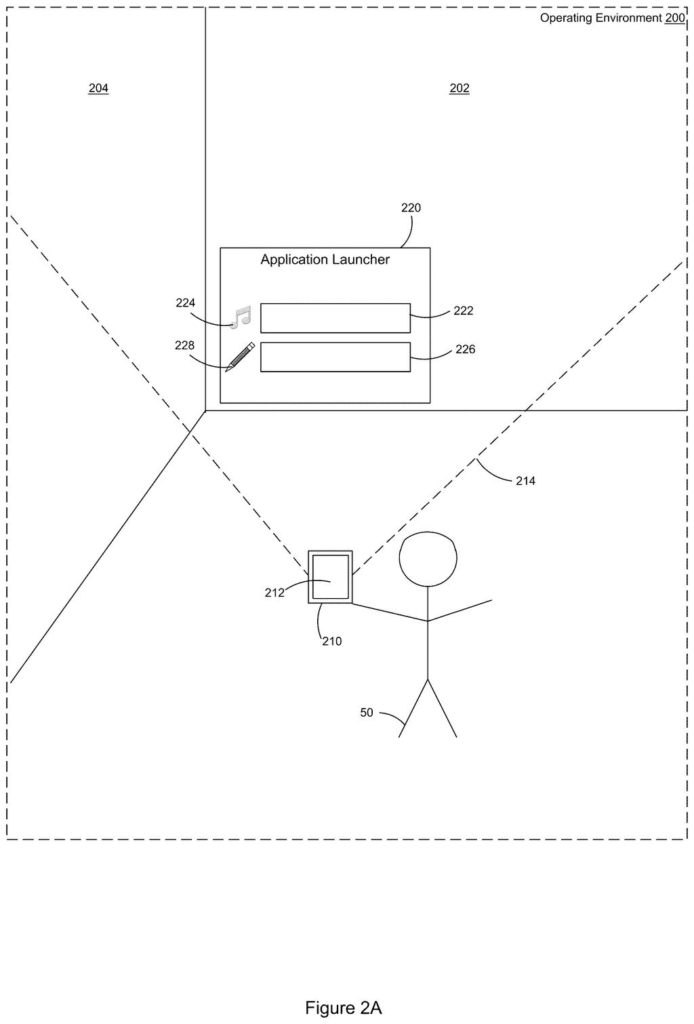
A person looking through a handheld screen sees digital buttons floating on a room wall across from them. Drawing from patent filing US 2026/0329373 A1.
A person looking through a handheld screen sees digital buttons floating on a room wall across from them.
See all 27 drawings from this filing ↓
Publication number US 2026/0329373 A1 US20260329373A1
Applicant Apple Inc.
Filing date Feb 3, 2026
Publication date Oct 22, 2026
Inventors Bryce L. Schmidtchen, Ioana Negoita, Anshu K. Chimalamarri, Gregory Lutter, Thomas J. Moore, Trevor J. McIntyre
US classification 345/156
Examiner PHAM, LONG D (Art Unit 2623)
Status when we published Waiting for an examiner (Jul 14, 2026)
Parent application is a Continuation of 18651151 (filed 2024-04-30)
Document 20 claims

What Apple's depth-based eye selection does

Eye tracking is never perfectly accurate. The spot a device thinks you're looking at can sit a little off from where your eyes really are, and that small miss gets bigger the farther away the thing you're looking at appears to be.

Apple's filing tackles this for screens where buttons can float at different distances, like a headset showing an app launcher out in the room in front of you. Each button has an invisible "hit zone" that your gaze has to land in. Apple's idea is to resize that zone based on how far away the button appears: push a button farther off and its zone grows, bring it closer and the zone shrinks.

The goal is fewer accidental selections, like launching the music app when you only meant to glance at the drawing app sitting next to it.

From the filing · CLAIM 1
… determining a dimensional characteristic of a selection region of the UI element based on a depth between the UI element and the electronic device …

Translation: The system calculates the size of the clickable area depending on how far away the button appears to be.

How the target grows as a button moves away

The core of the claims is simple. The device shows a UI element (a button, icon or menu item) and gives it a selection region, an invisible area that counts as "looking at it." The size of that region is set by the depth, meaning how far the element appears from the device. When the depth changes, the region's size changes too: a larger depth makes the region larger, and a smaller depth makes it smaller.

The filing explains the reasoning. Eye trackers have a small angle error, and the farther away something is, the more that error gets magnified at the target. A wider region leaves room for the miss.

Later claims add details:

  • The element is selected when your gaze stays inside the region for a threshold amount of time.
  • A gaze indicator appears once you've hit the target.
  • The device can cast a gaze cone (a cone that starts at your eye and is centered on the direction you're looking) and check whether it touches the region. The cone's radius grows as depth increases.

The description also covers other options the claims don't center on: buttons with two regions you look at in order, neighboring buttons' regions shrinking or switching off once you've locked onto one, and a selection that "sticks" to the first button if your gaze drifts.

From the filing · THE ABSTRACT
… determining, based on eye tracking data, that a targeting criterion is satisfied with respect to the first selection region or the second selection region …

Translation: The device figures out what you are looking at using your eye movements.

What this means for gaze-controlled headsets

If you use a headset where you pick things by looking, a wrong selection is annoying: the wrong app opens, or you have to stare harder to fix it. Sizing targets by distance is meant to keep a button across the virtual room about as easy to pick as one up close, without making everything huge all the time.

The filing is also a continuation of an application first filed in 2023, which itself claims a March 2022 provisional. So Apple has been working on this problem for a while. Nothing in the text says when or whether it would ship.

Apple's 54th filing we've tracked in the AR glasses race since May adds to a run that includes finding friends through walls and skipping repeat eye scans.

Editorial take

Claim 1 is short and wide. It asks for four things: a button on a screen, a hit zone whose size depends on how far away the button appears, a way to notice that distance changing, and a resize when it does. Eyes are never mentioned in that claim; they appear only in later claims.

As written, then, the first claim describes distance-scaled hit zones on any display, whatever input is used. The gaze cone and the hold-for-a-moment timer sit in dependent claims, which narrow things down.

The idea is easy to grasp: farther targets need bigger landing zones. Whether examiners allow a claim this broad is an open question, and some wording (claims 7 and 8 contain phrases that don't line up with claim 1) suggests the text may still change.

Get our take in your Top Stories

Liked this breakdown? Add Patentlyze as a preferred source on Google, and our plain-English take shows up more often in your Top Stories the next time Apple patent news breaks.

There are more where this came from

We read every patent application Big Tech publishes and send you the ones worth knowing. Plain English, free, every week.

The drawings

27 drawing sheets from US 2026/0329373 A1 · click any drawing to enlarge

Internal parts that power the device and eye tracker, drawing sheet 1 from US 2026/0329373 A1
Sheet 1 Internal parts that power the device and eye tracker
A person looking at virtual buttons across a room, drawing sheet 2 from US 2026/0329373 A1
Sheet 2 A person looking at virtual buttons across a room
Target areas placed across a long virtual button, drawing sheet 3 from US 2026/0329373 A1
Sheet 3 Target areas placed across a long virtual button
Your gaze landing on the left target zone, drawing sheet 4 from US 2026/0329373 A1
Sheet 4 Your gaze landing on the left target zone
Focusing on the left side preselects that zone, drawing sheet 5 from US 2026/0329373 A1
Sheet 5 Focusing on the left side preselects that zone
Glancing over to the right target zone, drawing sheet 6 from US 2026/0329373 A1
Sheet 6 Glancing over to the right target zone
Highlighting the entire button after eye contact, drawing sheet 7 from US 2026/0329373 A1
Sheet 7 Highlighting the entire button after eye contact
Opening an app menu once the button triggers, drawing sheet 8 from US 2026/0329373 A1
Sheet 8 Opening an app menu once the button triggers
Show the other 19 sheets
Connecting separate gaze zones across a wide button, drawing sheet 9 from US 2026/0329373 A1
Sheet 9 Connecting separate gaze zones across a wide button
Your gaze lands inside the first touch target, drawing sheet 10 from US 2026/0329373 A1
Sheet 10 Your gaze lands inside the first touch target
Highlighting the button once your eyes settle on it, drawing sheet 11 from US 2026/0329373 A1
Sheet 11 Highlighting the button once your eyes settle on it
Moving your eyes toward the other end of the button, drawing sheet 12 from US 2026/0329373 A1
Sheet 12 Moving your eyes toward the other end of the button
Keeping the button active while your eyes sweep across it, drawing sheet 13 from US 2026/0329373 A1
Sheet 13 Keeping the button active while your eyes sweep across it
Arriving at the opposite side without losing the selection, drawing sheet 14 from US 2026/0329373 A1
Sheet 14 Arriving at the opposite side without losing the selection
Linking both ends to treat the whole bar as selected, drawing sheet 15 from US 2026/0329373 A1
Sheet 15 Linking both ends to treat the whole bar as selected
Overlapping gaze zones between two nearby buttons, drawing sheet 16 from US 2026/0329373 A1
Sheet 16 Overlapping gaze zones between two nearby buttons
Two stacked buttons with overlapping selection zones, drawing sheet 17 from US 2026/0329373 A1
Sheet 17 Two stacked buttons with overlapping selection zones
Shrinking nearby hit targets to prevent accidental clicks, drawing sheet 18 from US 2026/0329373 A1
Sheet 18 Shrinking nearby hit targets to prevent accidental clicks
Glancing sideways across a button toward its other side, drawing sheet 19 from US 2026/0329373 A1
Sheet 19 Glancing sideways across a button toward its other side
Moving your gaze midway along the button, drawing sheet 20 from US 2026/0329373 A1
Sheet 20 Moving your gaze midway along the button
Reaching the far end of the button with your eyes, drawing sheet 21 from US 2026/0329373 A1
Sheet 21 Reaching the far end of the button with your eyes
Highlighting the full button once eye targeting succeeds, drawing sheet 22 from US 2026/0329373 A1
Sheet 22 Highlighting the full button once eye targeting succeeds
Placing a virtual control at a set distance, drawing sheet 23 from US 2026/0329373 A1
Sheet 23 Placing a virtual control at a set distance
Separate eye tracking targets sized for that distance, drawing sheet 24 from US 2026/0329373 A1
Sheet 24 Separate eye tracking targets sized for that distance
Sizing button targets larger when viewed from a greater distance, drawing sheet 25 from US 2026/0329373 A1
Sheet 25 Sizing button targets larger when viewed from a greater distance
How the headset confirms a button click using eye tracking, drawing sheet 26 from US 2026/0329373 A1
Sheet 26 How the headset confirms a button click using eye tracking
Shrinking nearby button targets to avoid accidental eye clicks, drawing sheet 27 from US 2026/0329373 A1
Sheet 27 Shrinking nearby button targets to avoid accidental eye clicks
Browse all the drawings 27 drawing sheets
Patent filing page

Source. Full patent text and figures from the official USPTO publication PDF.
Reader comments

Be the first to weigh in

Start the discussion

Real name or a handle, either is fine. Comments are read by a person before they appear, so allow a little time. Keep it about the filing.