
Apple Files Patent for Clicking With Your Pupils Instead of a Pinch
Apple's patent describes a click that happens in your eyes: stare at a bright spot on an icon, and the tiny shrink of your pupil tells a headset you want to select it.
What Apple's pupil-based click actually does
Imagine you're wearing a headset, your hands are full, and you want to pause the music. Instead of reaching up to pinch the air, you look at the pause button and focus on a bright white dot inside it. Your pupils shrink slightly when you pay attention to something bright, and the headset reads that as a click.
That is the idea in this Apple filing. An on-screen icon is split into bright and dark regions, and the device tells you to focus on a particular one. It watches your pupils while you do, learns what your "I mean it" response looks like, and later spots the same pattern to trigger a selection.
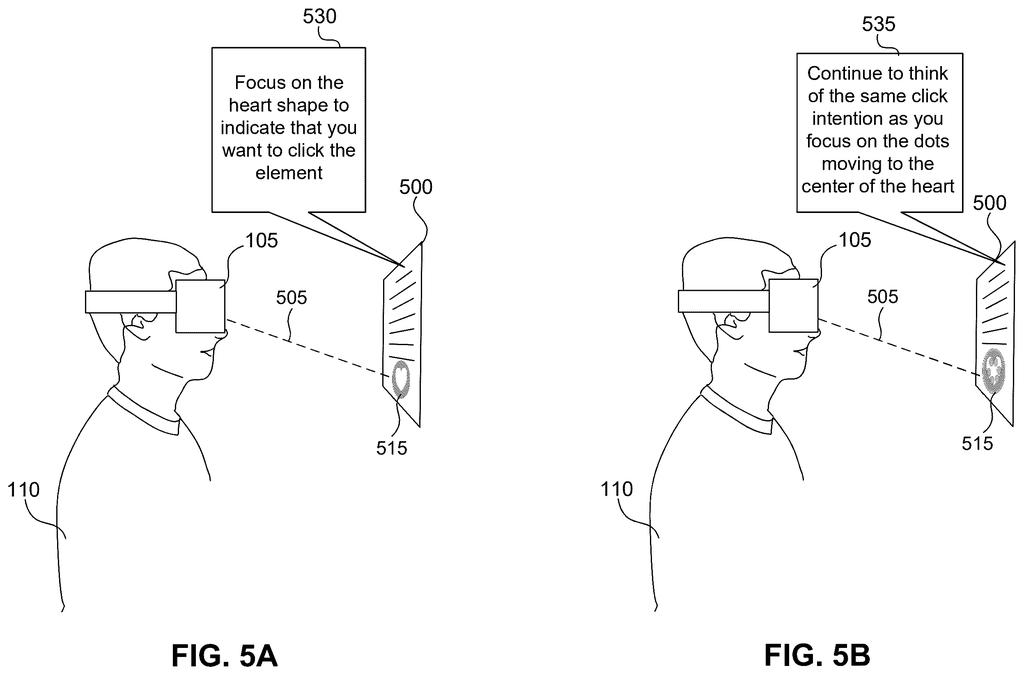
Apple also describes training you along the way, with prompts like "focus on the heart shape to indicate that you want to click." The goal is a hands-free way to use a headset, including for people who can't move their arms.
… obtaining a first set of physiological data for a first period of time, the physiological data associated with pupillary data; and determining, based on the first set of physiological data, an attention-induced physiological response during presentation of the content for the first period of time corresponding to an interaction with the interaction element …
Translation: The system tracks your eye movements and pupil changes to figure out when you are focusing on a specific button.
How a bright dot tells the headset you mean it
The core of the filing is a calibration and detection loop built around an interaction element, which is just an icon or button with regions of different brightness. A device shows the element and instructs you to focus on one region, such as a bright circle. While you do, it records pupillary data (measurements of your pupil size and eye movements, captured by inward-facing cameras in a headset).
From that data, the system identifies an attention-induced response: the small pupil constriction that happens when you voluntarily attend to a bright feature. It later watches for similar responses and treats them as a "click." The filing says a machine learning model (software that learns patterns from examples) predicts "click" or "no click" at each moment.
Several details make it practical:
- The system subtracts the pupil changes caused by the screen's own brightness, so it isolates your attention.
- A sensitivity threshold adapts to you over time, aiming for about a 90% true-positive rate, and keeps adjusting as you tire or improve.
- The icon can animate, with moving dots, to make the response easier to produce.
- Brain-signal (EEG) data can be combined with pupil data.
The filing also describes a dwell step: after about two seconds of focus the icon animates, and after about two more seconds it is selected.
… displaying content that includes an interaction element with a plurality of regions having different illumination characteristics. The process may further include providing instructions to focus on a particular region that is associated with a particular illumination characteristic.
Translation: The device shows a target with glowing sections and tells you to look closely at one specific part of it.
Why a hands-free click matters for Apple's headsets
If you wear a headset, the pinch gesture can get tiring, awkward in public, or impossible with full hands. A click that needs only your eyes could make wearing a headset feel more natural, and the filing says it could work as an accessibility feature for people who are paralyzed and can't move their hands.
It also fits Apple's focus on eye-driven controls in headsets, since the filing says the same eye-tracking cameras already in them can supply the signal. The filing lists uses like selecting icons or waking a device, and says it may be combined with other eye or touch input. It also stresses opt-in consent and keeping data on the device, which matters for something this personal.
Apple's 44th filing eye and hand controls we've tracked since May joins earlier work like easier far-away button targeting and custom hand gestures.
On the ship path, this is mostly a software problem. The filing describes the eye-tracking cameras already found in headsets, plus a model and a calibration routine. No new hardware has to exist first, and the EEG sensors are an optional extra, not a requirement.
The hard part is reliability. Pupils respond to room lighting, mood, tiredness and screen content, and the filing itself admits that clicking by staring at white dots in a still image was difficult for test participants. Moving, animated dots are its fix.
The shortest route to a product is probably a short setup routine where you practice clicking, then a feature that works alongside pinch and gaze rather than replacing them. Expect it to be an accessibility option first. A consumer-grade version depends on how well it holds up outside a quiet room.
Get our take in your Top Stories
Liked this breakdown? Add Patentlyze as a preferred source on Google, and our plain-English take shows up more often in your Top Stories the next time Apple patent news breaks.
There are more where this came from
We read every patent application Big Tech publishes and send you the ones worth knowing. Plain English, free, every week.
The drawings
14 drawing sheets from US 2026/0325027 A1 · click any drawing to enlarge


Show the other 6 sheets


Want this weekly breakdown for a company we don't cover? Patentlyze Pro →
Be the first to weigh in