
Apple Files Patent for a Computer Stand That Folds Flat for Shipping
A thin computer is surprisingly hard to carry, so Apple's patent gives it a stand that folds flat and a handle that hides under stretchy fabric.
What Apple's fold-flat computer stand does
Imagine unboxing a big, thin all-in-one computer and trying to carry it to another room. There is no handle, the stand sticks out the back, and the whole thing feels like hauling a picture frame with legs. That is the annoyance Apple is going after here.
The filing offers a few answers. One is a stand that folds flat against the back of the screen, so the box can be thinner. Another is a pair of legs that spring open on their own when you take the computer out of its packaging, then fold flat again when you lift it by a handle. A third wraps the stand and handle in stretchy fabric or rubber, so they stay out of sight until you need them.
The goal is a computer that ships thin and carries easily without looking any less sleek on your desk.
… a stand to support the electronic device housing, the stand comprising: a first segment attached to the electronic device housing; and a second segment to support the stand on a support surface; and a flexible sheet of material covering the stand.
Translation: The stand has two connected parts wrapped in a flexible material to hold the computer up.
How the legs, arms and fabric cover work
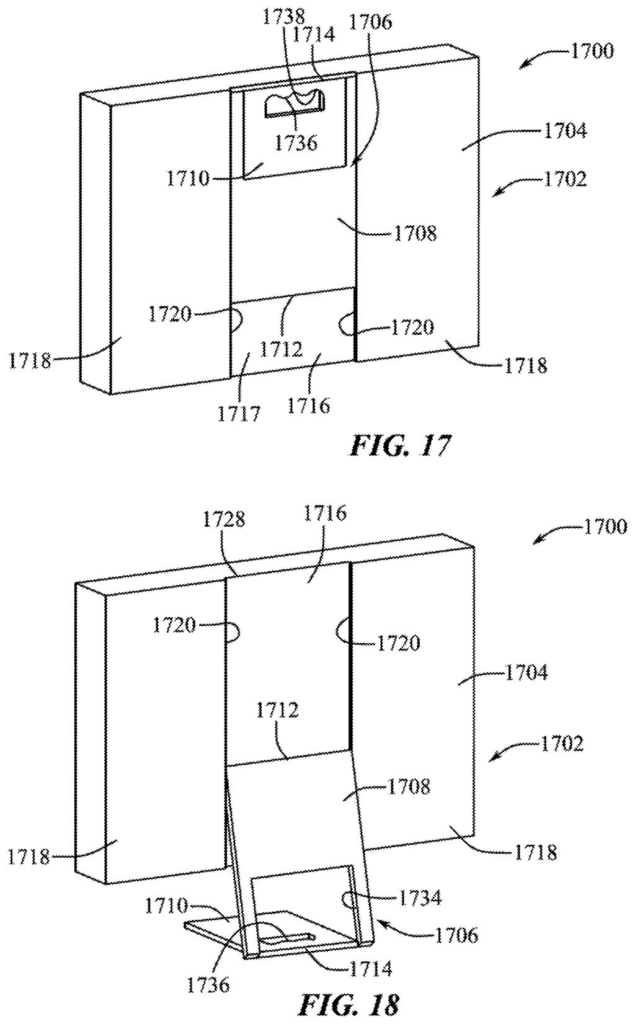
The filing bundles three separate ideas, one for each main claim. The first covers a stand made of two segments: one attached to the computer's housing, and one that rests on the desk. A flexible sheet of textile, woven material or rubber covers the stand. The sheet stays stretched tight as the segments move, so the stand looks like one smooth piece, and the space inside can hold things like cords or a power supply.
The second idea is a stand that both pivots and slides. It has two parallel arms joined by a crossbar:
- When stored, the arms sit in a groove running around at least three sides of the housing.
- To use it, you swing the stand out and slide it so it extends from the top of the computer.
- In that position, the crossbar works as a handle you can grab to carry the whole machine.
The third idea is a pair of rotatable legs. Flat, they add almost no thickness to the housing. Standing, their feet reach forward and backward so the computer does not tip over. The legs are spring-loaded, so they open by themselves once packaging is removed, and they are dampened (slowed by a built-in brake) so they move gently. Lifting the computer by a handle can pull the legs flat again.
The description also covers handles hidden behind the fabric. You press your fingers into the stretchy material to reach a recess, and it springs back when you let go.
Low-profile computer supports include features to reduce the thickness and improve the portability or storage capability of a computer system while it is disassembled, packaged, shipped, or moved.
Translation: These thin computer stands are designed to fold down flat for easier shipping and packing.
Why a thinner box and hidden handle matter
If you have ever wrestled a big, thin computer out of its box or carried one to a different desk, this is the problem Apple is addressing. A stand that folds flat means a thinner box, which helps with shipping and shelf space. A handle you can actually grab makes moving a large screen less nerve-racking.
The fabric cover protects the look of the machine, which matters a lot to Apple. You get a grip when you need one, and a clean back when you do not. The filing says these ideas apply to all-in-one computers, monitors and tablets, so you could see them in more than one product. It names no specific product, though.
Apple's 43rd filing in our Display coverage since May builds on work like the brightness band fix and tilt-based phone control, adding to the 43 screen-related applications we've tracked.
You would notice this on day one and maybe rarely after that. The first moment is unboxing, where legs that pop open on their own beat fiddling with a hinge. The second is carrying, where a real handle beats hugging a thin screen against your chest.
The fabric cover is the part that protects the look of the machine. A handle that disappears under stretchy material gives you the grip without a plastic loop spoiling a clean back panel. The open question is wear: fabric that gets pressed and stretched every time someone lifts the computer has to hold up for years.
For most buyers the gain is small but real, a desktop that is less awkward to move. It may change how you treat one, too, since a computer you can carry easily is one you might actually take to the kitchen table.
Get our take in your Top Stories
Liked this breakdown? Add Patentlyze as a preferred source on Google, and our plain-English take shows up more often in your Top Stories the next time Apple patent news breaks.
There are more where this came from
We read every patent application Big Tech publishes and send you the ones worth knowing. Plain English, free, every week.
The drawings
21 drawing sheets from US 2026/0329333 A1 · click any drawing to enlarge


Show the other 13 sheets


Want this weekly breakdown for a company we don't cover? Patentlyze Pro →
Be the first to weigh in