
Apple · Filed Apr 28, 2026 · Published Oct 29, 2026

Apple Files Patent for a Phone That Plays Through the Right Room's Speaker

Apple's filing describes a phone that remembers which speaker or TV you usually use in each room, then sends your music there the moment you tap play, with no menu required.
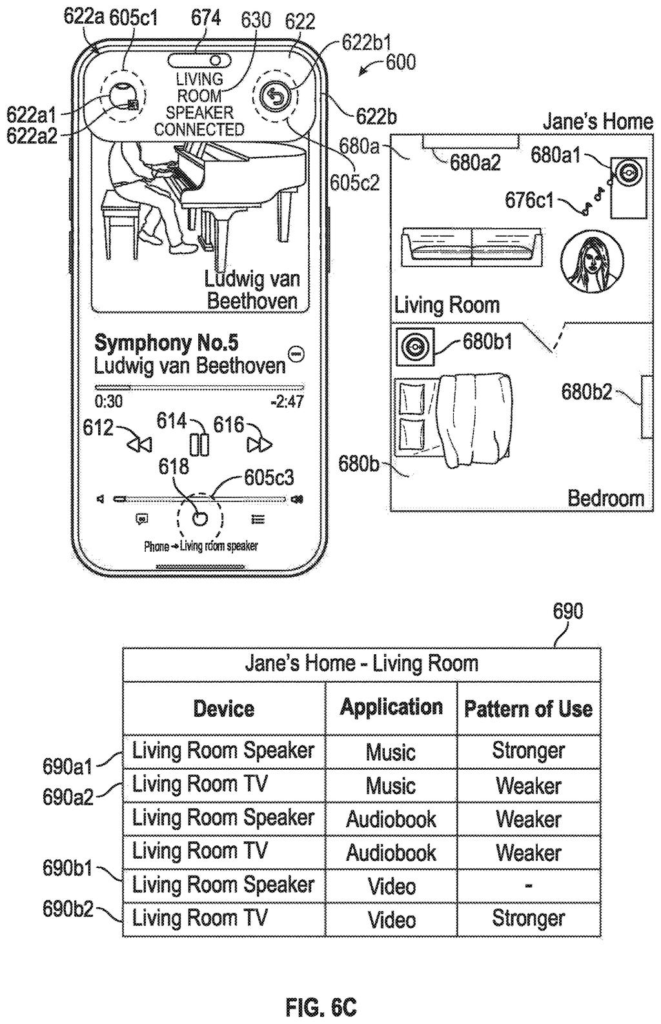
A phone connects automatically to a living room speaker when its owner enters the room and starts playing music. Drawing from patent filing US 2026/0342889 A1.
A phone connects automatically to a living room speaker when its owner enters the room and starts playing music.
See all 56 drawings from this filing ↓
Publication number US 2026/0342889 A1 US20260342889A1
Applicant Apple Inc.
Filing date Apr 28, 2026
Publication date Oct 29, 2026
Inventors Vincenzo O. GIULIANI, Brandon A. LYNNE, Joshua D. DEITEL, Patrick L. COFFMAN
US classification 709/203
Status when we published Waiting for an examiner (Jul 22, 2026)
Parent application is a Continuation of 18652558 (filed 2024-05-01)
Document 16 claims

What Apple's room-by-room auto-connect does

Imagine you walk into your living room, open a music app, and tap play. Today, you might have to open a menu and pick the speaker you want. In this patent, Apple describes a phone that skips that step: the sound just starts coming out of the speaker you always use in that room.

The idea is that your phone keeps track of where you are and where you have played things before. If you usually send audio to the living room speaker when you're in that room, it does that. Walk into the bedroom, where you have a different speaker or TV and a different habit, and it picks that one instead.

The filing describes a pattern of use as how often, or how many times, you've done it in a spot. It even treats separate rooms inside a home or a hotel as separate places.

From the filing · CLAIM 1
… automatically causing output of, via a second computer system separate from the first computer system, content associated with the application …

Translation: Your phone automatically plays your media through a nearby external speaker.

How your iPhone learns which speaker goes where

Claim 1 covers a simple chain of checks. While an app's screen is open on your phone (the filing's first computer system), you tap something, like play. The phone then asks two questions: where am I, and have I often sent this app's content to a particular device from here? If you are at one location and have that habit with a certain speaker or TV, it starts output there automatically. At a different location with a different habit, it picks a different device.

The dependent claims and the description add the fine print:

  • The phone can skip auto-connecting at certain types of location.
  • It can hold off if you are already connected to personal devices, such as headphones, or already playing media.
  • A habit can mean more than a set number of past uses, or a frequency of use.
  • The phone can show a notification saying which device is now playing.
  • If you switch devices, a time window decides whether the next tap goes to the new device or back to the usual one.

The description calls a specific spot, like a room in a house or a hotel, a micro-location. Its example is a home with a living room and a bedroom, each with its own speaker and TV. It also says a habit counts as stronger when the app is the most used one there, or sits in the same category as another app you often play in that spot (music and audiobooks are one category, video and podcasts are others).

From the filing · THE ABSTRACT
… automatically connecting an external device, connecting to an external device, managing a set of external devices, controlling media playback, and managing media controls …

Translation: The system handles linking your device to outside electronics and managing what plays on them.

What this means for your living room speaker

The practical payoff is fewer taps. If you play the same kind of thing in the same rooms every day, your phone could handle the speaker choice for you, and the filing says fewer inputs also saves time and battery.

The filing also describes related ideas beyond claim 1, like sorting a list of playback devices by how often you use them, and suggesting controls for a speaker that someone else started when you are within a set distance. Together they point to a phone that treats your home as a set of rooms with habits attached, instead of a flat list of devices to pick from.

That makes this Apple's 30th filing we've tracked since May on our device-to-device handoff watchlist, adding to earlier applications like activating via your old phone and simplifying cellular setup.

Editorial take

Claim 1 sets two conditions that must both be true before your phone automatically switches audio to a nearby device: the phone recognizes where you are, and it has a record of sending audio to a specific device at that location before. Both conditions have to be met together, which means the patent covers learned behavior, not a lucky guess.

The scope is deliberately wide. The claim puts no limit on what kind of device receives the audio, so speakers, televisions, and anything else that plays sound all fall inside it. Two locations and two previously paired devices are enough to satisfy the requirement, which describes the home setup most people already have.

If granted, any company building a feature that routes audio automatically based on location history and past connections would be operating inside Apple's claimed territory. That makes this patent matter well beyond any single product.

Get our take in your Top Stories

Liked this breakdown? Add Patentlyze as a preferred source on Google, and our plain-English take shows up more often in your Top Stories the next time Apple patent news breaks.

There are more where this came from

We read every patent application Big Tech publishes and send you the ones worth knowing. Plain English, free, every week.

The drawings

56 drawing sheets from US 2026/0342889 A1 · click any drawing to enlarge

Hardware parts and software inside a touchscreen phone, drawing sheet 1 from US 2026/0342889 A1
Sheet 1 Hardware parts and software inside a touchscreen phone
How apps detect and respond to user screen taps, drawing sheet 2 from US 2026/0342889 A1
Sheet 2 How apps detect and respond to user screen taps
External sensors and buttons around a smartphone screen, drawing sheet 3 from US 2026/0342889 A1
Sheet 3 External sensors and buttons around a smartphone screen
Internal parts of a computer with a separate trackpad, drawing sheet 4 from US 2026/0342889 A1
Sheet 4 Internal parts of a computer with a separate trackpad
An app icon home screen layout on a mobile phone, drawing sheet 5 from US 2026/0342889 A1
Sheet 5 An app icon home screen layout on a mobile phone
Moving fingers on a trackpad to control an external screen, drawing sheet 6 from US 2026/0342889 A1
Sheet 6 Moving fingers on a trackpad to control an external screen
Outside casing and display of a smartwatch, drawing sheet 7 from US 2026/0342889 A1
Sheet 7 Outside casing and display of a smartwatch
Motion sensors and processors running a wearable device, drawing sheet 8 from US 2026/0342889 A1
Sheet 8 Motion sensors and processors running a wearable device
Show the other 48 sheets
Matching your room and current app to playback habits, drawing sheet 9 from US 2026/0342889 A1
Sheet 9 Matching your room and current app to playback habits
Playing a song while standing near a living room speaker, drawing sheet 10 from US 2026/0342889 A1
Sheet 10 Playing a song while standing near a living room speaker
Confirming an automatic link to the nearby speaker, drawing sheet 11 from US 2026/0342889 A1
Sheet 11 Confirming an automatic link to the nearby speaker
Shrinking the connection banner into the top screen notch, drawing sheet 12 from US 2026/0342889 A1
Sheet 12 Shrinking the connection banner into the top screen notch
Choosing a different home speaker or TV manually, drawing sheet 13 from US 2026/0342889 A1
Sheet 13 Choosing a different home speaker or TV manually
Switching audio output from the speaker over to the TV, drawing sheet 14 from US 2026/0342889 A1
Sheet 14 Switching audio output from the speaker over to the TV
Starting a video while sitting in the living room, drawing sheet 15 from US 2026/0342889 A1
Sheet 15 Starting a video while sitting in the living room
Automatically routing video audio to the living room TV, drawing sheet 16 from US 2026/0342889 A1
Sheet 16 Automatically routing video audio to the living room TV
Tracking past habits to predict which bedroom screen plays music, drawing sheet 17 from US 2026/0342889 A1
Sheet 17 Tracking past habits to predict which bedroom screen plays music
Connecting automatically to a bedroom TV based on past habits, drawing sheet 18 from US 2026/0342889 A1
Sheet 18 Connecting automatically to a bedroom TV based on past habits
Playing audio through both a TV and nearby speaker simultaneously, drawing sheet 19 from US 2026/0342889 A1
Sheet 19 Playing audio through both a TV and nearby speaker simultaneously
Keeping audio streaming across multiple bedroom devices over time, drawing sheet 20 from US 2026/0342889 A1
Sheet 20 Keeping audio streaming across multiple bedroom devices over time
Switching sound to headphones when someone puts them on, drawing sheet 21 from US 2026/0342889 A1
Sheet 21 Switching sound to headphones when someone puts them on
Walking into the living room while listening to audio, drawing sheet 22 from US 2026/0342889 A1
Sheet 22 Walking into the living room while listening to audio
Linking sound to the living room TV upon entry, drawing sheet 23 from US 2026/0342889 A1
Sheet 23 Linking sound to the living room TV upon entry
Routing music to a speaker based on past preference, drawing sheet 24 from US 2026/0342889 A1
Sheet 24 Routing music to a speaker based on past preference
Playing an audiobook while tracking room habits, drawing sheet 25 from US 2026/0342889 A1
Sheet 25 Playing an audiobook while tracking room habits
A prompt appears to route speech to a nearby speaker, drawing sheet 26 from US 2026/0342889 A1
Sheet 26 A prompt appears to route speech to a nearby speaker
Selecting an audio target manually from an output menu, drawing sheet 27 from US 2026/0342889 A1
Sheet 27 Selecting an audio target manually from an output menu
Moving sound to a TV updates learned user preferences, drawing sheet 28 from US 2026/0342889 A1
Sheet 28 Moving sound to a TV updates learned user preferences
Starting a podcast with no established room habits, drawing sheet 29 from US 2026/0342889 A1
Sheet 29 Starting a podcast with no established room habits
Suggesting a connection to a newly detected subwoofer, drawing sheet 30 from US 2026/0342889 A1
Sheet 30 Suggesting a connection to a newly detected subwoofer
Offering to stream hotel video to a nearby television, drawing sheet 31 from US 2026/0342889 A1
Sheet 31 Offering to stream hotel video to a nearby television
Streaming video wirelessly to the hotel room screen, drawing sheet 32 from US 2026/0342889 A1
Sheet 32 Streaming video wirelessly to the hotel room screen
How the phone picks which speaker plays your audio, drawing sheet 33 from US 2026/0342889 A1
Sheet 33 How the phone picks which speaker plays your audio
Deciding whether to connect to a nearby speaker automatically, drawing sheet 34 from US 2026/0342889 A1
Sheet 34 Deciding whether to connect to a nearby speaker automatically
Walking down a hallway while listening to music, drawing sheet 35 from US 2026/0342889 A1
Sheet 35 Walking down a hallway while listening to music
Opening a menu of nearby speakers and screens, drawing sheet 36 from US 2026/0342889 A1
Sheet 36 Opening a menu of nearby speakers and screens
Moving into the living room reorders available speakers, drawing sheet 37 from US 2026/0342889 A1
Sheet 37 Moving into the living room reorders available speakers
Choosing the living room speaker transfers your playback, drawing sheet 38 from US 2026/0342889 A1
Sheet 38 Choosing the living room speaker transfers your playback
Browsing active playback across other household devices, drawing sheet 39 from US 2026/0342889 A1
Sheet 39 Browsing active playback across other household devices
Lock screen updates local audio controls upon bedroom entry, drawing sheet 40 from US 2026/0342889 A1
Sheet 40 Lock screen updates local audio controls upon bedroom entry
Tracking which bedroom device you use most for music, drawing sheet 41 from US 2026/0342889 A1
Sheet 41 Tracking which bedroom device you use most for music
Selecting the bedroom TV based on past listening habits, drawing sheet 42 from US 2026/0342889 A1
Sheet 42 Selecting the bedroom TV based on past listening habits
Shifting the TV to top choice when watching videos, drawing sheet 43 from US 2026/0342889 A1
Sheet 43 Shifting the TV to top choice when watching videos
Sorting nearby speakers by how often you use them, drawing sheet 44 from US 2026/0342889 A1
Sheet 44 Sorting nearby speakers by how often you use them
Checking who owns which speaker across the home, drawing sheet 45 from US 2026/0342889 A1
Sheet 45 Checking who owns which speaker across the home
Showing music controls when you enter your own bedroom, drawing sheet 46 from US 2026/0342889 A1
Sheet 46 Showing music controls when you enter your own bedroom
Alerting you to active music when passing another room, drawing sheet 47 from US 2026/0342889 A1
Sheet 47 Alerting you to active music when passing another room
Offering options to join or dismiss nearby playback, drawing sheet 48 from US 2026/0342889 A1
Sheet 48 Offering options to join or dismiss nearby playback
Pausing a nearby bedroom speaker from the lock screen, drawing sheet 49 from US 2026/0342889 A1
Sheet 49 Pausing a nearby bedroom speaker from the lock screen
Resuming music playback on the bedroom speaker, drawing sheet 50 from US 2026/0342889 A1
Sheet 50 Resuming music playback on the bedroom speaker
Opening the full music app to control the active speaker, drawing sheet 51 from US 2026/0342889 A1
Sheet 51 Opening the full music app to control the active speaker
Minimizing the bedroom speaker controls when the TV takes over, drawing sheet 52 from US 2026/0342889 A1
Sheet 52 Minimizing the bedroom speaker controls when the TV takes over
Showing speaker controls as you walk closer, drawing sheet 53 from US 2026/0342889 A1
Sheet 53 Showing speaker controls as you walk closer
Switching your main audio controls to the living room speaker, drawing sheet 54 from US 2026/0342889 A1
Sheet 54 Switching your main audio controls to the living room speaker
How the phone chooses which nearby speaker to show, drawing sheet 55 from US 2026/0342889 A1
Sheet 55 How the phone chooses which nearby speaker to show
Managing controls for multiple smart speakers at once, drawing sheet 56 from US 2026/0342889 A1
Sheet 56 Managing controls for multiple smart speakers at once
Browse all the drawings 56 drawing sheets
Patent filing page

Source. Full patent text and figures from the official USPTO publication PDF.
Reader comments

Be the first to weigh in

Start the discussion

Real name or a handle, either is fine. Comments are read by a person before they appear, so allow a little time. Keep it about the filing.