
Apple Files Patent to Simplify Cellular Setup on a Brand-New Phone
Getting a new phone onto a cell network is still full of dead ends: no Wi-Fi, a number on the old phone, a carrier plan to move. Apple's filing lays out one setup flow that handles all of them.
What Apple's new-phone cellular setup actually does
A person unboxes a new phone at the kitchen table. The screen lights up, but there is no Wi-Fi password handy, the old phone is in another room, and the phone number still lives on the old device.
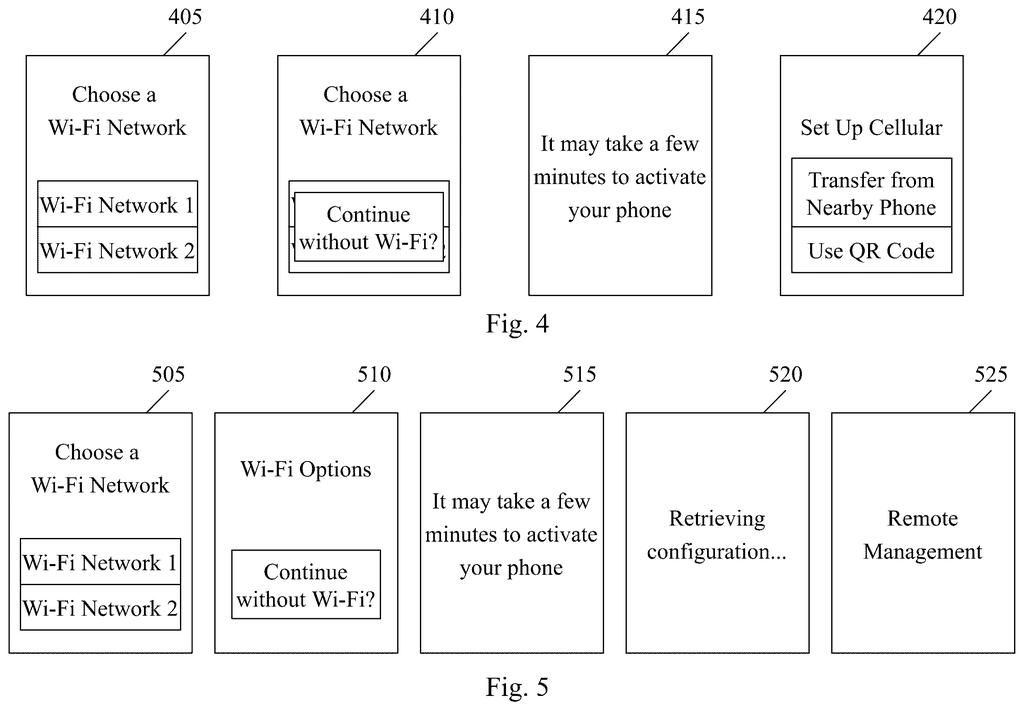
Apple's filing describes a setup flow built for exactly this moment. Your new device offers a few ways to get online and switch on: borrow the Wi-Fi settings from your old phone, join a Wi-Fi network, or use a temporary cellular link built into the phone, which the filing calls a bootstrap connection. A QR code, like one printed in the box, can also kick off the cellular setup.
After that, the phone figures out the easiest way to get your number working. It might use a number the store already tied to the phone, move one over from your other devices, or verify your carrier plan with a text-message code. Work phones and store demo units can skip the questions entirely.
receive, via user input, a selection of one of a plurality of connections or a QR code to activate a user equipment (UE) …
Translation: The phone lets you choose a Wi-Fi network, another device, or a QR code to set things up.
How a new device picks Wi-Fi, QR code or temp link
The claims cover a device that lets you pick how to activate it (get approved to run on a cellular network): a Wi-Fi connection, a bootstrap connection to another device, or a QR code. The description explains that a bootstrap connection is a temporary cellular link, using credentials stored in the phone's built-in digital SIM (an eSIM), that lets a not-yet-set-up phone talk to a carrier.
Once the device is active, the claims describe several paths for finishing cellular setup:
- Managed or demo devices: the phone finds a discovery server (a lookup service that tells it where to fetch its eSIM) and installs a predefined setup with no input from you.
- Number already tied to the phone: you enter identifying details, such as a zip code, and the phone verifies them before activating.
- Carrier tied to the phone: you enter plan details, and a verification code arrives by text message on your other device.
- Wi-Fi with an account service: the phone checks a service that links your devices to one account, finds a number on one of them, and starts a transfer.
If a phone number is already set up, the flow skips the transfer option. The filing also covers scanning a QR code with the phone's camera to pull down the cellular setup information, and a case where the discovery server offers several phone numbers to choose from.
… the plurality of connections comprise a Wi-Fi connection or a bootstrap connection to a further device and activate the UE using the selected one of the connections or QR code.
Translation: Your new phone connects to Wi-Fi or a nearby device to get activated right out of the box.
Why Apple wants phone-number setup to be this easy
The most direct effect is fewer dead ends when you unbox a phone, tablet or watch. Today, a missing Wi-Fi password or a number stuck on an old device can stall setup. A built-in temporary cellular link means setup can keep going where Wi-Fi isn't available.
The managed-device path matters for businesses and stores. An employer could hand out phones that configure themselves, and a store demo unit could arrive with its setup already in place. The filing describes this as a way to improve the setup experience, and it fits well with how eSIM phones work with carriers today. It is a patent application, so nothing here says when or whether it will reach a product.
Apple's 28th filing we've tracked since May in our device handoff between Apple products watch builds on shared screen alarm taps and handing off without losing your account.
The problem here is common. Almost everyone who buys a phone has hit a setup screen that asks for something they don't have, and a phone that can't get online can't fix itself. Offering several ways in (Wi-Fi, an old phone, a QR code, a temporary cellular link) fits that problem well.
The filing is mostly a careful map of branches: which path to take when a number is already on the phone, when a carrier plan needs checking, or when the device belongs to an employer. That is routine product engineering rather than a new invention, and the claims are broad about the choices offered. Still, setup is the first thing a buyer sees, and getting it right matters.
The weak spot is the number of paths. Each added option is another place for a confused user to get stuck, so the real test is how few screens you actually see.
Get our take in your Top Stories
Liked this breakdown? Add Patentlyze as a preferred source on Google, and our plain-English take shows up more often in your Top Stories the next time Apple patent news breaks.
There are more where this came from
We read every patent application Big Tech publishes and send you the ones worth knowing. Plain English, free, every week.
The drawings
17 drawing sheets from US 2026/0333014 A1 · click any drawing to enlarge


Show the other 9 sheets


Want this weekly breakdown for a company we don't cover? Patentlyze Pro →
Be the first to weigh in