
Apple Files Patent to Activate a New Device Through Your Old Phone
Setting up a new phone usually means a maze of screens. Apple's filing lets your old device vouch for the new one over Bluetooth and hand over your Wi-Fi details, settings and phone number.
What Apple's Bluetooth device activation does
You've just unboxed a new phone. It has no phone number yet, it doesn't know your Wi-Fi password, and the setup screens keep asking you to pick between options you barely understand.
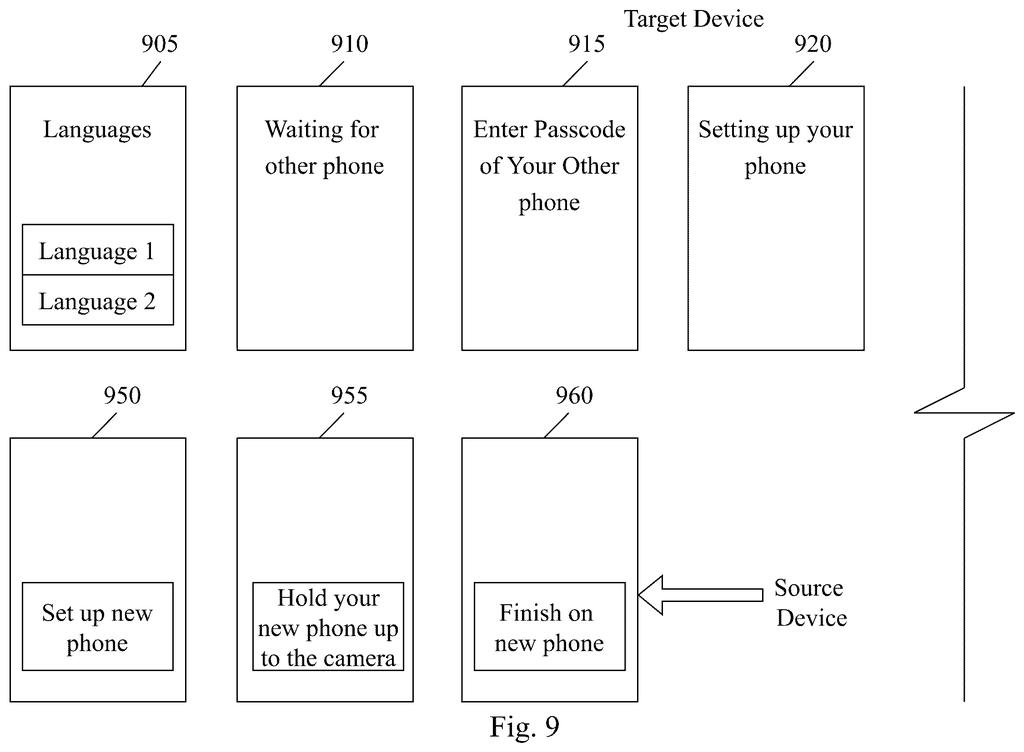
Apple's filing describes a shortcut. During setup, the new device offers to connect over Bluetooth to another device you already own, such as your old phone. That nearby device lends the new one its Wi-Fi details so it can get online and switch on, then passes along your settings. If the old phone holds a phone number, you can pick it and move it over.
If you skip the shortcut, the filing says the new device can fall back on Wi-Fi or on a temporary cellular connection built into it at the factory. The goal is fewer confusing paths to the same finish line.
receive, via user input, a selection of a short range communication connection to a further device to activate the UE; activate the UE using the short range communication connection; and transfer settings from the further device to the UE via the short range communication connection.
Translation: Your new device sets itself up using a nearby older device when you tap a button.
How a new device picks Bluetooth, Wi-Fi or cellular
The main claim covers a device (the filing calls it a user equipment, or UE, which can be a phone, watch or tablet) that lets you pick a short-range link, such as Bluetooth, to another device you own. That link is used to switch the new device on and to copy settings across.
The filing says setup varies by device type, by who you are, by what service you have and by what else you own, which makes for a poor experience. In the described flow, you power on the device and it offers to connect to a source device. If you accept, it borrows that device's Wi-Fi settings to get online and activate. If Wi-Fi fails and the device has an eSIM (a built-in digital SIM card) with temporary credentials, it can use that short-lived cellular link instead, which the filing calls a bootstrap connection.
The dependent claims add what happens next:
- Number transfer: the new device reads a phone number from signals sent by the other device, moves it over, and sets up cellular service.
- Carrier plan: if a plan was linked at purchase, you enter identifying details and a verification code texted to the other device.
- Options screen: the choices shown depend on whether the device-to-device setup already happened, and the number-transfer option disappears once a number is set up.
The description also covers work-issued phones and store demo units that install preset setups silently, plus a QR code option when no other device is nearby.
Why this could shorten new-phone setup for you
For you, the payoff is fewer decisions at the most annoying moment of owning a new device, plus a phone number that follows you without extra detours. The filing's own examples include a new watch paired with your phone, a new phone paired with your old one, and a phone paired with a tablet.
For Apple and carriers, setup is the moment a purchase turns into working service. A shorter, more predictable path should mean fewer people giving up halfway or asking for help. Keep in mind that this is a patent application, and the filing does not say any product will ship with it.
Apple's 29th filing we've tracked since May on passing content between devices follows earlier applications on setting up a new phone and shared screen alarm taps.
You would notice this once every few years, on the day you buy a new phone or watch. The filing goes after the small stumbles: the Wi-Fi password you can't remember, the phone number stuck on the old device, the carrier screen asking for an account number.
The main claim is short and broad, and most of the filing describes a decision tree of setup screens. If it works as described, you tap through fewer screens and your old device does the heavy lifting.
Setup is the first impression of any device, so trimming it counts for something. When it works, you will barely register it, and that is the best result a setup screen can get.
Get our take in your Top Stories
Liked this breakdown? Add Patentlyze as a preferred source on Google, and our plain-English take shows up more often in your Top Stories the next time Apple patent news breaks.
There are more where this came from
We read every patent application Big Tech publishes and send you the ones worth knowing. Plain English, free, every week.
The drawings
17 drawing sheets from US 2026/0333004 A1 · click any drawing to enlarge


Show the other 9 sheets


Want this weekly breakdown for a company we don't cover? Patentlyze Pro →
Be the first to weigh in