
Apple Files Patent for a Shared Screen That Knows Whose Alarm You Just Tapped
Two people, one shared screen, one 'morning alarm' button. Apple's patent application has the device work out who tapped it, so one person gets a 7 AM alarm and the other gets 9 AM.
What Apple's shared-screen widgets actually do
On a device the whole household shares, getting to your own stuff usually means logging in and proving who you are, every single time. Apple's filing describes a way around that: the device works out who is standing in front of it and handles the rest.
Say you and a roommate share one screen. Both of you have a morning alarm button on it. When you tap it, your 7 AM alarm gets turned on. When your roommate taps the exact same button, theirs goes off at 9 AM instead. The device can tell you apart using a camera, or by noticing whose phone or watch is nearby.
The same idea covers what the screen shows. If your timer is on display and you walk away, it can disappear. If someone else with their own timer steps up, theirs can show instead. No login and no profile switching.
in accordance with a determination that the input corresponds to a first subject, performing a first operation corresponding to the first subject; and in accordance with a determination that the input corresponds to a second subject, performing a second operation, different from the first operation, corresponding to the second subject …
Translation: The system figures out who touched the screen and changes its response based on that person.
How the screen works out who just tapped it
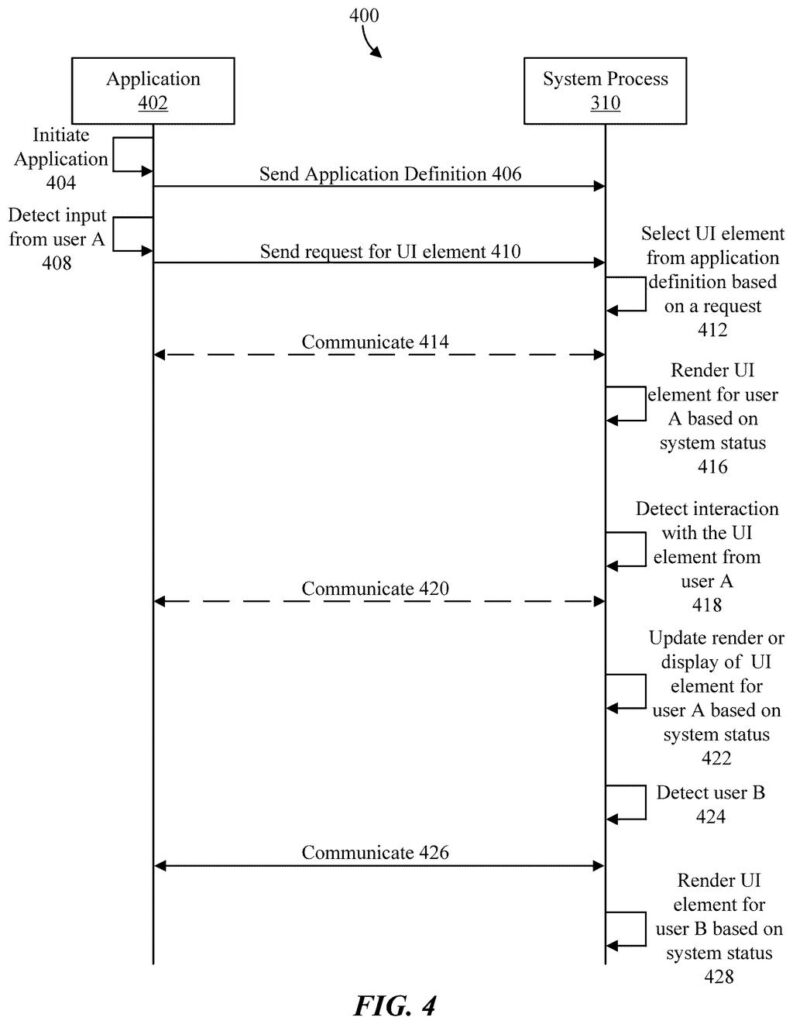
The filing bundles two related ideas about live activities, the small always-on widgets (a timer, an alarm, a live game score) that stay on screen while you switch between apps. In the first idea, each app sends the operating system a definition up front (basically a blueprint of how its widgets should look and behave). The operating system, not the app, then hosts a reserved area of the screen and draws the widgets from those blueprints.
That drawing adapts to the current state of the device: portrait or landscape orientation, light or dark mode, low or high power mode, text size, how many widgets are showing, or whether the device is locked.
The second idea is what the claims actually cover. When an input arrives on a widget, the app decides which subject (a user, in the main example) the input belongs to, then performs the operation tied to that subject. The same tap can do different things for different people. The filing describes two ways to tell who is who:
- Camera content, using face recognition, voice recognition or machine learning (software that learns patterns from examples).
- A message from a person's own phone, watch or tablet that identifies them.
In the filing's example, a morning-alarm widget sets a 7 AM alarm for one person and a 9 AM alarm for another. The filing also says a subject could be an animal, another device or an object.
The present disclosure generally relates to displaying live activities. Some techniques are for displaying content of an application based on state of device in accordance with some embodiments.
Translation: Apple is patenting a way to update live notifications depending on what is happening on the device.
What this means for shared Apple devices
If you share a screen with other people, this is aimed at removing small annoyances: the wrong person's alarm going off, someone else's timer in your way, or your own content still sitting there after you walk off. The filing's background says shared devices are becoming common and that making people log in each time is a drawback.
For developers, apps would register their widgets with the system once, and the system would handle layout and style. The filing lists devices including smart speakers, televisions, tablets, watches and head-mounted displays. Because it relies on cameras, voice and nearby phones to tell people apart, the privacy details matter, and the filing includes the usual language about user consent and opting out.
Apple's 27th filing we've tracked since May on device-to-device handoff ideas builds on earlier work like passing a device to another person and headsets switching audio sources.
Claim 1 is written very broadly. It says nothing about live activities, cameras or even people. It only says that when you interact with something on screen, the app checks which of two different subjects the input belongs to and does a different thing for each.
Read plainly, that covers any app that reacts differently depending on who is tapping, as long as some element is showing. The narrower details, like using a camera to identify the person (claim 10) or a message from their phone (claim 11), appear only in the dependent claims.
If it were granted as written, the wide wording would be the part that could limit how other companies build shared screens that treat two people differently. The half of the filing about restyling widgets for orientation or dark mode is absent from these claims entirely. Verdict: a simple idea claimed as broadly as possible, with the interesting specifics held in reserve.
Get our take in your Top Stories
Liked this breakdown? Add Patentlyze as a preferred source on Google, and our plain-English take shows up more often in your Top Stories the next time Apple patent news breaks.
There are more where this came from
We read every patent application Big Tech publishes and send you the ones worth knowing. Plain English, free, every week.
The drawings
11 drawing sheets from US 2026/0319640 A1 · click any drawing to enlarge


Show the other 3 sheets


Want this weekly breakdown for a company we don't cover? Patentlyze Pro →
Be the first to weigh in