
Samsung Files Patent to Turn Your Photo Into Custom App Icons
Samsung describes a phone that takes your photo and redraws every app icon with you in it: you in headphones on the music app, you running on the health app.
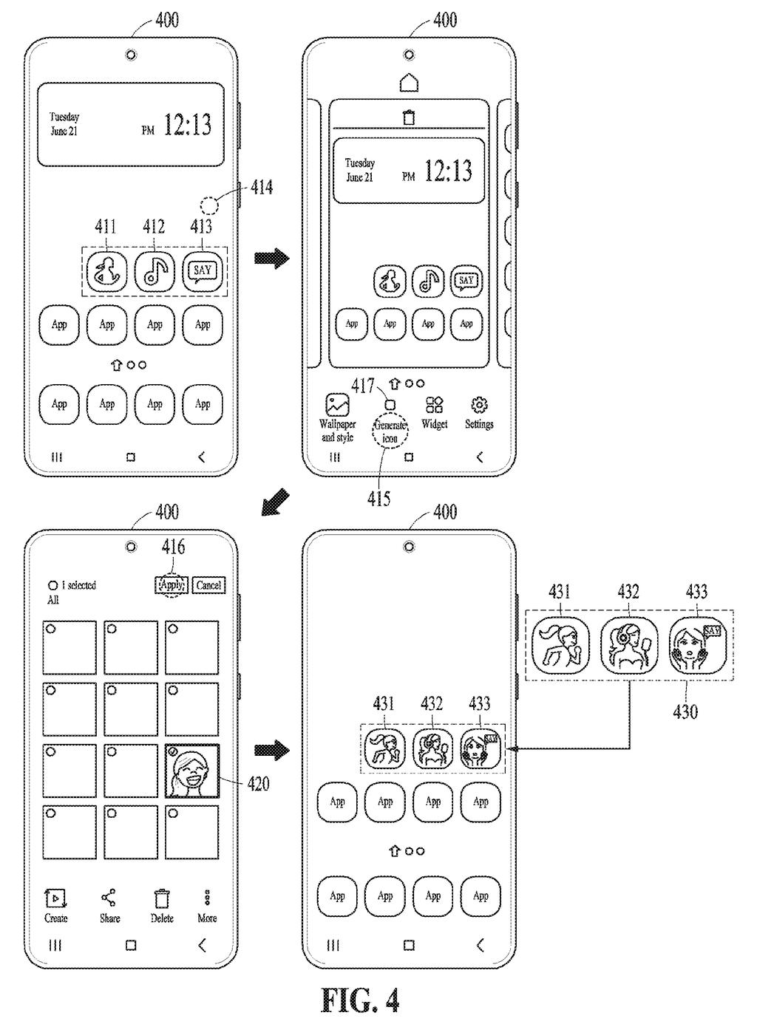
What Samsung's photo-to-icon idea actually does
Ever scrolled past a home screen full of identical icons and wished it felt a little more like yours? Most people stop at changing the wallpaper. Samsung's filing goes further and changes the icons themselves.
You pick a photo, say a selfie or a picture of your dog. The phone looks at what each app is about, then draws a new icon that mixes your photo with that theme. In the filing's examples, a music app icon shows the person from the photo listening through a headset, and a streaming app shows them holding popcorn.
The phone also keeps the app's original colors, so the new icons still feel like the apps you know. It can even nudge the pictures with extras like the season or the weather, so your icons might wear a Christmas look in December.
obtain an image, obtain first feature information of an application (app) to generate a target user interface (UI) object, extract second feature information from the image, and generate the target UI object related to the app …
Translation: The phone takes your photo and mixes it with the app's original design to create a custom icon.
How Samsung mixes your photo with an app's look
The filing covers a device that takes an image and builds a replacement UI object (a user interface object, such as an app icon or a widget) for a chosen app. It works from two bundles of information. The first feature information describes the app: its category and hashtags from the app store or its own metadata, the colors in its current icon, and any object drawn on the icon. The second feature information comes from your photo: the main subject (a person, pet or character), the colors, and the background.
A key branch depends on the original icon. If the icon's drawing is shaped like a person in a pose, such as a runner, the device blends part of your appearance (your face) with that pose. If it is not a person, such as a speech bubble or a logo, the device builds a scene from the app's description instead, like a person talking with hands near their mouth for a messenger app.
The filing also describes optional extras:
- Auxiliary information: season, weather or location, taken from other apps or typed in as a prompt.
- Usage history: a tennis player on a health app, or a recently watched movie on a streaming app.
- Generative AI (a model that creates new images) can draw an intermediate second image first, which then becomes the icon.
The finished icons can be shared across your other synced devices, such as a tablet, watch or headset.
… acquire an image. The instructions, when executed by the processor, may cause the electronic device to obtain first feature information of an app for which a target UI object is to be generated. The instructions, when executed by the processor, may cause the electronic device to extract second feature information from the image.
Translation: The system grabs a picture and blends its visual traits with the app details.
Why your home screen could soon look like you
The practical result is a home screen that is built for you, not picked from a theme store. Samsung already lets people change wallpapers and icon packs, and this filing describes a way to automate the whole job so you don't have to design each icon by hand.
The filing also thinks about privacy. A foldable's outer screen, which strangers can see, could show a plainer, cartoon-like version, while the inside screen shows your actual face. Apps behind a login could get more personal icons than public ones. Another example refreshes icons for the holidays and offers you the change through a pop-up.
This is the 36th Samsung filing we've tracked under Enterprise AI since June, adding to earlier applications like one on compressing photo patches and one on scanning ID text.
On the ship-path question, this one looks close to shippable. It needs no new hardware: a phone already has a gallery, a camera, face unlock and app store data, and the filing says the image generation can run on the phone or on a server. The shortest route is a theme-style tool in Samsung's customization settings where you pick a photo and tap apply.
The hard part is quality. Turning your face into a convincing runner or movie watcher for dozens of icons, at tiny size, in a style that still matches each app, is a big test for any image model. Mistakes on a screen you look at all day would be obvious.
The unlock-based version, where a fresh face scan changes your icons, adds the most work, since it ties image generation to a security feature. The simpler photo-picker version could come first, and it is the one most people would actually try.
Get our take in your Top Stories
Liked this breakdown? Add Patentlyze as a preferred source on Google, and our plain-English take shows up more often in your Top Stories the next time Samsung patent news breaks.
There are more where this came from
We read every patent application Big Tech publishes and send you the ones worth knowing. Plain English, free, every week.
The drawings
15 drawing sheets from US 2026/0341000 A1 · click any drawing to enlarge


Show the other 7 sheets


Want this weekly breakdown for a company we don't cover? Patentlyze Pro →
Be the first to weigh in