
Microsoft Files Patent for Touchscreens That Can Tell a Plain Stylus From Your Finger
A stylus with no electronics inside usually looks like a fingertip to your touchscreen. Microsoft's patent application describes a way to spot the difference from how each touch is shaped and how it behaves.
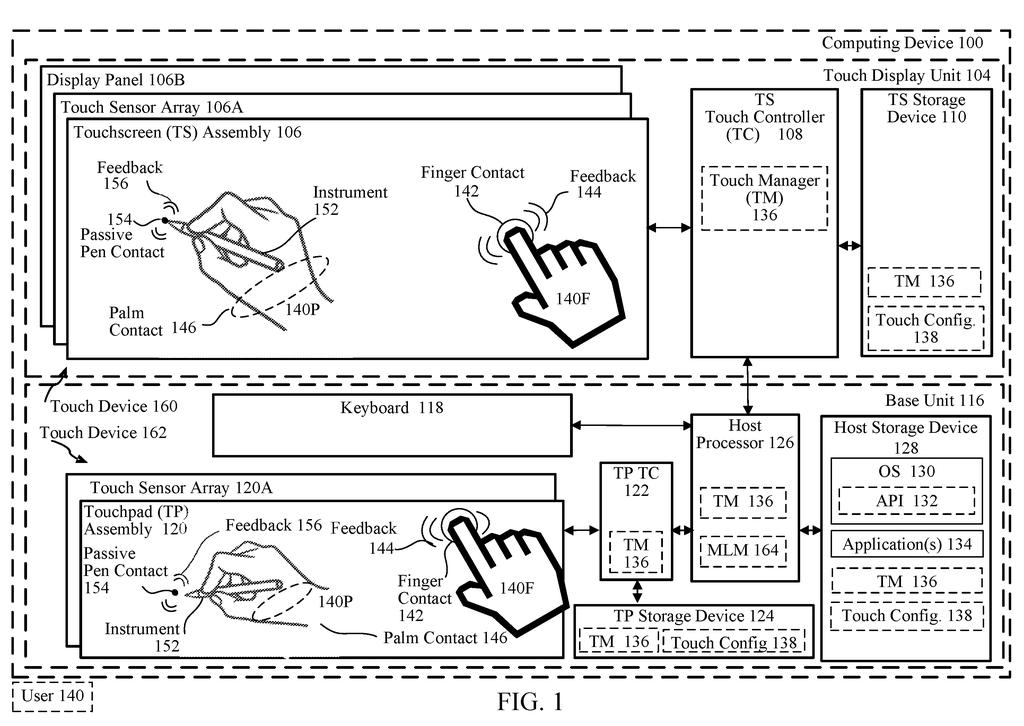
What Microsoft's passive pen detection does
Every time you rest your palm on a tablet and write with an ordinary stylus, the screen has to guess which touches count. A pen with no electronics inside looks like a finger to many touchscreens, so the device can't switch on pen features like handwriting or signing. Your resting palm can add a few phantom touches too.
Microsoft's patent application describes a way for the touch surface to sort them out. It watches each contact for a fraction of a second, noting its size, roundness, pressure and how those change, then labels it as finger, palm or pen.
If the system decides it's a pen, the computer treats it like one, so your stroke draws or signs instead of dragging the page around. If it's a finger, everything works as usual.
… a classifier configured to classify the contact as a class in a set of classifications comprising at least user touch input and passive pen input based on a touch profile indicated by the features; …
Translation: The system sorts screen touches to figure out if you used your finger or a basic stylus.
How the touchscreen sorts finger, palm and pen
The touch surface reads its sensor grid about 100 times a second (one reading, called a frame, every 10 milliseconds). Each reading shows where something is touching and how big, round and strong the signal is, a bit like a heat map.
From there the system runs a short chain of steps:
- Collect: a data collector builds a dataset for each contact and tracks it across frames with an ID.
- Extract: a feature extractor pulls out traits such as size, shape, pressure, duration and how the contact changes.
- Classify: a classifier (a trained machine-learning model, or a simple rule-based one) labels the contact finger, palm or passive pen.
- Handle: the operating system treats pen contacts as pen input and finger contacts as touch input.
The filing says pens tend to look rounder and smaller, press harder, change less in size from frame to frame, and often show up with a palm nearby. One rule-based example: a smaller contact area plus higher pressure means pen.
A post-processing step attaches a confidence score to each label. With a default threshold of 90 percent, a shaky guess waits a few frames (5 to 10 in one example) for more evidence before anything is reported. Users can also adjust the sensitivity.
Features extracted from a touch event dataset can include touch location, size, shape, duration, consistency, capacitance intensity, dynamics (e.g., shape change, size change, movement pattern), clustering, palm indication, pressure, etc.
Translation: It analyzes many details like size, shape, and pressure over time to understand what touched the screen.
Why a plain stylus could get pen features
The practical payoff is that a cheap, ordinary stylus could get the same treatment as a fancy one. If the screen knows it's a pen, apps can let you write, sign a PDF or draw in Paint without you changing a setting. The filing names Surface-style 2-in-1 devices and apps like Paint and Office as examples.
It could also mean fewer mistakes from your hand. When the system knows a pen is in use, it has a better basis for ignoring the palm resting nearby, which cuts stray marks and undo-and-redo cycles. The filing adds that skipping junk touch reports saves battery. It is a patent application, so nothing here says it will ship.
That makes this the 19th Display patent we've tracked from Microsoft since May, adding to earlier applications like one on water fooling touchscreens and one on sweat and dirt accuracy.
Claim 1 is short and wide. It asks for a sensor grid, a data collector, a feature extractor, a classifier and a handler that treats a pen contact as pen input. The only sorting it requires is user touch versus passive pen.
Everything more specific sits in the dependent claims: the confidence threshold, the multi-frame wait, the machine-learning model and the simple rule-based version. Because claim 1 never names machine learning, any method that sorts finger from stylus by how the contact looks fits its wording, even a hand-written rule about size and pressure.
If granted as written, that would be a wide net around a feature most people would simply call the stylus working properly. The engineering itself is routine: measure the touch, guess its type, act on the guess. The value is real for anyone who has watched a tablet drag a page when they meant to write, but claims can change before any grant.
Get our take in your Top Stories
Liked this breakdown? Add Patentlyze as a preferred source on Google, and our plain-English take shows up more often in your Top Stories the next time Microsoft patent news breaks.
There are more where this came from
We read every patent application Big Tech publishes and send you the ones worth knowing. Plain English, free, every week.
The drawings
6 drawing sheets from US 2026/0339506 A1 · click any drawing to enlarge


Want this weekly breakdown for a company we don't cover? Patentlyze Pro →
Be the first to weigh in