
Samsung · Filed Jun 11, 2026 · Published Oct 29, 2026

Samsung Files Patent for One Volume Button That Handles a Call and Its Translation

When a phone call is translated live, you hear two voices at once, and Samsung's new patent application wants one volume button to keep both at the right level.
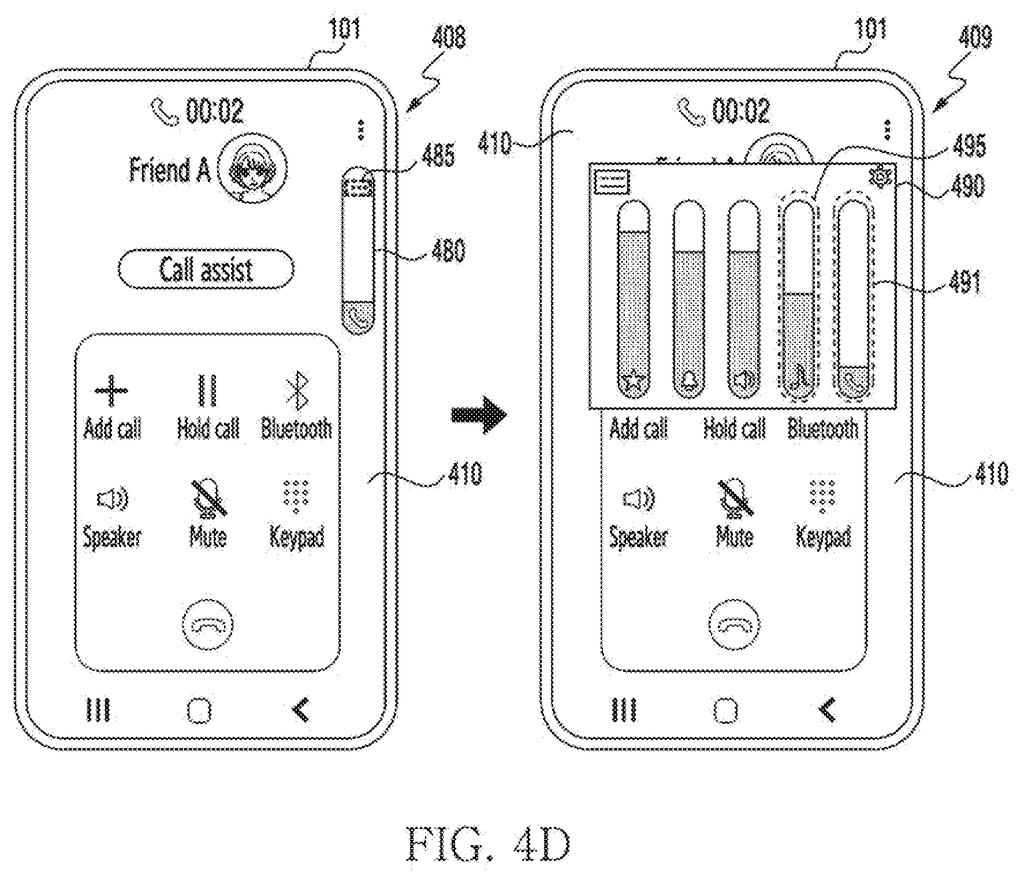
A phone screen with volume sliders lets callers independently adjust audio levels for the live phone call and its translated voice. Drawing from patent filing US 2026/0339599 A1.
A phone screen with volume sliders lets callers independently adjust audio levels for the live phone call and its translated voice.
See all 25 drawings from this filing ↓
Publication number US 2026/0339599 A1 US20260339599A1
Applicant SAMSUNG ELECTRONICS CO., LTD.
Filing date Jun 11, 2026
Publication date Oct 29, 2026
Inventors Hyeri SHIM, Mira SEO, Sangheon KIM, Yeunwook LIM
US classification 381/104
Status when we published Waiting for an examiner (Aug 21, 2026)
Parent application is a Continuation of PCTKR2024017198 (filed 2024-11-04)
Document 20 claims

What Samsung's call-translation volume fix does

When a phone call is being translated live, your phone plays two voices: the real person talking, and a computer voice reading the translation a moment behind. Samsung's filing points out that these two can overlap, and a third sound, like a notification, can bury both. So you end up fiddling with the volume, wanting the translation louder than the original.

Samsung's patent application gives each sound its own volume range, then lets a single press of your volume key move them together. The translated voice gets the louder range, because it is the one you need to follow. The caller's original voice sits a step lower.

Background sounds like music or notifications stay quieter than the call, unless the app is on your screen or giving you directions.

From the filing · CLAIM 1
receive a first audio signal from a first application using the communication circuitry; output first audio based on the first audio signal through the speaker; during outputting of the first audio through the speaker, receive a first volume control input; based on the first volume control input, control a volume of the first audio within a first volume range; …

Translation: The device plays audio from a phone call or other app while letting you adjust its volume normally.

How Samsung splits volume between two voices

The claims cover a phone that plays audio from two apps at once, such as the phone app (the caller's voice) and a translation feature (a computer voice reading the translation). Each stream gets its own volume range, meaning its own set of allowed loudness levels. When the second sound starts, the call's range can shift down a step.

The example tables in the filing give a sense of the numbers:

  • The call voice gets 8 volume steps.
  • The translated voice uses the upper half of a 15-step media scale (steps 8 to 15). Through the loudspeaker it stops at step 12, about 88% of full output, to keep echo from traveling back to the caller.
  • Lower-priority sounds like music or notifications sit about 2 dB (decibels, a measure of loudness) under the call.

One press of the physical volume key moves both streams one step each. One version of the claims goes further: with a call and a translation running, the button changes only the translation and leaves the caller's voice alone.

The filing also covers wireless speakers. With Bluetooth earbuds or a car system, the phone sets its own volume to maximum and lets the speaker control loudness, so two separate volume cuts don't stack up.

Why live-translated calls need their own volume rules

The practical payoff is simple: you could follow a translated call without stopping to dig through settings. Live translation only helps if you can clearly hear the translated voice, and a single volume key that already knows which voice matters most removes a small but constant annoyance.

The same logic reaches beyond translation. The filing describes a game running while a call comes in, where the button would adjust the call and leave the game audio alone. It also covers earbuds, a smart watch and a headset, so the idea is meant to work across Samsung-style devices, not one phone screen. The echo cap on speakerphone is a quiet bonus: the person on the other end hears less of their own voice bouncing back.

This is the 1568th Samsung filing in our Samsung coverage since May, adding to work like keeping AI memory intact and faster on-device chip data flow.

Editorial take

Of all the volume features you could imagine, this one needs the least new stuff. It is all software. The speaker, volume keys and call app already exist, and the filing builds the translation voice from three software steps: turning speech into text, translating it, then turning the text back into speech.

The shortest route to a product is an update to the phone's audio settings and the on-screen volume slider, which the filing sketches with separate call and translation icons. The main work left is tuning. The tables of steps and percentages would need testing for each kind of speaker, from the phone's earpiece to Bluetooth earbuds to a car system.

That puts this idea near the shippable end: a software update, no new parts. Its value rests on live-translated calls becoming an everyday habit, and if they do, you will notice this fix mainly when it is missing.

Get our take in your Top Stories

Liked this breakdown? Add Patentlyze as a preferred source on Google, and our plain-English take shows up more often in your Top Stories the next time Samsung patent news breaks.

There are more where this came from

We read every patent application Big Tech publishes and send you the ones worth knowing. Plain English, free, every week.

The drawings

25 drawing sheets from US 2026/0339599 A1 · click any drawing to enlarge

Internal parts of a smartphone connecting to networks and servers, drawing sheet 1 from US 2026/0339599 A1
Sheet 1 Internal parts of a smartphone connecting to networks and servers
How the phone routes translated call audio to speakers, drawing sheet 2 from US 2026/0339599 A1
Sheet 2 How the phone routes translated call audio to speakers
Converting live speech into spoken translations and adjusting volume, drawing sheet 3 from US 2026/0339599 A1
Sheet 3 Converting live speech into spoken translations and adjusting volume
Opening settings from the phone keypad before making a call, drawing sheet 4 from US 2026/0339599 A1
Sheet 4 Opening settings from the phone keypad before making a call
Turning on live call translation in phone app settings, drawing sheet 5 from US 2026/0339599 A1
Sheet 5 Turning on live call translation in phone app settings
Starting a live translation right from an active phone call, drawing sheet 6 from US 2026/0339599 A1
Sheet 6 Starting a live translation right from an active phone call
Picking languages and translation options during a live phone conversation, drawing sheet 7 from US 2026/0339599 A1
Sheet 7 Picking languages and translation options during a live phone conversation
When caller voice and spoken translation audio overlap in time, drawing sheet 8 from US 2026/0339599 A1
Sheet 8 When caller voice and spoken translation audio overlap in time
Show the other 17 sheets
Expanding the slider reveals individual volume controls for callers, drawing sheet 9 from US 2026/0339599 A1
Sheet 9 Expanding the slider reveals individual volume controls for callers
How the phone presets call and media levels when connecting, drawing sheet 10 from US 2026/0339599 A1
Sheet 10 How the phone presets call and media levels when connecting
Adjusting speech and audio levels based on what is playing, drawing sheet 11 from US 2026/0339599 A1
Sheet 11 Adjusting speech and audio levels based on what is playing
Deciding whether the caller or the background audio takes priority, drawing sheet 12 from US 2026/0339599 A1
Sheet 12 Deciding whether the caller or the background audio takes priority
Matching volume levels to the active speaker or headset, drawing sheet 13 from US 2026/0339599 A1
Sheet 13 Matching volume levels to the active speaker or headset
Capping playback levels so sound never exceeds speaker limits, drawing sheet 14 from US 2026/0339599 A1
Sheet 14 Capping playback levels so sound never exceeds speaker limits
Changing both call and media volume with one button press, drawing sheet 15 from US 2026/0339599 A1
Sheet 15 Changing both call and media volume with one button press
Linked sliders that move together when you adjust call volume, drawing sheet 16 from US 2026/0339599 A1
Sheet 16 Linked sliders that move together when you adjust call volume
Adjusting call and translation volumes with one button, drawing sheet 17 from US 2026/0339599 A1
Sheet 17 Adjusting call and translation volumes with one button
Folding screen running a call, chat, and music, drawing sheet 18 from US 2026/0339599 A1
Sheet 18 Folding screen running a call, chat, and music
Wireless earbuds and car speakers playing translated calls, drawing sheet 19 from US 2026/0339599 A1
Sheet 19 Wireless earbuds and car speakers playing translated calls
Smartwatch and VR headset running the phone features, drawing sheet 20 from US 2026/0339599 A1
Sheet 20 Smartwatch and VR headset running the phone features
Standard call screen showing a single on-screen volume slider, drawing sheet 21 from US 2026/0339599 A1
Sheet 21 Standard call screen showing a single on-screen volume slider
Separate volume sliders for voice and AI speech, drawing sheet 22 from US 2026/0339599 A1
Sheet 22 Separate volume sliders for voice and AI speech
Answering an incoming call with translation turned on, drawing sheet 23 from US 2026/0339599 A1
Sheet 23 Answering an incoming call with translation turned on
How the AI translates live phone conversations, drawing sheet 24 from US 2026/0339599 A1
Sheet 24 How the AI translates live phone conversations
Managing call and translation volumes with one button press, drawing sheet 25 from US 2026/0339599 A1
Sheet 25 Managing call and translation volumes with one button press
Browse all the drawings 25 drawing sheets
Patent filing page

Source. Full patent text and figures from the official USPTO publication PDF.
Reader comments

Be the first to weigh in

Start the discussion

Real name or a handle, either is fine. Comments are read by a person before they appear, so allow a little time. Keep it about the filing.