
Samsung Patents an In-App Translation Tool That Expands the Screen to Fit Both Languages
Reading an app in a foreign language usually means copying text, switching to a translator, then switching back. Samsung's new patent describes a way to surface a translation directly inside whatever app you're already using, with the display automatically expanding to make room for both the original and translated text.
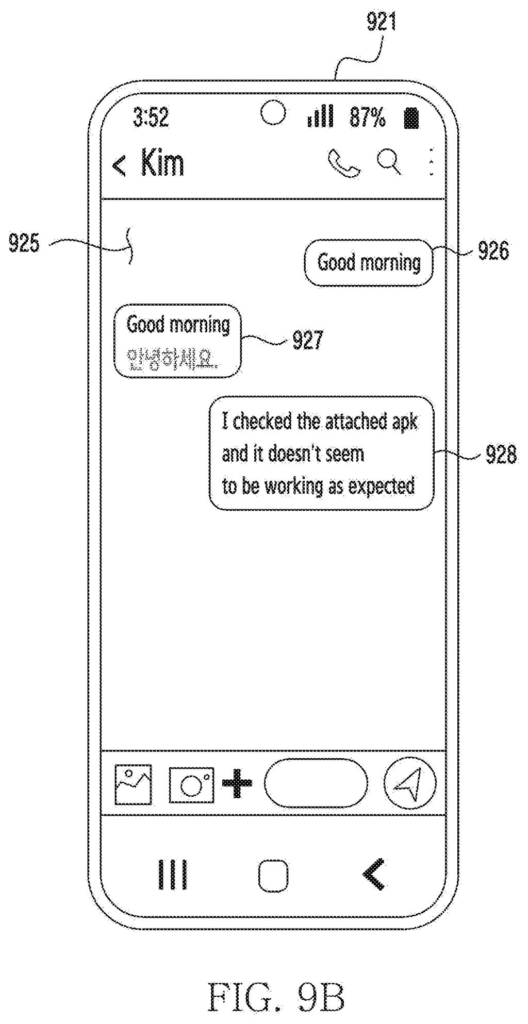
How Samsung's in-app translation overlay works
Imagine you're reading a news article inside an app written entirely in Korean, and you don't speak Korean. Right now, your options are awkward: screenshot it, paste it into a translator, or just give up.
Samsung's patent describes a different approach. A second app, essentially a translation service running in the background, can be activated while you stay inside the first app. When it kicks in, the area of the screen showing the content gets bigger, and a translated version of the text appears alongside the original. You never leave the app you were using.
The key detail is the automatic resize. The patent is specific that the display region grows to a second size bigger than the first, so the translated text doesn't just squeeze in on top of the original. Both versions are shown together, with the layout adjusting to fit them.
How the view area resizes to hold two languages at once
The patent describes an electronic device with a display, memory, and a processor that coordinates two software applications at once.
Here is how the sequence works:
- You open a first app (say, a shopping or news app) and scroll to content written in a foreign language.
- A second app, a translation service, gets activated in the background while that content is on screen.
- The device detects which text is in the original language and generates a translated version in a second language.
- The on-screen content area automatically expands to a larger size so it can display both the original text and the translation side by side or stacked.
The claim is careful to say the translated content area shows both languages: the original is preserved, and the new language sits alongside it. This is different from a straight substitution, where translated text just replaces the source. The expansion is automatic and tied to the activation of the translation function, not a manual user resize.
The patent covers this as a device-level behavior, meaning the coordination between the two apps and the display resizing happens at the operating system or platform layer, not inside the individual app being viewed.
What this means for foreign-language app users
For anyone who regularly uses apps built for a different market, whether that's K-pop fan communities, foreign e-commerce sites, or travel apps, the friction of switching to a separate translator and losing your place is a real annoyance. A system that handles translation inside the existing app, with the layout adapting automatically, removes that context-switching entirely.
Samsung has been building on-device AI features into its Galaxy line under the Galaxy AI brand, and translation is already part of that story. This patent extends that idea down to the app layer, covering any first-party or third-party app, not just Samsung's own. Translation patents are among the more competitive areas of the latest Big Tech patents, with device makers racing to offer fluent, in-context language support as phones become more global.
This is the 1099th Samsung filing in our Samsung coverage since May, adding to work like the earbud switching patent and the video data trimming one.
Expanding the reading area to show both languages at once means something else has to give: either the rest of the screen gets squeezed, or the user loses sight of content that was visible a moment before. That is a real cost, and whether it feels worth it depends entirely on whether you are reading carefully or just skimming.
The translation also depends on a second app waking up and connecting smoothly in the background. If that handoff is slow or requires an extra tap, the convenience advantage over simply copying text and pasting it into a translator shrinks to almost nothing.
The core idea, automatically enlarging the view when translation turns on, is a specific and narrow improvement to a problem most people have tolerated for years. It is a reasonable bet, but a small one.
Get our take in your Top Stories
Liked this breakdown? Add Patentlyze as a preferred source on Google, and our plain-English take shows up more often in your Top Stories the next time Samsung patent news breaks.
There are more where this came from
We read every patent application Big Tech publishes and send you the ones worth knowing. Plain English, free, every week.
The drawings
27 drawing sheets from US 2026/0252826 A1 · click any drawing to enlarge


Want this weekly breakdown for a company we don't cover? Patentlyze Pro →
Be the first to weigh in