
IBM Patents a Screenshot Format That Keeps Buttons Functional
A screenshot is usually a dead image — you can see the button, but you can't tap it. IBM wants to change that by embedding simulated, functional versions of UI elements directly into the screenshot itself.
What IBM's interactive screenshot actually does
Imagine you take a screenshot of an app to show a friend how to use a feature. You circle a button, send it over — and your friend just stares at a flat image. The button is right there, but it doesn't do anything.
IBM's patent describes a system that goes further. When you take a screenshot of an interactive screen, it automatically detects the buttons, sliders, or other interactive elements in that image and generates simulated versions of them. These simulated objects get layered on top of the screenshot — so the image you share isn't just a picture, it's a working replica of the original interface.
So if you screenshot an app's settings page and send it to someone in a help ticket or tutorial, they could actually interact with those UI elements — not the real app, but a functional stand-in that mirrors what the real thing does.
How IBM generates the simulated interactive layer
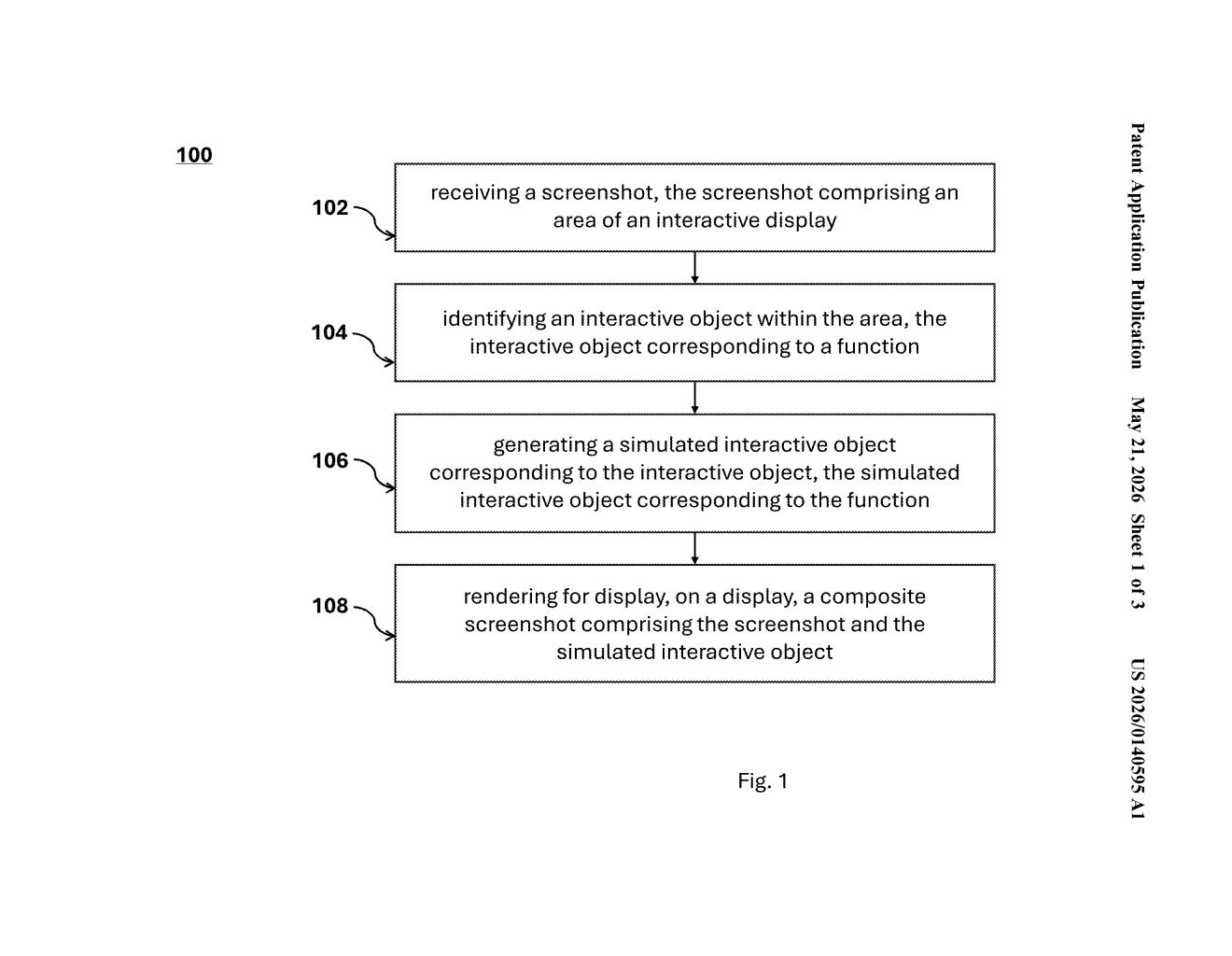
The patent describes a pipeline with a few distinct stages. First, a screenshot is captured from an interactive display — a phone screen, tablet UI, or desktop app window.
Next, the system runs a detection pass to identify interactive objects within the screenshot — things like buttons, toggles, dropdowns, or gesture-sensitive areas. Each object is mapped to its corresponding function (what it actually does when tapped or clicked).
Then comes the key step: for each detected interactive element, the system generates a simulated interactive object — essentially a functional proxy that mirrors the behavior of the original. This isn't just a visual overlay; it's tied to the function that the original element performs.
Finally, the system renders a composite screenshot — a merged image that includes both the original screenshot and these simulated interactive objects — ready to display on any screen. IBM's patent drawings reference components like a pre-mockup module, gesture extraction, event queues, and response handling, suggesting the simulated objects can process user input the same way a real UI would.
What this means for mobile support and documentation
For anyone doing tech support, onboarding, or software documentation, this is a genuinely useful idea. Right now, walkthroughs require either a live screen share or a series of annotated static images. A screenshot format that preserves interactivity could let support agents send a single image that the user can actually navigate — no app install required.
On a broader level, this hints at a blurry line between screenshots and lightweight app demos. If a simulated screenshot can faithfully replicate button behavior, you could theoretically hand someone a fully navigable UI mockup delivered as an image file — useful for enterprise software demos, accessibility testing, or even automated UI regression testing.
This is a genuinely clever idea that solves a real friction point in software support and documentation. The hard part isn't the concept — it's making the simulated objects behave accurately enough to be useful, especially across complex or dynamic UIs. IBM files a lot of patents in enterprise software tooling, and this one feels squarely aimed at their IT services and workflow automation customers.
There are more where this came from
We read every patent application Big Tech publishes and send you the ones worth knowing. Plain English, free, every week.
Want this weekly breakdown for a company we don't cover? Patentlyze Pro →