
Google Files Patent for a Phone Camera That Zooms In Without Cutting Out Your Friends
Google has described a camera that zooms in on the main subject of a photo and still keeps the faces that matter, so a friend standing at the edge doesn't get cropped out.
What Google's auto-zoom camera actually does
Every time you pinch to zoom on your phone camera, you're guessing how tight to crop. Zoom too far and the friend at the edge of the group vanishes. Stay wide and your subject shrinks to a speck.
Google's patent application describes a camera that makes that call for you. It works out which part of the scene your eye would most likely go to, finds every face, and combines the two into one box. Then it zooms just enough to fill the screen with that box.
The filing also covers faces that sit off to the side. Ones that are large enough or look important enough get included, while tiny background faces get ignored. A little padding keeps people from being jammed against the edge of the frame.
… determining a saliency bounding box based on a saliency metric determined for pixels of the image; determining one or more face bounding boxes surrounding one or more faces identified within the image; determining a zoom bounding box based on the saliency bounding box and the one or more face bounding boxes; …
Translation: The software draws virtual boxes around important areas and people's faces to figure out the best framing.
How the zoom box gets built from faces and focus
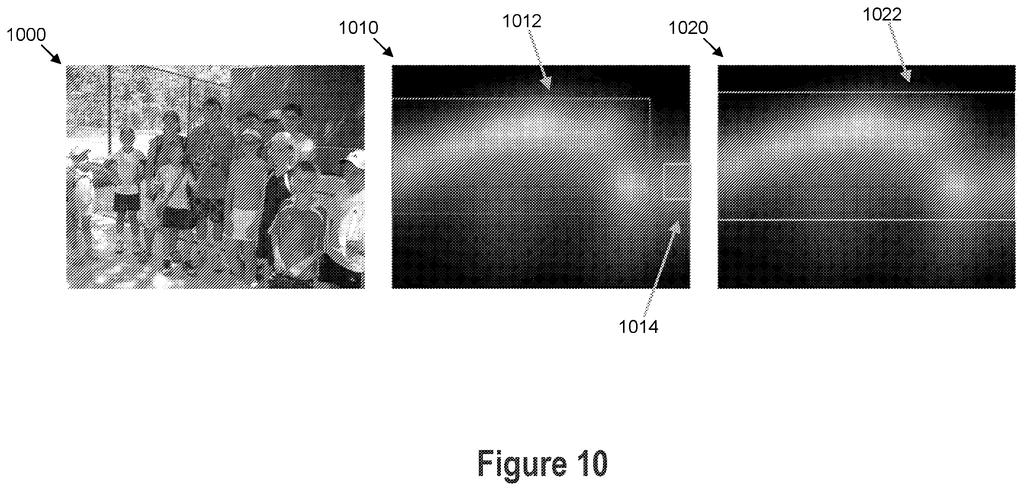
The system starts with a photo from the camera. A trained model (software taught on example images where people drew boxes around the interesting part) builds a saliency heatmap, a map where brighter pixels mean "your eye would go here." A separate model finds faces and draws a box around each one.
Next come the combining rules. The main approach joins the attention box with every face box that overlaps it, producing one zoom box. A face box sitting off by itself gets a check: either how bright the heatmap is inside it, or how large the face appears in the frame. If it fails, it is left out.
To find the attention box, the software subtracts a fixed amount from every pixel's score, then searches for the rectangle with the highest average score. It uses a standard search method (Kadane's algorithm, a dynamic programming trick for finding the best stretch of numbers). If several candidates turn up, it picks the one that crops the least.
The zoom ratio is the larger of the box's width or height as a share of the full image, plus optional padding. The zoom can be optical, a digital crop, or a switch to another camera. If the box hugs the image edge, the phone can swap to a wider lens and try again.
What this means for group photos on your phone
If a version of this reaches phones, you'd tap once and the camera would pick a framing that holds your subject and the people beside them. It also points to the camera choosing the right lens for you, since the filing describes swapping between wide and telephoto cameras depending on where the box lands.
The examiner's first review rejected the claims as filed, which is routine and usually followed by edits, so the final wording may end up narrower. Still, auto-framing is a feature people notice right away. It can be the difference between a photo you keep and one you retake.
Google's 75th filing we've tracked in our AI photo editing race since May follows earlier applications like fixing blurry photos with AI and pre-shoot color tuning.
Claim 1 covers five steps: find the most visually interesting region of a photo, locate any faces in it, combine those two findings into a single framing box, translate that box into a zoom level, and display the result. Nothing in the claim locks this down to a phone, a particular piece of software, or any specific way of combining the regions.
That breadth matters. Any automatic framing feature that follows both visual interest and faces to control zoom, however the underlying code actually works, could fall within its reach.
The later claims add specifics like merging overlapping face boxes, ignoring faces near the edges, and padding the final frame. Those narrower versions serve as fallback positions if the broad claim gets challenged, and even a trimmed version covering part of this approach would give meaningful control over any camera software designed to keep people centered in the shot rather than lost in the background.
Get our take in your Top Stories
Liked this breakdown? Add Patentlyze as a preferred source on Google, and our plain-English take shows up more often in your Top Stories the next time Google patent news breaks.
There are more where this came from
We read every patent application Big Tech publishes and send you the ones worth knowing. Plain English, free, every week.
The drawings
13 drawing sheets from US 2026/0352940 A1 · click any drawing to enlarge


Show the other 5 sheets


Want this weekly breakdown for a company we don't cover? Patentlyze Pro →
Be the first to weigh in