
Microsoft Files Patent for AI Rewrites That Keep Your Document's Layout Intact
Ask an AI to turn a coleslaw recipe into a pancake recipe and you usually get a pile of text that ignores the page design. Microsoft's patent application keeps the design and swaps only the words.
What Microsoft's format-keeping AI rewrite does
Imagine you've made a good-looking recipe card for coleslaw dressing: a title up top, an ingredient list in a neat table, a photo of cabbage, the fonts just so. Now you want a pancake card with the same look. You ask an AI to write it, and the result comes back as a lump of text that doesn't fit your table or your fonts.
This Microsoft patent application describes a fix. The software first sorts your document into content (the words and pictures) and formatting (fonts, spacing, layout). It gives every piece of content a numbered tag, asks the AI to write the new version from source documents you pick, then matches the new pieces back to the old tags.
Then it swaps only the content. Your layout never moves, so the pancake card looks like your coleslaw card. Labels like "Ingredients" can stay put, too.
… determine a first subset of content elements for updating and a second subset of content elements for preservation …
Translation: The system figures out which parts of the text need to change and which parts should stay exactly the same.
How each text block gets an ID and a new home
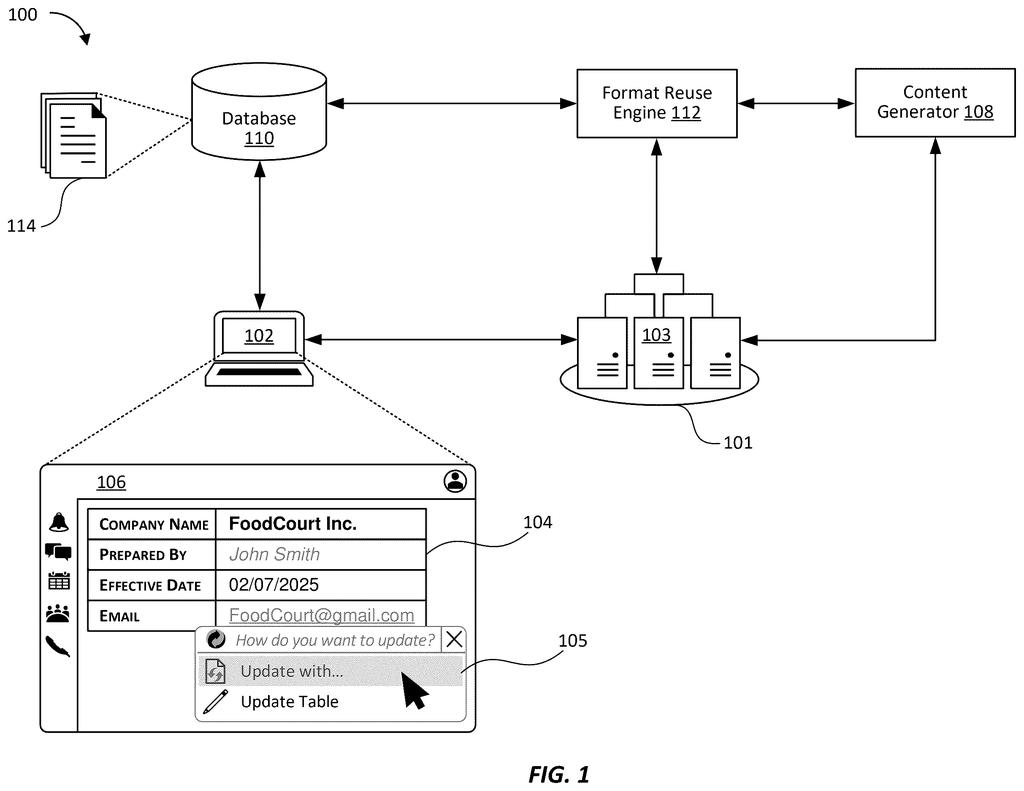
The patent describes a format reuse engine, software that sits between a document app and an AI text generator (a large language model, or LLM, the type of AI that writes human-sounding text). When you ask for an update, the engine splits the document into content elements (text, images, table cells) and formatting elements (font, size, alignment, spacing).
It then sorts the content into pieces to update and pieces to keep. Titles and row labels can stay, while ingredient lists and numbers get replaced. You can correct the engine if it guesses wrong. Each piece to update gets a unique ID, shown in the filing as a tag on every paragraph in an HTML version of the page.
The rest runs in steps:
- The engine sends the AI the tagged content plus the grounding documents (the source material you chose). The AI writes freely, because forcing it to match the old structure could make it invent filler or cut real information.
- A second request asks the AI to attach the original tags to its new text. Extra pieces are marked "new," and leftover old pieces are flagged for removal.
- The engine drops each new piece into the slot with the matching tag, so it inherits the old font, spacing and layout.
The filing also describes saving a document as a reusable template with placeholders, and letting you accept, revise or discard the result.
… generate an updated document by replacing the content elements with the updated content elements based on the mapping. As such, the updated content elements inherit the formatting elements of the input document.
Translation: The new text swaps into the old layout so seamlessly that it keeps all the original styling and structure intact.
Why AI edits could stop wrecking your layout
If you've ever asked an AI to redo a document and then spent a while fixing fonts, table widths and bullet styles, this targets that chore. The filing says the goal is minimal to no rework of the formatting, which matters most for documents that have to look a certain way, such as brand-controlled materials or reports that follow company standards.
The filing places this inside productivity apps such as word processors, with either the device or a server doing the work. It also covers reusable templates, so you could refill the same layout later with different source documents. You stay in control: you pick the source documents, and you can accept, revise or discard what the AI produces.
Microsoft's 79th filing in the Language AI patents we've tracked since May adds to a run that includes one to fact-check before summarizing and lip-synced speech rewriting.
You would notice this the moment it works: the AI's answer lands in your document already looking like the rest of it. No stray fonts, no table that suddenly bulges, no heading that changes size. Anyone who has pasted AI text into a styled document knows how annoying that cleanup is.
The core idea is simple: label every piece of text, then match the new text back to the labels. The payoff depends on how well the AI sticks to those labels. The filing plans for the messy cases, such as the AI returning extra or missing pieces, and that planning is what makes the idea usable.
The review step helps too. You can accept, revise or discard the result, so a wrong guess about what to keep costs you very little.
Get our take in your Top Stories
Liked this breakdown? Add Patentlyze as a preferred source on Google, and our plain-English take shows up more often in your Top Stories the next time Microsoft patent news breaks.
There are more where this came from
We read every patent application Big Tech publishes and send you the ones worth knowing. Plain English, free, every week.
The drawings
11 drawing sheets from US 2026/0350299 A1 · click any drawing to enlarge


Show the other 3 sheets


Want this weekly breakdown for a company we don't cover? Patentlyze Pro →
Be the first to weigh in