
Microsoft Files Patent for AI Coding Help That Checks Its Own Work First
Microsoft describes an AI coding helper that tests its own suggestions in the background and keeps the broken ones off your screen.
What Microsoft's test-first code helper actually does
You're typing in your code editor when an AI helper offers to finish the job. You hit Tab to accept, and the program stops working. The suggestion looked perfect, but it called a function that the latest version of the software library no longer has.
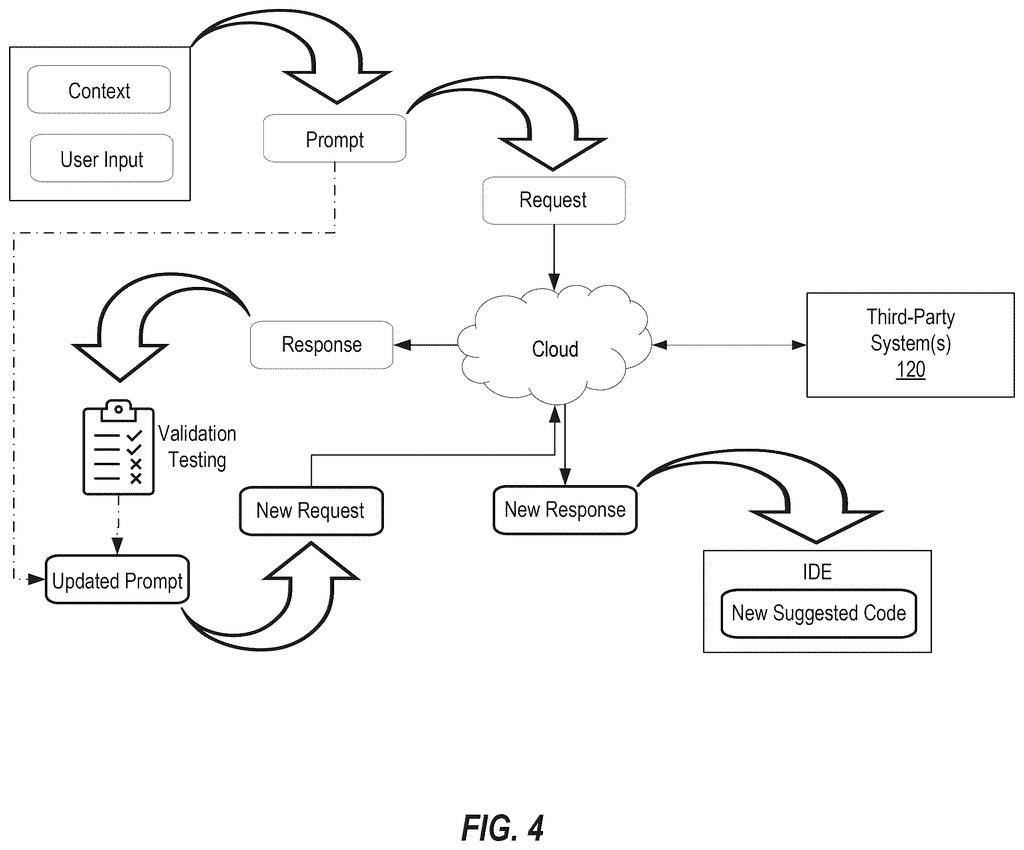
Microsoft's new patent application adds a checkpoint before that moment. When the AI sends back a suggestion, the system first tries it out behind the scenes: does it read as valid code, does the program still build, does it actually run? If the suggestion fails, you never see it. The system tells the AI what went wrong and asks again.
It repeats until a suggestion passes, and only then does it appear on your screen. If you wave off a suggestion by simply typing on, that rejection gets fed back to the AI too, so the next try is different.
… prior to the suggested code being displayed at the code development interface, performing one or more validation tests with the suggested code …
Translation: The system tests the AI code before showing it to the developer.
How a failed suggestion triggers a retry
The system starts by building a prompt, which is the written request sent to an AI model. It combines what you just typed with code context: the lines around your cursor, the programming language, and the names of nearby files and functions. That request goes to a remote service or large language model (an AI trained on huge amounts of text and code), which sends back suggested code.
Before anything appears in your editor, the suggestion goes through validation tests. The claims name four types:
- Syntactic test: language tools check that the code is written in valid form.
- Semantic test: checks that the code makes sense in context.
- Compile test: turns the code into a runnable program and watches for errors.
- Runtime test: runs that program to see whether it works.
The filing says these checks can run as background programs, sometimes on a copy of your project, so you don't see them working.
If any test fails, the suggestion is held back, the prompt is updated with the failure, and a new request goes out. The new answer gets the same tests, and the loop continues until one passes. A rejection by you starts the same loop.
You can also choose the tests. The filing describes tests you write yourself, tests from third parties, and tests stored locally or remotely, with editor menus to pick them and set what counts as a fail.
… refines prompts and obtains new code suggestions until valid solutions are achieved and/or accepted …
Translation: It fixes its own mistakes by asking the AI again until the code actually works.
Why Microsoft's check-first idea matters to coders
If you use AI to help write code, the biggest cost of a wrong suggestion is the time spent hunting the bug it planted. This filing moves that check ahead of you: the code has to survive a build and a test run before it reaches your screen. Suggestions that look right but call retired functions or misread the project are the exact failures it targets.
For companies selling AI coding help, trust is the product, and a tool that hides its own mistakes earns more of it. The trade-off is waiting. Every failed check means another round trip to the AI, and the filing gives no timing figures.
Microsoft's 28th filing we've tracked since July in the AI safety guardrails space builds on earlier work like one pre-checking documents before summarizing and one checking AI-written database code.
Of all the ideas in this filing, this one sits close to shippable. It needs no new hardware, only software that already exists: a code editor, an AI model in the cloud, and the build and test tools most projects already have.
The shortest route to a product is a thin layer between the AI's answer and your screen. That layer drops the suggestion into a copy of your project, runs the build, and decides whether you get to see it. Nothing in the document requires a new kind of AI.
The hard part is speed and setup. Every check adds waiting time to a feature people expect to feel instant, and a project with no tests gives the system little to check against. Early versions would likely lean on the quick checks (does it read correctly, does it compile) and save full test runs for slower moments.
Get our take in your Top Stories
Liked this breakdown? Add Patentlyze as a preferred source on Google, and our plain-English take shows up more often in your Top Stories the next time Microsoft patent news breaks.
There are more where this came from
We read every patent application Big Tech publishes and send you the ones worth knowing. Plain English, free, every week.
The drawings
6 drawing sheets from US 2026/0349667 A1 · click any drawing to enlarge


Want this weekly breakdown for a company we don't cover? Patentlyze Pro →
Be the first to weigh in