
Adobe Files Patent for an AI Writer That Sticks to Your Sources and Adds Pictures
You hand Adobe's tool a rough outline and a pile of articles, and it writes a first draft from them. Then it decides on its own which paragraphs deserve a picture.
What Adobe's source-grounded drafting tool does
Imagine you're writing a report on coral reefs. You have a rough outline and a folder of articles, and you want a first draft that reflects those articles instead of whatever an AI half-remembers from the internet.
That's the gap this Adobe filing targets. You give the tool your outline and your reference documents. It finds the sentences in those documents that best match your topic, then asks an AI writer to build a paragraph only from them. That makes it much harder for the AI to make things up.
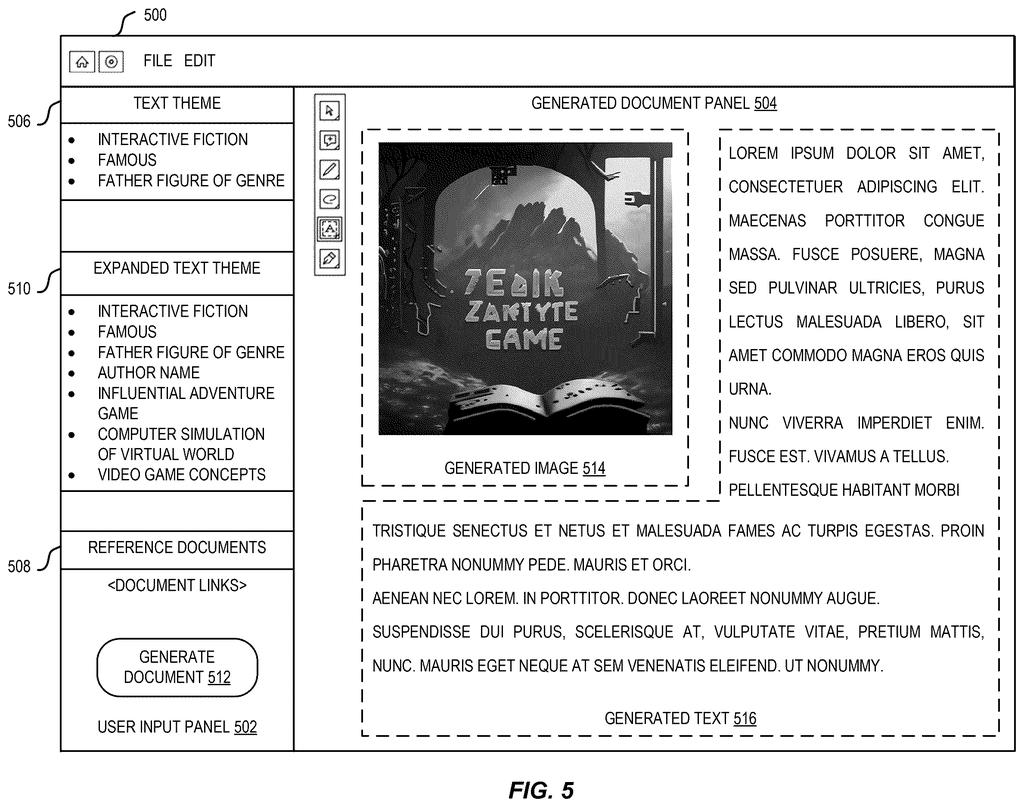
Next, a second AI checks each new paragraph and asks whether a picture would help. If so, the tool looks for a fitting image inside your documents first. If it finds none, it creates a new one. You end up with a draft that already has text and images in place.
… determining, using a second machine learning model, that the text paragraph is a visual text, wherein the second machine learning model is trained to classify whether an input paragraph is non-visual text or visual text; …
Translation: An AI checks if the written paragraph describes something that would look good as a picture.
How it picks sentences and decides on pictures
A request has two parts: a text theme (an outline, bullet points or a short description) and one or more reference documents. The system finds the relevant material in two passes. It turns each paragraph and the theme into embeddings (lists of numbers that capture meaning), picks the closest paragraphs, then repeats the process sentence by sentence. An approximate nearest-neighbor search (a fast shortcut for finding close matches in a huge pile of text) keeps this quick.
If the theme is vague, the filing describes pulling key phrases from the retrieved sentences, adding them to the theme, and searching again, three to five rounds in the example. A large language model then gets a prompt built from those sentences and the theme, and writes one paragraph from them.
A second model, a BERT classifier (a language model trained to sort text into categories), labels the paragraph as visual or non-visual. For visual text, the system compares images in your reference documents to the paragraph using CLIP (a model that scores how well a picture matches words), with a cutoff of 0.34 in one example. With no good match, it extracts key phrases and prompts a diffusion model (an image generator) to make one.
A separate claim covers training the writer: take paragraphs from a document collection such as Wikipedia, keep the first two sentences as context, remove the rest, and have an AI write guidelines for the removed text. No hand-labeled data is needed.
A visual classifier can determine whether this generated text is visual text and, if so, image content can be retrieved or generated to be added to the draft document.
Translation: Once the system finds descriptive text, it automatically pulls or creates a matching image for the document.
Why fewer made-up facts matter for AI drafts
If you've asked an AI to write something from your own notes, you know the risk: it slips in facts that appear nowhere in your sources. This filing tackles that by feeding the AI only selected sentences from your documents, which also sidesteps the limit on how much text a model can read at once. For you, the payoff would be a first draft you can trace back to what you provided, with pictures placed without you hunting for them.
The application is at an early stage: an examiner rejected the claims as filed in a first review, which is routine and usually followed by amendments. The filing also covers a separate idea, a way to train the writing model without hand-labeled data.
Adobe's 11th filing we've tracked in our AI guardrails race since July builds on earlier work like one pinpointing answers in documents and one tracing text to source data.
You would notice this the first time an AI draft sticks to what you gave it. Anyone who has caught a chatbot inventing a statistic knows how much time that check costs, and a draft built from your own articles lets you skim for mistakes instead of verifying every line.
The picture step is a smaller win. It saves you a round of searching for images, though a model deciding which paragraphs deserve art will sometimes guess wrong. The filing lets you pick among candidate images, which is the right escape hatch.
Nothing here promises the AI will never invent a sentence; it narrows the odds. Still, a writing tool that drafts from your sources is something a student or office worker would use on day one.
Get our take in your Top Stories
Liked this breakdown? Add Patentlyze as a preferred source on Google, and our plain-English take shows up more often in your Top Stories the next time Adobe patent news breaks.
There are more where this came from
We read every patent application Big Tech publishes and send you the ones worth knowing. Plain English, free, every week.
The drawings
24 drawing sheets from US 2026/0320092 A1 · click any drawing to enlarge


Show the other 16 sheets


Want this weekly breakdown for a company we don't cover? Patentlyze Pro →
Be the first to weigh in