
Google Files Patent for Video Call Blur That Doesn't Flicker When You Move
Anyone who uses background blur has watched it glitch: you lean over, and your messy room flashes into view for a moment. Google's patent application uses a distance sensor to stop that from happening.
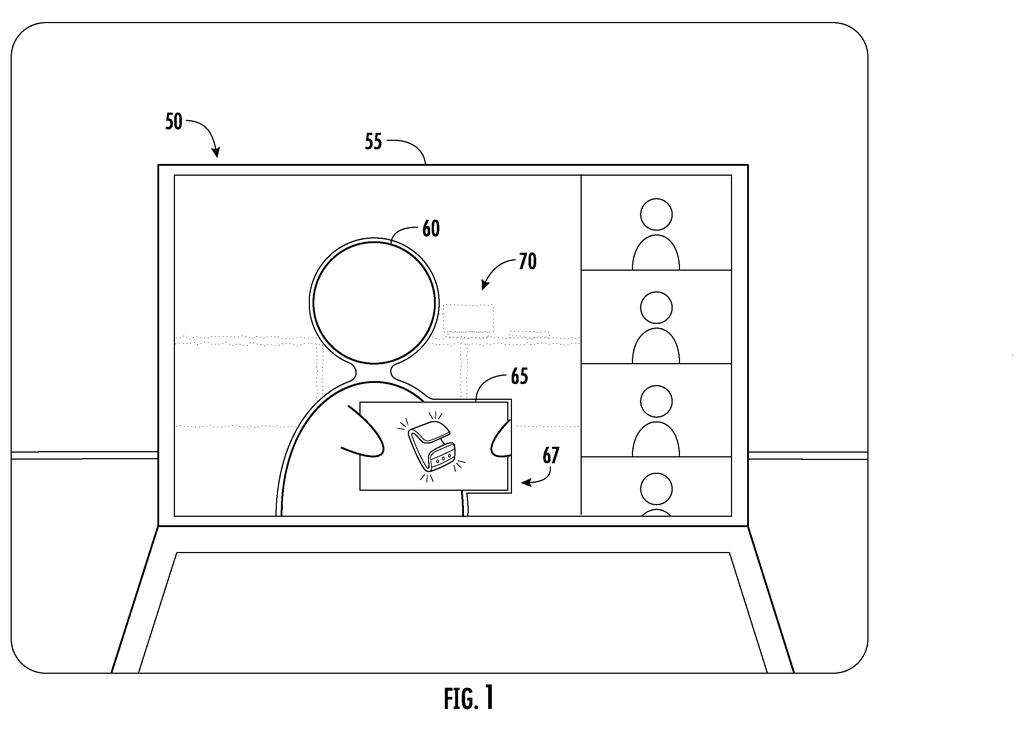
What Google's distance-aware video blur does
A woman on a work video call leans sideways to grab a pen. For a split second the blur around her flickers, and the laundry pile behind her snaps into sharp focus. If you use background blur, you have probably seen something like this, or watched a document you held up to the camera turn into a smudge.
Google's patent application describes a fix. It adds a sensor that measures distance, such as radar or lidar (sensors that judge how far away things are), or it uses two cameras. The system draws an outline around whatever is closest to the camera, usually you, and keeps everything inside that outline sharp. Everything outside stays blurred.
Because it knows distances, it can also blur things by how far back they sit. A coffee mug on your desk gets a light blur, while a poster across the room gets a heavy one. And a drawing you hold up to the camera stays clear.
detecting a movement of a user in received video data based on the received video data and location data indicating a distance of the user from the video capture device, the location data being received from a sensor …
Translation: The system tracks your physical movement and distance from the camera using a sensor.
How the zone of inclusion tracks you
The main claim covers a video-calling device with a camera and a sensor that reports how far the user is from that camera. The system watches for movement, either by spotting changed pixels (the tiny dots that make up the image) or by getting new distance readings. When the user moves, it updates which pixels are blurred based on the user's new position, then sends the video to the other people on the call.
The filing calls the sharp region a zone of inclusion, with an edge it calls a boundary of exclusion. To find the person, the system groups points that sit at similar distances. The description gives examples such as points within three inches of each other, or a face and shoulders falling within six inches of one another. When you move, pixels are added to or removed from the zone and blurred or unblurred right away, instead of the system re-identifying you from scratch. The filing says that gap is when the background leaks through.
The filing also describes some variations:
- Other ways to measure distance: radar, lidar, or a second camera using parallax (the shift in an object's apparent position when seen from two angles).
- Graded blur: pixels farther from the camera are blurred more. A point 10 centimeters behind you gets a light blur, while one a meter back gets a heavier one.
- Whole-object blur: a shelf item or poster is treated as one object and blurred evenly.
… determining, by the electronic processor, a zone of inclusion for the video data based on the video data and the location data and applying continuous and undisrupted background blur to pixels of the video data located outside the zone of inclusion …
Translation: It maps out your exact position to keep the background blurred smoothly without glitches.
Why flicker-free blur matters on your next call
Background blur exists to keep your home private on a call, so a flicker that shows your room defeats the point. A system that knows how far away things are could cut those slips, and it would stop blurring the document or drawing you hold up to show your coworkers.
The catch is hardware. The main version relies on a radar or lidar sensor, which most laptops and webcams do not have, though the filing also describes using two cameras to estimate distance. This is a patent application, so there is no sign it will ship. If it did, you would notice it in small moments: leaning over, reaching for a mug, or holding up a page.
Google's 1013th filing we've tracked since May in our Google coverage follows work like glare detection on scans and placing products in scenes.
Background blur fails at the worst times. You shift in your chair, the edge of the blur wobbles, and your coworkers get a quick look at your kitchen. Anyone who has held up a printed page and watched it dissolve into mush knows the other failure. Both are small annoyances that happen in front of other people, and this filing goes straight at them.
The fix is sensible: use real distance readings instead of guessing where you end and the room begins. You would notice the difference only when something goes wrong less often, which is a quiet kind of win but a real one on a daily video call.
The hardware requirement limits the benefit. A radar or lidar sensor adds cost to a laptop, and the two-camera option needs a second lens. Until that kind of sensor is common in everyday devices, most people would not get to use this.
Get our take in your Top Stories
Liked this breakdown? Add Patentlyze as a preferred source on Google, and our plain-English take shows up more often in your Top Stories the next time Google patent news breaks.
There are more where this came from
We read every patent application Big Tech publishes and send you the ones worth knowing. Plain English, free, every week.
The drawings
7 drawing sheets from US 2026/0350761 A1 · click any drawing to enlarge


Want this weekly breakdown for a company we don't cover? Patentlyze Pro →
Be the first to weigh in