
Sony · Filed Mar 14, 2025 · Published Oct 22, 2026

Sony Files Patent to Show Mood and Energy in Video Call Captions

Sony wants captions on a video call to show how people feel, not just what they say. Louder voices make bigger bubbles, happy tones turn warm orange, and a dying conversation fades to dark.
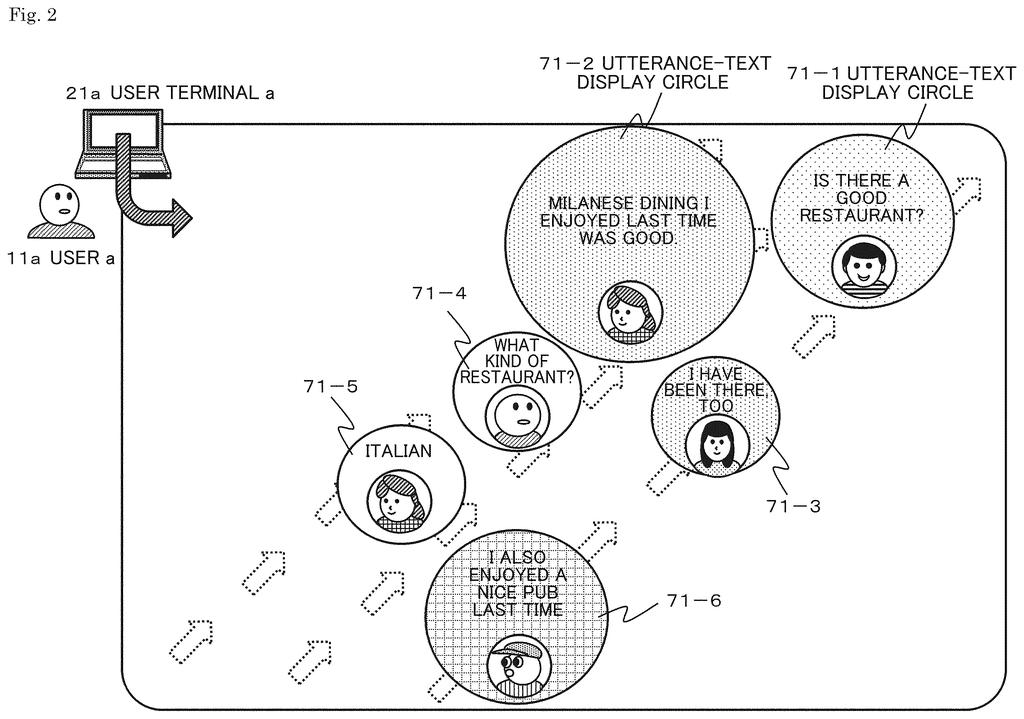
Dynamic speech bubbles adjust their size and style to reflect the tone, volume, and emotion of each speaker in a call. Drawing from patent filing US 2026/0329506 A1.
Dynamic speech bubbles adjust their size and style to reflect the tone, volume, and emotion of each speaker in a call.
See all 45 drawings from this filing ↓
Publication number US 2026/0329506 A1 US20260329506A1
Applicant Sony Group Corporation
Filing date Mar 14, 2025
Publication date Oct 22, 2026
Inventors Haruka MATSUBARA, Tomoaki TAKUMA, Hironari HOSHINO, Kouichiro TAKASHIMA
US classification 345/156
Examiner COHEN, YARON (Art Unit 2626)
Status when we published Examiner raised objections; the company can respond (Sep 9, 2026)
Parent application is a National Stage Entry of PCTJP2023028226 (filed 2023-08-02)
Document 20 claims

What Sony's mood-reading caption bubbles do

Ever sat through a video meeting and had no idea whether anyone liked your idea? Without a room to read, you miss the sighs, the smiles, and the moment the energy dropped.

Sony's filing tackles that gap. A server listens to everyone's microphone and watches each camera feed, then turns what people say into floating circles of text. The circles change with the conversation: louder speech makes a bigger circle, a cheerful tone makes it warmer in color, and a gloomy one makes it cooler.

The filing says this could help people who are hard of hearing, since they can read the words but miss the emotion. It also lets you switch each visual effect on or off and dial its strength up or down.

From the filing · CLAIM 1
a data analysis unit that analyzes received data from a user terminal carrying out a conversation via a communication network; and a display data control unit that controls display data having an utterance-text display region including text corresponding to a user utterance to be provided to the user terminal, on a basis of an analysis result of the data analysis unit …

Translation: The system reads chat data and changes how captions look based on what it finds.

How Sony's server turns voice into bubble size

The system has two main parts. A data analysis unit takes in voice and camera data from each participant's device. A display data control unit then decides how each caption bubble should look, based on that analysis.

The filing lists thirteen things the bubbles can show. Here are some of them:

  • Volume: louder speech makes a bigger circle.
  • Tone: a cheerful voice gets a bright or warm color, a depressed one gets a dark or cold color, and effects like a glow or a cloud can appear around it.
  • Keywords: key words in a sentence are enlarged or highlighted in a color such as red.
  • Replies: a positive reply drifts toward the comment it answers and takes a similar color, while a negative reply moves away and takes a different color.
  • Group mood: when the chat is lively, the background brightens and bubbles bounce. When it fades, the background darkens.

The server also reads facial expressions, nods and head shakes. In one variation, it uses body signals like pulse, temperature and where you are looking, from sensors you wear. Bubbles drift across the screen and fade as they age, and opinion groups (say, dog people versus cat people) cluster apart.

From the filing · THE ABSTRACT
A display data control unit controls the size, position, color, or a movement of the utterance-text display region or at least one of output images around the utterance-text display region, and generates display data visualizing at least one of a user state and a conversation state of the user carrying out a conversation.

Translation: It alters text size, color, movement, or background visuals to show how participants feel.

Why mood-tinted captions matter for remote meetings

If your work or classes happen over video, this could change how a call feels. A quiet participant's reaction would show up on screen, and a meeting that has gone flat would look flat. For hearing-impaired users, the extra cues could fill in what a plain transcript leaves out. The examiner's first review rejected the claims as filed, which is routine at this stage and usually followed by amendments.

The filing also raises a privacy question, because the tool reads your face, tone and possibly your pulse. It does let each user turn individual effects off, which is an important part of the design. The filing does not name a Sony product, so treat it as an idea on paper.

Sony's 640th filing in our Sony coverage since May follows work like turning game sounds into haptics and faster graphics compression.

Editorial take

The trade here is accuracy against attention. Every effect depends on software guessing your mood from a voice or a face, and those guesses will sometimes be wrong. A bubble that turns gloomy blue because you spoke softly could misrepresent you in front of your boss.

There is also a clutter cost. Bubbles that grow, shake, flash, drift and change the background color could pull your eyes away from the people you are talking to. The on/off and strength sliders in the filing help, and they are probably the most important part of the design.

On balance, the trade looks worth making for readers who cannot hear the call, where the gain is large. For everyone else, it depends on how restrained the final design turns out to be.

Get our take in your Top Stories

Liked this breakdown? Add Patentlyze as a preferred source on Google, and our plain-English take shows up more often in your Top Stories the next time Sony patent news breaks.

There are more where this came from

We read every patent application Big Tech publishes and send you the ones worth knowing. Plain English, free, every week.

The drawings

45 drawing sheets from US 2026/0329506 A1 · click any drawing to enlarge

Connecting callers through a central server that processes their chat, drawing sheet 1 from US 2026/0329506 A1
Sheet 1 Connecting callers through a central server that processes their chat
Speech bubbles float across the call screen as people speak, drawing sheet 2 from US 2026/0329506 A1
Sheet 2 Speech bubbles float across the call screen as people speak
Later bubbles push older remarks across the meeting display, drawing sheet 3 from US 2026/0329506 A1
Sheet 3 Later bubbles push older remarks across the meeting display
Collecting caller audio and video to build live captions, drawing sheet 4 from US 2026/0329506 A1
Sheet 4 Collecting caller audio and video to build live captions
Server parts that evaluate voices and faces into visual cues, drawing sheet 5 from US 2026/0329506 A1
Sheet 5 Server parts that evaluate voices and faces into visual cues
Parts of an animated caption circle around an avatar, drawing sheet 6 from US 2026/0329506 A1
Sheet 6 Parts of an animated caption circle around an avatar
Matching voice volume and mood to bubble colors, drawing sheet 7 from US 2026/0329506 A1
Sheet 7 Matching voice volume and mood to bubble colors
Strategies for fading older remarks and highlighting key speakers, drawing sheet 8 from US 2026/0329506 A1
Sheet 8 Strategies for fading older remarks and highlighting key speakers
Show the other 37 sheets
Rules for clustering captions that respond to earlier comments, drawing sheet 9 from US 2026/0329506 A1
Sheet 9 Rules for clustering captions that respond to earlier comments
Methods to animate speech bubbles during cheerful moments, drawing sheet 10 from US 2026/0329506 A1
Sheet 10 Methods to animate speech bubbles during cheerful moments
Visual cues for awkward silence, hesitation, and disagreement, drawing sheet 11 from US 2026/0329506 A1
Sheet 11 Visual cues for awkward silence, hesitation, and disagreement
Ways the screen brightens as meeting energy builds, drawing sheet 12 from US 2026/0329506 A1
Sheet 12 Ways the screen brightens as meeting energy builds
How captions dim when group enthusiasm fades away, drawing sheet 13 from US 2026/0329506 A1
Sheet 13 How captions dim when group enthusiasm fades away
Grouping matching viewpoints by caption style and color, drawing sheet 14 from US 2026/0329506 A1
Sheet 14 Grouping matching viewpoints by caption style and color
Scaling caption bubbles up as speech gets louder, drawing sheet 15 from US 2026/0329506 A1
Sheet 15 Scaling caption bubbles up as speech gets louder
Shifting caption colors warmer when someone speaks cheerfully, drawing sheet 16 from US 2026/0329506 A1
Sheet 16 Shifting caption colors warmer when someone speaks cheerfully
Matching bubble colors and graphic effects to vocal tone, drawing sheet 17 from US 2026/0329506 A1
Sheet 17 Matching bubble colors and graphic effects to vocal tone
Emphasizing key phrases within speech bubbles using bold styling, drawing sheet 18 from US 2026/0329506 A1
Sheet 18 Emphasizing key phrases within speech bubbles using bold styling
Floating conversation bubbles across the screen in chronological order, drawing sheet 19 from US 2026/0329506 A1
Sheet 19 Floating conversation bubbles across the screen in chronological order
Alternative screen paths for drifting old and new comments, drawing sheet 20 from US 2026/0329506 A1
Sheet 20 Alternative screen paths for drifting old and new comments
Fading color intensity as speech bubbles grow older, drawing sheet 21 from US 2026/0329506 A1
Sheet 21 Fading color intensity as speech bubbles grow older
Centering the most important spoken message along the visual path, drawing sheet 22 from US 2026/0329506 A1
Sheet 22 Centering the most important spoken message along the visual path
Tagging a core discussion topic with an outline badge, drawing sheet 23 from US 2026/0329506 A1
Sheet 23 Tagging a core discussion topic with an outline badge
Highlighting a central discussion point with a solid badge, drawing sheet 24 from US 2026/0329506 A1
Sheet 24 Highlighting a central discussion point with a solid badge
Connecting caption bubbles to show replies in conversation, drawing sheet 25 from US 2026/0329506 A1
Sheet 25 Connecting caption bubbles to show replies in conversation
Grouping multiple replies around an earlier spoken remark, drawing sheet 26 from US 2026/0329506 A1
Sheet 26 Grouping multiple replies around an earlier spoken remark
Moving a bubble closer to signal an agreeing response, drawing sheet 27 from US 2026/0329506 A1
Sheet 27 Moving a bubble closer to signal an agreeing response
Shifting a bubble away to reflect a disagreeing response, drawing sheet 28 from US 2026/0329506 A1
Sheet 28 Shifting a bubble away to reflect a disagreeing response
Shaking and brightening a bubble to reflect enthusiastic agreement, drawing sheet 29 from US 2026/0329506 A1
Sheet 29 Shaking and brightening a bubble to reflect enthusiastic agreement
Flashing colors and particle effects highlight strong positive reactions, drawing sheet 30 from US 2026/0329506 A1
Sheet 30 Flashing colors and particle effects highlight strong positive reactions
Squashing and darkening a bubble to reveal user disagreement, drawing sheet 31 from US 2026/0329506 A1
Sheet 31 Squashing and darkening a bubble to reveal user disagreement
Jagged outlines and pulsing shadows mark sharp negative reactions, drawing sheet 32 from US 2026/0329506 A1
Sheet 32 Jagged outlines and pulsing shadows mark sharp negative reactions
A bright background cloud signals rising excitement in the chat, drawing sheet 33 from US 2026/0329506 A1
Sheet 33 A bright background cloud signals rising excitement in the chat
Sparkle effects pop up as the group conversation heats up, drawing sheet 34 from US 2026/0329506 A1
Sheet 34 Sparkle effects pop up as the group conversation heats up
Dark clouds behind captions show room energy is dropping, drawing sheet 35 from US 2026/0329506 A1
Sheet 35 Dark clouds behind captions show room energy is dropping
Lightning bolts flare across captions during tense or negative moments, drawing sheet 36 from US 2026/0329506 A1
Sheet 36 Lightning bolts flare across captions during tense or negative moments
Separate speech bubbles cluster together by topic or shared opinion, drawing sheet 37 from US 2026/0329506 A1
Sheet 37 Separate speech bubbles cluster together by topic or shared opinion
Adjusting how strongly speech moods appear on screen, drawing sheet 38 from US 2026/0329506 A1
Sheet 38 Adjusting how strongly speech moods appear on screen
Tapping a topic tab filters for related speech bubbles, drawing sheet 39 from US 2026/0329506 A1
Sheet 39 Tapping a topic tab filters for related speech bubbles
Pinching the screen zooms in to enlarge specific speaker bubbles, drawing sheet 40 from US 2026/0329506 A1
Sheet 40 Pinching the screen zooms in to enlarge specific speaker bubbles
Grouping spoken comments into clusters by topic on screen, drawing sheet 41 from US 2026/0329506 A1
Sheet 41 Grouping spoken comments into clusters by topic on screen
Sending caller vitals to the server with call audio, drawing sheet 42 from US 2026/0329506 A1
Sheet 42 Sending caller vitals to the server with call audio
How the cloud tracks pulse and gaze for bubbles, drawing sheet 43 from US 2026/0329506 A1
Sheet 43 How the cloud tracks pulse and gaze for bubbles
Inside your laptop or phone during a live group call, drawing sheet 44 from US 2026/0329506 A1
Sheet 44 Inside your laptop or phone during a live group call
Standard computing hardware that runs the calling software, drawing sheet 45 from US 2026/0329506 A1
Sheet 45 Standard computing hardware that runs the calling software
Browse all the drawings 45 drawing sheets
Patent filing page

Source. Full patent text and figures from the official USPTO publication PDF.
Reader comments

Be the first to weigh in

Start the discussion

Real name or a handle, either is fine. Comments are read by a person before they appear, so allow a little time. Keep it about the filing.