
Adobe Patents Automatic Helpers for Positioning 3D Objects Precisely Within Scenes
Positioning a 3D object precisely on a curved or angled surface is one of those small tasks that eats a surprising amount of time in 3D design work. Adobe's new patent describes a system that handles the geometry automatically and shows you exactly where things are allowed to go.
What Adobe's 3D placement guide system actually does
Placing one 3D object on the surface of another, say a sticker on a sphere or a label on a bottle, requires the object to sit perfectly flush, pointing straight out from the surface. Today that usually means manually rotating and adjusting until it looks right, which can take several attempts even for experienced designers.
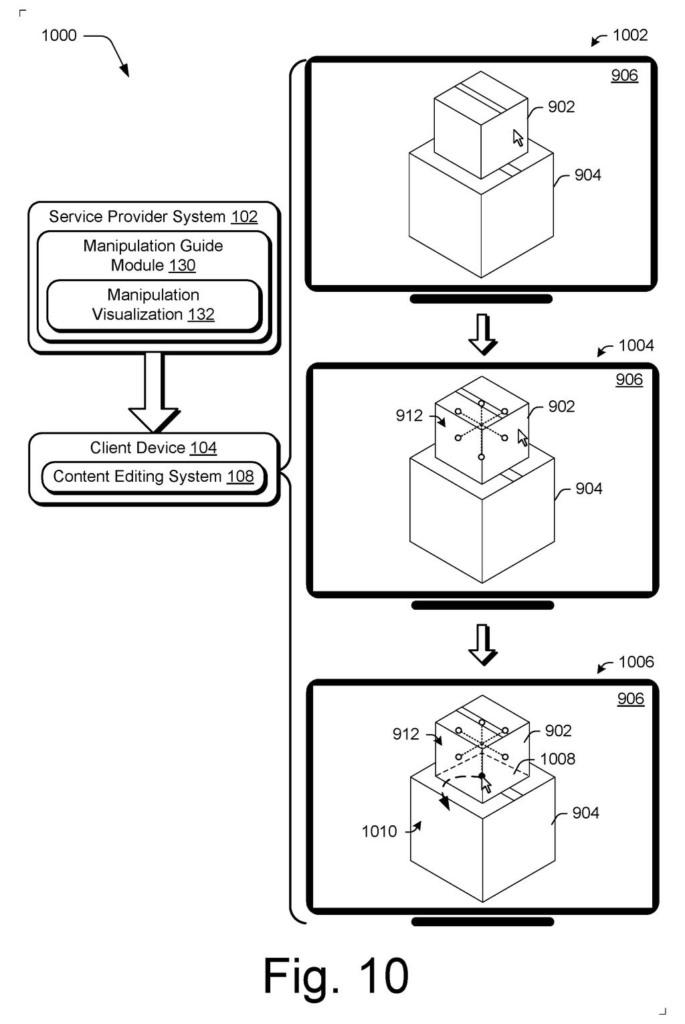
Adobe's patent describes a system that takes over that geometry for you. When you drag one 3D object toward another, the software automatically rotates it so it sits at a right angle to whatever surface it lands on. A visual guide then appears showing exactly which directions you can move it from there, so you're not guessing.
The patent also covers two other tools in the same editing system: a history navigation control that lets you scroll back through how a 3D scene was built step by step, and a shadow control that you can interact with directly to change how light falls across objects in the scene.
… reorienting, by the processing device, the first three-dimensional object in the user interface in three-dimensional space such that the first three-dimensional object appears disposed as normal to a surface of the second three-dimensional object; …
Translation: The software automatically rotates an object so it sits flush against another surface.
How the alignment guide snaps objects to surface normals
The core claim in this patent covers a specific placement behavior called surface-normal alignment. A surface normal is simply an imaginary line pointing straight out from any point on a surface at a 90-degree angle to that surface. If you dropped a pin into a beach ball, the pin would follow the surface normal at that point.
When a user drags one 3D object toward another in Adobe's described interface, the system does two things automatically:
- It reorients the incoming object so it points along that surface normal, meaning it sits flush and upright relative to wherever it lands.
- It displays an alignment guide, a visual overlay showing which axes of movement are still available, constrained to sliding along the surface rather than floating freely in 3D space.
Beyond placement, the patent describes a history navigation control that lets designers scrub backward through the construction steps of a 3D scene, similar to an undo history but visualized as a timeline of the scene's assembly. There is also a shadow control that acts both as an editing handle and a preview, letting users adjust how a light source casts shadows by interacting directly with the shadow itself in the viewport.
All three features are framed as parts of a single content editing system, suggesting they are intended to work together inside one application rather than as separate plugins.
… the content editing system implements a shadow control that is usable as part of an editing and as a visualization to control rendering of illumination within a three-dimensional environment.
Translation: Another tool lets creators easily manage how light and shadows fall across the scene.
What this means for designers building 3D scenes
For designers using tools like Adobe Substance 3D or similar scene editors, small placement tasks are a frequent source of friction. Getting an object to sit correctly on an irregular surface currently involves manual rotation across three axes, and a single misjudged angle makes the result look wrong. A system that handles the geometry automatically and shows you your remaining movement options reduces that friction to a single drag, which adds up across a full project.
The shadow control is the less obvious piece here, but potentially the more useful one. Light and shadow in a 3D scene are usually adjusted through abstract numerical settings or camera-angle sliders that feel disconnected from the image. Making the shadow itself an interactive handle lets you edit by looking at the result, which matches how most visual designers already think about their work.
Adobe's 177th filing in our Adobe coverage since May follows earlier applications like text-to-video generation and hover-triggered prompt writing.
Automatic alignment saves real effort, but the price is inflexibility: the moment a designer wants something placed at an odd angle, the tool that usually helps becomes the thing they have to argue with. For routine work that trade is clearly worth it; for the unexpected placement, it is not.
The shadow-as-handle idea folds two separate steps into one, which is a genuine time saver when compositing a still image with a single light source. It breaks down in scenes with several lights or moving elements, where the shadow no longer tells a simple story and the shortcut becomes more confusing than helpful.
These tools solve specific, tedious problems that anyone who has placed objects in a scene will recognize on sight. The design choices are practical and the costs are manageable for the common cases, which is all most tools ever need to be.
There are more where this came from
We read every patent application Big Tech publishes and send you the ones worth knowing. Plain English, free, every week.
The drawings
18 drawing sheets from US 2026/0289932 A1 · click any drawing to enlarge


Want this weekly breakdown for a company we don't cover? Patentlyze Pro →
Be the first to weigh in