
Adobe Files Patent to Turn a Typed Request Into a Step-by-Step Marketing Automation
Adobe's filing lets you describe a marketing automation in one run-on sentence and get an editable flowchart back. The AI's draft gets checked against the software's own rules before you ever see it.
What Adobe's workflow assistant actually does
Setting up an automated campaign in a marketing tool today means knowing where everything lives: which menu holds which step, how your customer data is organized, and which settings go where. The people doing the work are usually marketers, not engineers, so it takes a lot of learning and clicking.
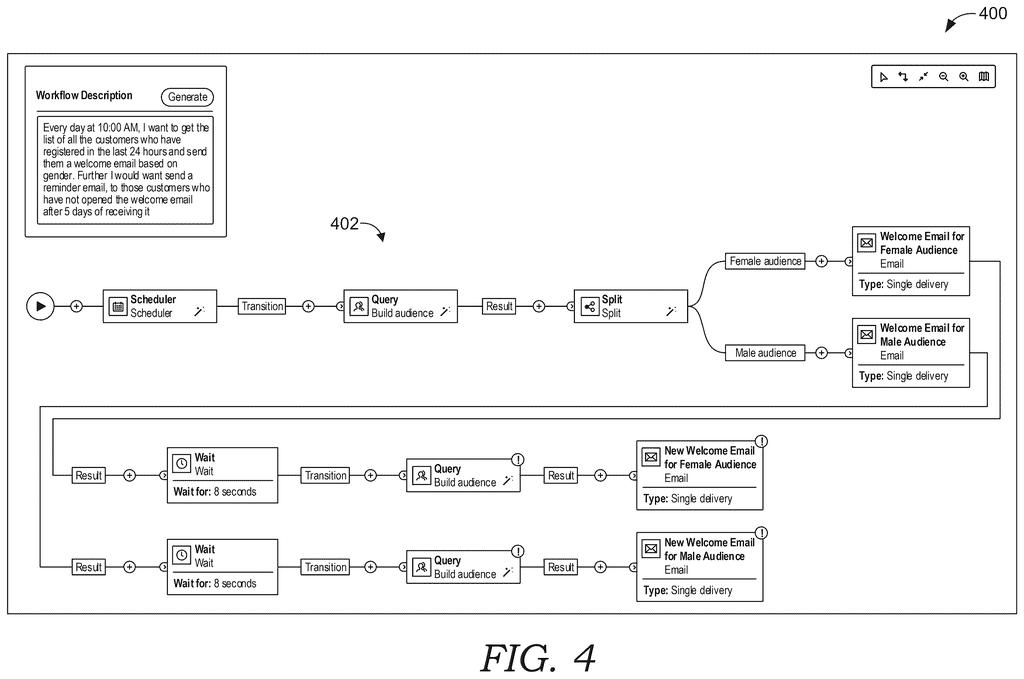
Adobe's filing describes an assistant that skips most of that. You type what you want in plain English, such as: every morning at 10, find everyone who signed up in the last 24 hours and send a welcome email, then send a reminder five days later to anyone who never opened it. The assistant works out the steps and lays them out on screen as a flowchart.
The AI's first guess does not go straight to you. Each idea is matched against the steps the app really offers, and the finished layout is checked against the app's own rules.
… determining, by the relevant workflow activity engine, relevant workflow activities from predefined workflow activities by performing a semantic search between corresponding semantic vector embeddings of the suggested workflow activities to semantic vector embeddings of the predefined workflow activities; …
Translation: The system matches your typed request to pre-made marketing steps by comparing their underlying meanings.
How Adobe checks the AI's workflow before use
The system runs in several passes, and each pass gives the AI a narrower job. First, a large language model (the AI technology behind chatbots) reads your request and brainstorms a list of suggested steps.
- Match to real tools. Each suggested step is turned into a string of numbers that captures its meaning (a semantic vector embedding). Those are compared with numbers for the app's actual built-in steps using cosine similarity (a score for how close two meanings are). The closest matches win.
- Draw the map. The AI gets a second prompt with your request and the matched steps, and builds a graph: each step is a box, each arrow is a handoff. Every box carries a plain-language note on how to set it up, such as trigger at 10:00 AM daily.
- Check the map. Each built-in step has rules about its type and how many connections can come in and go out. The system confirms every box exists in the app, every arrow links steps that are allowed to connect, and the connection counts fit. If something fails, the AI gets the graph, the error and the rules, and is asked to fix it.
- Translate. The checked graph becomes a structured file (JSON or XML, formats software reads easily) that the app uses to show the workflow.
The filing also describes an optional last stage that builds fully configured steps from those notes, creating independent steps at the same time to save processing time, and then runs the workflow.
What this means for Adobe's marketing tools
If this works as described, building a campaign could become typing a sentence and reviewing a diagram you can edit, instead of hunting through menus. The checking stage matters most here, because AI tools sometimes invent steps that don't exist. This design tests the draft against the app's real list of steps and connection rules before it reaches you.
The filing names Adobe Customer Journey Analytics as one example application and leans on marketing email examples. The examiner's first review rejected the claims as filed, which is routine and usually followed by amendments. For now this is a design on paper, and the filing gives no accuracy figures.
Adobe's fifth patent we've tracked since August in our AI agents that act for you watchlist builds on one that rewrites website copy and one built around plain-English job flows.
If you have ever stared at an automation tool wondering which box comes next, this is the pain being targeted. Typing a sentence and getting a flowchart you can inspect would save the first stretch of setup, which is often the slowest part.
The piece you would feel most is the checking. An AI that invents a step the software doesn't offer produces a workflow that breaks later, and here the app's own rules catch that before the diagram appears. You would notice it as fewer broken drafts.
The example in the filing is a fairly simple email sequence, and it says nothing about how the system handles messy or contradictory requests. For a marketer who just wants the welcome email to go out on time, it is a sensible fix to a daily annoyance.
Get our take in your Top Stories
Liked this breakdown? Add Patentlyze as a preferred source on Google, and our plain-English take shows up more often in your Top Stories the next time Adobe patent news breaks.
There are more where this came from
We read every patent application Big Tech publishes and send you the ones worth knowing. Plain English, free, every week.
The drawings
9 drawing sheets from US 2026/0330485 A1 · click any drawing to enlarge


Show the other 1 sheets

Want this weekly breakdown for a company we don't cover? Patentlyze Pro →
Be the first to weigh in