
Apple Files Patent for a Voice Assistant That Picks the App Without Being Told
Say "remind me to call the dentist at 5" from your home screen, and Apple's assistant would work out which app should handle it. The filing boils that decision down to a simple fork: use the app on screen or the one you named, and otherwise pick another.
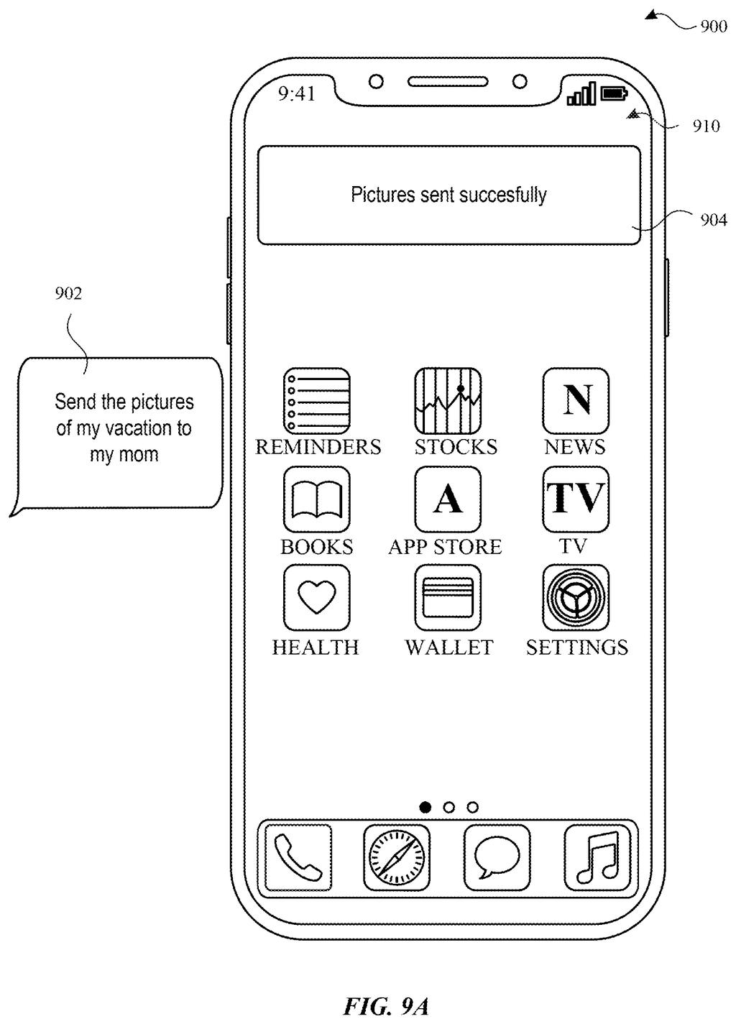
What Apple's app-picking assistant actually does
You're standing in the kitchen, your phone showing the home screen, and you say, "Remind me to call the dentist at 5." You never said which app to use, and none is open. Somebody, or something, has to decide where that reminder goes.
Apple's patent describes how its digital assistant would make that call. First it checks whether the task belongs to the app already on your screen, or whether you named an app out loud. If so, it uses that one. If not, it finds a different app that can do the job, hands over the details of your request, lets that app carry it out, and reports back the result.
When several apps could handle the task, the filing says the assistant can rank them using your preferences and usage history, or simply show you the options and let you pick.
… in accordance with a determination that the task is associated with an application displayed by the electronic device and/or that the request includes a name of the application, determining the application as a target application for performing the task; …
Translation: If the app is already on screen or named, the system uses it.
How the assistant decides which app gets the job
Claim 1 covers a decision rule for a digital assistant (the voice or text helper on a phone, tablet or watch). The assistant receives your request for a task, then checks two things: is the task tied to the app currently on screen, and does your request include an app's name? If either is true, that app becomes the target application. If neither is true, the assistant determines a different app to use.
The dependent claims fill in how that second pick can work:
- It chooses from apps whose capabilities match the task.
- It can rank them using your preferences, past inputs and usage history, or show you the matching apps and wait for your selection.
- It hands the chosen app a payload (a bundle holding the task and its parameters, such as a time or a name), and the app works out how to carry it out.
Once the app finishes, the assistant gives back the result. If the app was the one already on screen, the result shows up in that app's updated interface.
The description also covers the usual assistant plumbing: turning speech into text, working out what you meant (intent), and calling the right service, with examples like restaurant reservations and reminders.
… in accordance with a determination that a context being displayed by the electronic device does not include an application for performing the task: determining a target application for performing the task; …
Translation: If no relevant app is visible, the system figures out which one to use.
Why fewer taps could matter for talking to your iPhone
The practical gain is skipping a step: you would not have to open the right app, or say its name, before the assistant acts. The filing itself says this means fewer inputs from you, which also trims power use and helps battery life.
The description lists iPhone, iPad and Apple Watch, plus speakers and TVs, as places the assistant could run. On a small screen like a watch, where opening apps is a chore, having the assistant choose for you matters most. And because the pick can be ranked by your habits and preferences, the app it chooses can reflect what you actually use.
That makes this Apple's seventh filing we've tracked since July in our AI agents that act for you watchlist, building on earlier applications covering an AI that books your calls and an AI that plans before coding.
Claim 1 is short, and that is the interesting part. It describes a two-way fork: if your request fits the app already on screen, or you say an app's name, the assistant uses that app. If neither is true, it picks a different one.
Nothing in that claim mentions speech, AI models, or how the second app gets chosen. The ranking by usage history and preferences, the matching of app abilities, and the pick-from-a-list option all sit in the dependent claims below it. If it were granted as written, the broad rule itself would be the main thing covered, however an assistant makes the choice.
Whether that is a lot to claim depends on how obvious you find the idea. Plenty of people would say an assistant should route requests this way anyway. The narrower claims about ranking and handing over your request are where the concrete detail lives.
Get our take in your Top Stories
Liked this breakdown? Add Patentlyze as a preferred source on Google, and our plain-English take shows up more often in your Top Stories the next time Apple patent news breaks.
There are more where this came from
We read every patent application Big Tech publishes and send you the ones worth knowing. Plain English, free, every week.
The drawings
17 drawing sheets from US 2026/0339491 A1 · click any drawing to enlarge


Show the other 9 sheets


Want this weekly breakdown for a company we don't cover? Patentlyze Pro →
Be the first to weigh in