Get the newsletter
Apple · Software · Filed Apr 3, 2026 · USPTO published Aug 13, 2026 · Aug 13 release

Apple Patents Edge-Swipe Shortcuts That Pull Up AI or Notifications Based on Where You Start

One swipe, two completely different outcomes, determined purely by which part of the screen's edge your finger crosses first. Apple's latest patent filing turns the edges of a touchscreen into a context-sensitive shortcut strip.
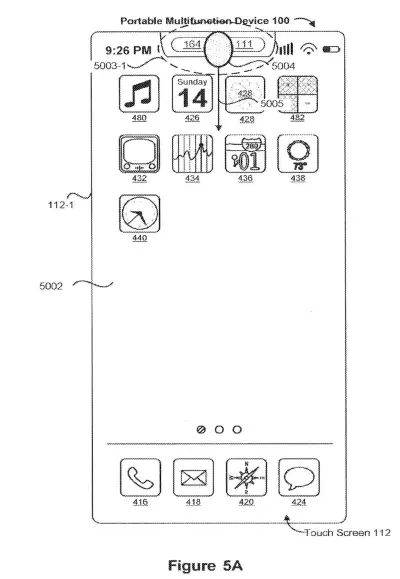
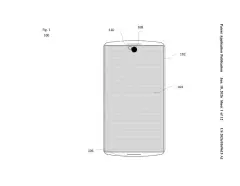
A smartphone screen showing an edge-swipe gesture initiating an interface action from the top bezel. Drawing from patent filing US 2026/0236161 A1.
A smartphone screen showing an edge-swipe gesture initiating an interface action from the top bezel.All 66 drawings ↓
Publication number
US 2026/0236161 A1(US20260236161A1)
Applicant
Apple Inc.
Filed · Published
Apr 3, 2026 · Aug 13, 2026
Inventors
Nathan de Vries, Chanaka G. Karunamuni, William M. Tyler
Status when we published
Waiting for an examiner
Document
12 claims
US classification
715/764
Parent application
Continuation of 18/638,596 (filed Apr 17, 2024)(18638596)

What Apple's edge-swipe gesture system actually does

Ever tried to reach a feature on your phone and wondered why you need three taps to get there? Apple's new patent is trying to make that faster by turning the edges of a touchscreen into intelligent shortcuts.

Here's how it works in plain terms: swipe inward from one part of an edge and you get an AI assistant interface where you can type or ask a question. Swipe inward from a different part of that same edge and your notifications fan out instead. Same direction, same basic motion, but where your finger starts is what decides which screen appears.

The broader patent also covers a related idea for spatial computing (think Apple Vision Pro): floating virtual objects can be repositioned only after you switch them into a special "reconfiguration mode," so you don't accidentally bump things around while working. Both ideas share the same goal, giving your gestures more precision without forcing you to memorize a complicated set of moves.

From the filing · CLAIM 1
… replacing at least a portion of the first user interface with a respective user interface in the display region, wherein the respective user interface is for responding to a user-provided query …

Translation: Swiping from one specific part of the screen brings up an assistant to answer questions.

How the touch sensor reads start position to split two actions

The core invention is a gesture-routing system built around the edge of a touch-sensitive surface. When a user's finger crosses the edge of the screen in a single continuous motion, the device checks two things: which portion of the edge the finger crossed, and in what direction it moved.

  • First criteria (AI query interface): if the contact crosses a first defined portion of the edge, the system replaces the current screen with a query interface, essentially an AI or search panel where you can ask questions.
  • Second criteria (notifications): if the contact crosses a different, non-overlapping portion of the same edge, the system surfaces a list of previously received notifications instead.

The division is positional, not speed- or pressure-based. The same swipe direction (say, left-to-right across the bottom edge) produces a different result depending on whether your finger started in the lower-left quarter or the lower-right quarter of that edge.

The abstract also describes a separate but related mode for 3D environments (like augmented or mixed reality headsets). Virtual objects sit at fixed positions by default; a specific gesture locks them into a "reconfiguration mode" before a repositioning gesture actually moves them. This two-step requirement prevents accidental displacement during routine interactions.

From the filing · THE ABSTRACT
… displays a first visual indication that the virtual object has transitioned into a reconfiguration mode, and further detects a second hand movement performed by the user …

Translation: The system shows a visual clue when an item is ready to be moved in 3D space.

What this means for how you call up AI on iPhone

For everyday iPhone users, this kind of gesture design is about reducing friction between you and features that currently require navigating menus. If Apple shipped this, pulling up an AI query panel or scanning your latest notifications could become a one-motion action you do without looking. That's a meaningful quality-of-life change for people who check their phones dozens of times a day.

From a strategic angle, the filing also signals that Apple is thinking carefully about how hand gestures scale across both flat touchscreens and spatial computing devices, and the newest Big Tech patents in the AR and touch-interface space show several companies racing toward this same gesture-unification problem. The two-step repositioning lock for virtual objects is particularly telling: it suggests Apple's spatial OS team is iterating on accidental-interaction problems that real Vision Pro users run into.

Source: US 2026/0236161 A1 at the USPTO (PDF). Full patent text and figures are in the official publication.

Get our take in your Top Stories

Liked this breakdown? Add Patentlyze as a preferred source on Google, and our plain-English take shows up more often in your Top Stories the next time Apple patent news breaks.

There are more where this came from

We read the new patents from Big Tech, carmakers and more and send you the ones worth knowing. Plain English, free, every week.

The drawings · 66 sheets

66 drawing sheets from US 2026/0236161 A1 · click any drawing to enlarge

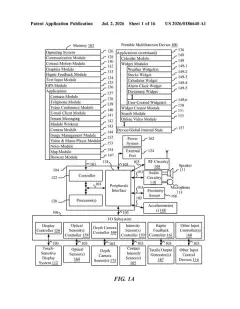
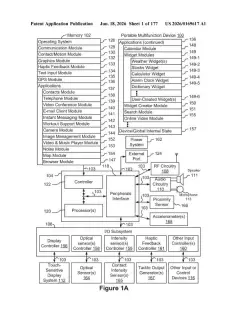
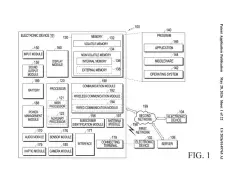
System architecture block diagram, drawing sheet 1 from US 2026/0236161 A1
Sheet 1 System architecture block diagram
Event handling and sorting structure, drawing sheet 2 from US 2026/0236161 A1
Sheet 2 Event handling and sorting structure
Front view with touch sensor, drawing sheet 3 from US 2026/0236161 A1
Sheet 3 Front view with touch sensor
Alternative device internal layout, drawing sheet 4 from US 2026/0236161 A1
Sheet 4 Alternative device internal layout
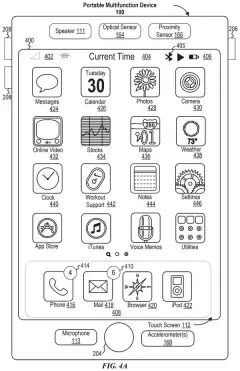
Home screen app grid, drawing sheet 5 from US 2026/0236161 A1
Sheet 5 Home screen app grid
Device orientation and motion sensors, drawing sheet 6 from US 2026/0236161 A1
Sheet 6 Device orientation and motion sensors
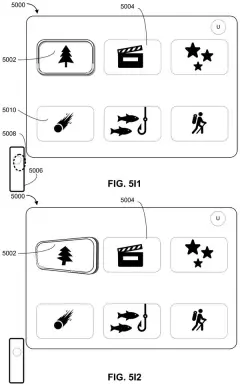
Edge swipe gesture interaction, drawing sheet 7 from US 2026/0236161 A1
Sheet 7 Edge swipe gesture interaction
Suggested action shortcut panel, drawing sheet 8 from US 2026/0236161 A1
Sheet 8 Suggested action shortcut panel
Show the other 52 sheets
Apple Patents Edge-Swipe Shortcuts That Pull Up AI or Notifications Based on Where You Start patent drawing, sheet 9
Sheet 9
Apple Patents Edge-Swipe Shortcuts That Pull Up AI or Notifications Based on Where You Start patent drawing, sheet 10
Sheet 10
Apple Patents Edge-Swipe Shortcuts That Pull Up AI or Notifications Based on Where You Start patent drawing, sheet 11
Sheet 11
Apple Patents Edge-Swipe Shortcuts That Pull Up AI or Notifications Based on Where You Start patent drawing, sheet 12
Sheet 12
Apple Patents Edge-Swipe Shortcuts That Pull Up AI or Notifications Based on Where You Start patent drawing, sheet 13
Sheet 13
Apple Patents Edge-Swipe Shortcuts That Pull Up AI or Notifications Based on Where You Start patent drawing, sheet 14
Sheet 14
Apple Patents Edge-Swipe Shortcuts That Pull Up AI or Notifications Based on Where You Start patent drawing, sheet 15
Sheet 15
Apple Patents Edge-Swipe Shortcuts That Pull Up AI or Notifications Based on Where You Start patent drawing, sheet 16
Sheet 16
Apple Patents Edge-Swipe Shortcuts That Pull Up AI or Notifications Based on Where You Start patent drawing, sheet 17
Sheet 17
Apple Patents Edge-Swipe Shortcuts That Pull Up AI or Notifications Based on Where You Start patent drawing, sheet 18
Sheet 18
Apple Patents Edge-Swipe Shortcuts That Pull Up AI or Notifications Based on Where You Start patent drawing, sheet 19
Sheet 19
Apple Patents Edge-Swipe Shortcuts That Pull Up AI or Notifications Based on Where You Start patent drawing, sheet 20
Sheet 20
Apple Patents Edge-Swipe Shortcuts That Pull Up AI or Notifications Based on Where You Start patent drawing, sheet 21
Sheet 21
Apple Patents Edge-Swipe Shortcuts That Pull Up AI or Notifications Based on Where You Start patent drawing, sheet 22
Sheet 22
Apple Patents Edge-Swipe Shortcuts That Pull Up AI or Notifications Based on Where You Start patent drawing, sheet 23
Sheet 23
Apple Patents Edge-Swipe Shortcuts That Pull Up AI or Notifications Based on Where You Start patent drawing, sheet 24
Sheet 24
Apple Patents Edge-Swipe Shortcuts That Pull Up AI or Notifications Based on Where You Start patent drawing, sheet 25
Sheet 25
Apple Patents Edge-Swipe Shortcuts That Pull Up AI or Notifications Based on Where You Start patent drawing, sheet 26
Sheet 26
Apple Patents Edge-Swipe Shortcuts That Pull Up AI or Notifications Based on Where You Start patent drawing, sheet 27
Sheet 27
Apple Patents Edge-Swipe Shortcuts That Pull Up AI or Notifications Based on Where You Start patent drawing, sheet 28
Sheet 28
Apple Patents Edge-Swipe Shortcuts That Pull Up AI or Notifications Based on Where You Start patent drawing, sheet 29
Sheet 29
Apple Patents Edge-Swipe Shortcuts That Pull Up AI or Notifications Based on Where You Start patent drawing, sheet 30
Sheet 30
Apple Patents Edge-Swipe Shortcuts That Pull Up AI or Notifications Based on Where You Start patent drawing, sheet 31
Sheet 31
Apple Patents Edge-Swipe Shortcuts That Pull Up AI or Notifications Based on Where You Start patent drawing, sheet 32
Sheet 32
Apple Patents Edge-Swipe Shortcuts That Pull Up AI or Notifications Based on Where You Start patent drawing, sheet 33
Sheet 33
Apple Patents Edge-Swipe Shortcuts That Pull Up AI or Notifications Based on Where You Start patent drawing, sheet 34
Sheet 34
Apple Patents Edge-Swipe Shortcuts That Pull Up AI or Notifications Based on Where You Start patent drawing, sheet 35
Sheet 35
Apple Patents Edge-Swipe Shortcuts That Pull Up AI or Notifications Based on Where You Start patent drawing, sheet 36
Sheet 36
Apple Patents Edge-Swipe Shortcuts That Pull Up AI or Notifications Based on Where You Start patent drawing, sheet 37
Sheet 37
Apple Patents Edge-Swipe Shortcuts That Pull Up AI or Notifications Based on Where You Start patent drawing, sheet 38
Sheet 38
Apple Patents Edge-Swipe Shortcuts That Pull Up AI or Notifications Based on Where You Start patent drawing, sheet 39
Sheet 39
Apple Patents Edge-Swipe Shortcuts That Pull Up AI or Notifications Based on Where You Start patent drawing, sheet 40
Sheet 40
Apple Patents Edge-Swipe Shortcuts That Pull Up AI or Notifications Based on Where You Start patent drawing, sheet 41
Sheet 41
Apple Patents Edge-Swipe Shortcuts That Pull Up AI or Notifications Based on Where You Start patent drawing, sheet 42
Sheet 42
Apple Patents Edge-Swipe Shortcuts That Pull Up AI or Notifications Based on Where You Start patent drawing, sheet 43
Sheet 43
Apple Patents Edge-Swipe Shortcuts That Pull Up AI or Notifications Based on Where You Start patent drawing, sheet 44
Sheet 44
Apple Patents Edge-Swipe Shortcuts That Pull Up AI or Notifications Based on Where You Start patent drawing, sheet 45
Sheet 45
Apple Patents Edge-Swipe Shortcuts That Pull Up AI or Notifications Based on Where You Start patent drawing, sheet 46
Sheet 46
Apple Patents Edge-Swipe Shortcuts That Pull Up AI or Notifications Based on Where You Start patent drawing, sheet 47
Sheet 47
Apple Patents Edge-Swipe Shortcuts That Pull Up AI or Notifications Based on Where You Start patent drawing, sheet 48
Sheet 48
Apple Patents Edge-Swipe Shortcuts That Pull Up AI or Notifications Based on Where You Start patent drawing, sheet 49
Sheet 49
Apple Patents Edge-Swipe Shortcuts That Pull Up AI or Notifications Based on Where You Start patent drawing, sheet 50
Sheet 50
Apple Patents Edge-Swipe Shortcuts That Pull Up AI or Notifications Based on Where You Start patent drawing, sheet 51
Sheet 51
Apple Patents Edge-Swipe Shortcuts That Pull Up AI or Notifications Based on Where You Start patent drawing, sheet 52
Sheet 52
Apple Patents Edge-Swipe Shortcuts That Pull Up AI or Notifications Based on Where You Start patent drawing, sheet 53
Sheet 53
Apple Patents Edge-Swipe Shortcuts That Pull Up AI or Notifications Based on Where You Start patent drawing, sheet 54
Sheet 54
Apple Patents Edge-Swipe Shortcuts That Pull Up AI or Notifications Based on Where You Start patent drawing, sheet 55
Sheet 55
Apple Patents Edge-Swipe Shortcuts That Pull Up AI or Notifications Based on Where You Start patent drawing, sheet 56
Sheet 56
Apple Patents Edge-Swipe Shortcuts That Pull Up AI or Notifications Based on Where You Start patent drawing, sheet 57
Sheet 57
Apple Patents Edge-Swipe Shortcuts That Pull Up AI or Notifications Based on Where You Start patent drawing, sheet 58
Sheet 58
Apple Patents Edge-Swipe Shortcuts That Pull Up AI or Notifications Based on Where You Start patent drawing, sheet 59
Sheet 59
Apple Patents Edge-Swipe Shortcuts That Pull Up AI or Notifications Based on Where You Start patent drawing, sheet 60
Sheet 60

Sheets 61 to 66 are in the full USPTO filing.

Patent filing page