
Intel Patents a Fix for Screen Flickering During Display Setting Changes
Every time your laptop changes its display settings, such as switching refresh rate or adjusting brightness, the screen can flicker or blank for a split second. Intel's new patent targets exactly that moment.
What Intel's display buffer trick actually does
Imagine your laptop screen briefly goes black or flickers whenever you plug into an external monitor or your device switches from high-refresh gaming mode to a power-saving mode. That tiny interruption happens because the display has to stop and restart while the new settings kick in. It's minor, but noticeable.
Intel's patent describes a way to keep the current image on screen during those transitions. The idea is to save a copy of whatever frame is being shown into a small memory buffer built into the display controller. When the display settings change, instead of going blank, the screen just keeps showing that saved image until the new settings are fully loaded.
Think of it like pausing a video call while you adjust your camera settings, then resuming without the other person seeing a black screen. The display holds its last good frame, changes its internal settings and then picks right back up.
How the remote frame buffer holds the image steady
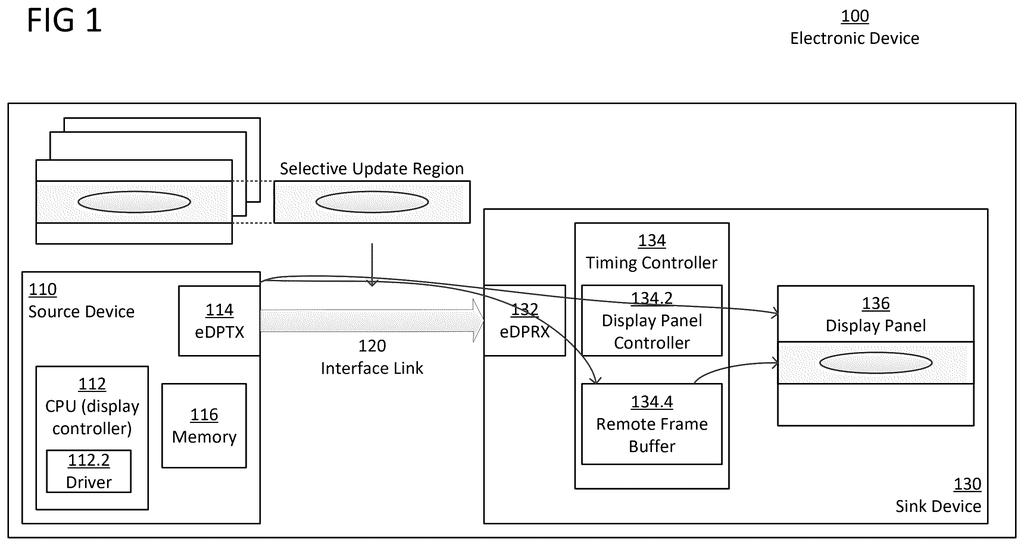
The patent describes a three-part system inside an electronic device:
- A display panel that receives image data directly from a source device (like a GPU or a connected PC).
- A remote frame buffer, a small memory store that keeps a copy of the most recent image frame being shown.
- A display panel controller that, when a display property change is triggered, pulls from that saved frame buffer to keep refreshing the screen rather than going blank.
The key phrase here is "display property changes." This covers things like switching color depth, adjusting refresh rate, changing brightness or HDR modes, or reconnecting a signal source. Normally, the display pipeline has to pause during these operations, which causes a visible interruption.
By storing the current frame in the remote frame buffer and having the controller continue to redraw from it, the screen stays visually stable throughout the transition. The source device (the GPU or host computer) doesn't need to keep sending new frames during this period; the display handles it locally.
This approach is closely related to Panel Self-Refresh (PSR), an existing power-saving feature where displays redraw from a local buffer rather than asking the GPU to resend unchanged frames. Intel is extending that same idea to cover the moment when display settings are actively changing.
What this means for laptop and monitor display quality
For everyday users, this patent targets one of those small but persistent annoyances in PC and laptop use: the brief screen flicker when your display changes modes. Whether you're plugging in an external monitor, letting your laptop drop to a lower refresh rate to save battery, or switching HDR on and off, a momentary black screen is a common result. Intel's approach would make those transitions invisible.
On a deeper level, this matters for thin-and-light laptops and external displays that rely on power-saving display technologies. As manufacturers push for smoother, more power-efficient screens, keeping the display pipeline stable during configuration changes becomes more important. A fix at the controller level, rather than requiring software workarounds, is a cleaner solution.
This is a small, practical fix to a real annoyance rather than a headline-grabbing invention. Screen flicker during mode changes is a known pain point, especially on high-refresh-rate laptops, and addressing it at the hardware controller level is the right place to solve it. Don't expect a press release, but you might notice its absence the next time you plug in a monitor.
Get our take in your Top Stories
Liked this breakdown? Add Patentlyze as a preferred source on Google, and our plain-English take shows up more often in your Top Stories the next time Intel patent news breaks.
There are more where this came from
We read every patent application Big Tech publishes and send you the ones worth knowing. Plain English, free, every week.
The drawings
4 drawing sheets from US 2026/0221117 A1 · click any drawing to enlarge


Want this weekly breakdown for a company we don't cover? Patentlyze Pro →