
Samsung Patent Would Make Urgent Emails Ring Like Incoming Phone Calls
Samsung is exploring a way to make certain emails impossible to miss by hijacking your phone's full-screen incoming call interface when they arrive.
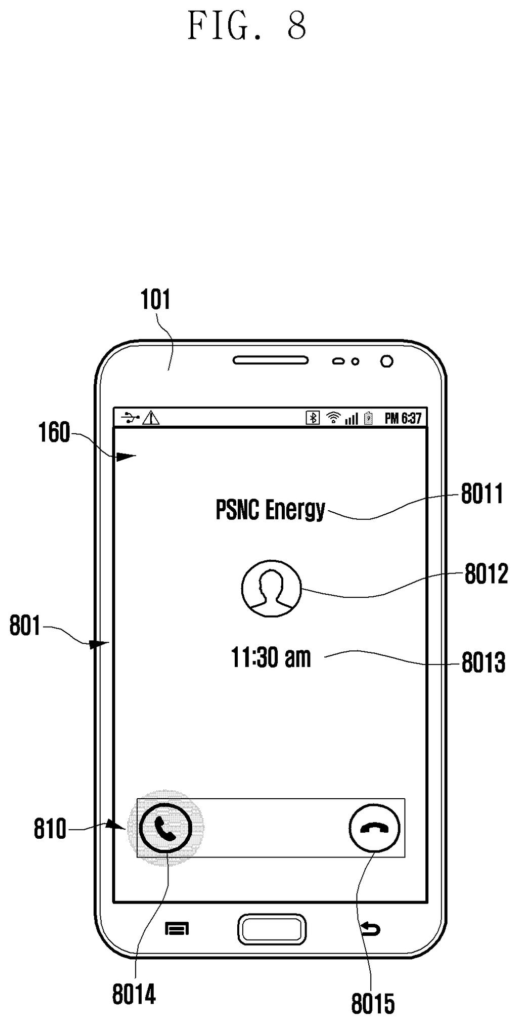
How Samsung's email-as-call-screen idea actually works
Imagine you're waiting for an urgent email from your boss or doctor, but it gets buried in your inbox like every other message. Samsung's patent describes a fix for exactly that scenario.
You'd set a condition inside your email app, something like "if a message from this sender arrives, treat it as a call." When that email lands, your phone would light up with the same full-screen alert you see when someone rings you, complete with the familiar incoming call display.
The idea is that a call-style alert is much harder to ignore than a standard notification badge. It takes over the screen rather than sitting in your notification tray, giving high-priority emails the same visual urgency as a phone call.
How the device detects and re-routes email packets
The patent describes a system built around four main components: a display, a communication chip, memory, and a processor.
Here's the basic flow:
- The user opens an email configuration screen and sets a condition (a rule, essentially) that defines which incoming emails deserve special treatment.
- When an email arrives, the processor analyzes the network packet (the raw data bundle carrying the email) to check whether it matches the stored condition.
- If it matches, the device triggers the call application's incoming call UI, the same full-screen display normally reserved for phone calls, showing the email as if it were a call.
The key detail is that the system inspects the packet before the email is simply routed to the inbox. That low-level inspection is what allows the device to react quickly and reroute the alert through the call interface rather than the standard notification path.
What this means for Galaxy users who rely on email
For people who depend on email for time-sensitive communication, standard notifications are easy to miss, especially on a phone that's face-down or on silent. A full-screen call alert is much harder to overlook because it's the same pattern your brain already associates with something that needs immediate attention.
This is a relatively narrow feature, but it fits squarely into Samsung's ongoing work on Galaxy productivity tools. If it ships, it would likely be a configurable option inside Samsung's native email app, useful for professionals, caregivers, or anyone who treats certain senders as on-call contacts.
This is a genuinely practical idea, not a flashy one. The insight that a call-screen alert carries more psychological urgency than a push notification is simple and correct. Whether Samsung builds it into a shipping product or lets it sit in the patent archive is another question entirely, but the concept is sound and the implementation described is straightforward.
There are more where this came from
We read every patent application Big Tech publishes and send you the ones worth knowing. Plain English, free, every week.
The drawings
14 drawing sheets from US 2026/0214158 A1 · click any drawing to enlarge


Want this weekly breakdown for a company we don't cover? Patentlyze Pro →
Be the first to weigh in