
Microsoft Patents a Way to Flip Between Phone Screens by Tilting Your Device
What if flipping between sections of an app felt less like tapping through menus and more like tilting a physical card to see what's underneath? That's the idea behind Microsoft's new tilt-navigation patent.
What Microsoft's tilt-navigation idea actually does
A person opens a mobile app and immediately faces a wall of tabs, menus, and nested screens. You've been there. Finding the right part of the app can feel like digging through a drawer.
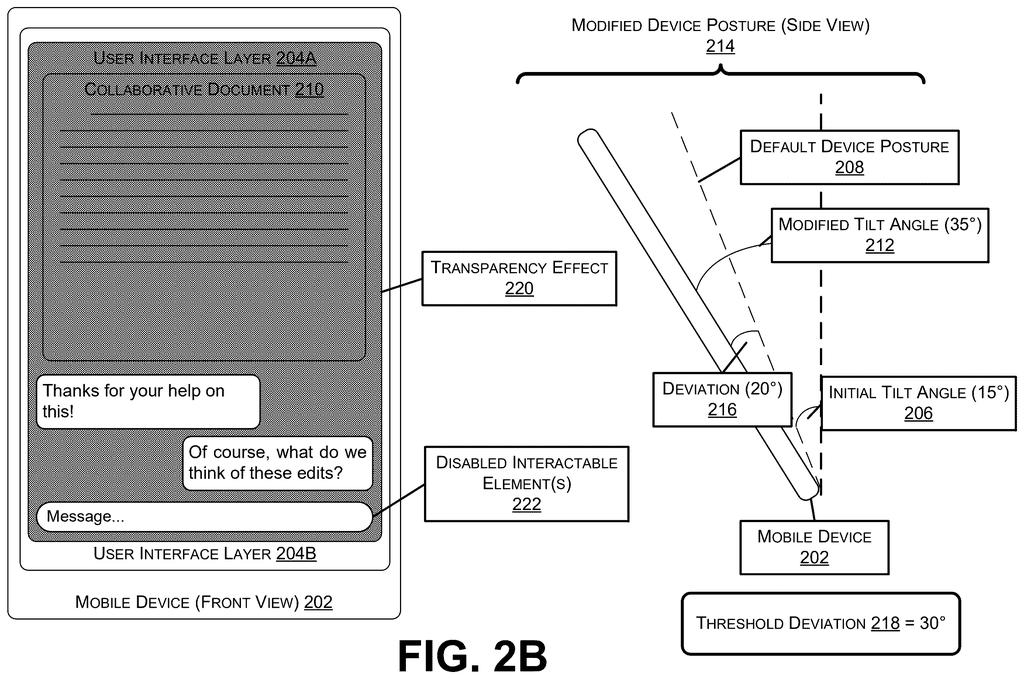
Microsoft's patent describes a different approach. Your phone's screen is organized as a stack of layered panels, like a deck of cards. When you tilt the phone slightly, the top card goes transparent and you can see the panel beneath it. Tilt a bit more, past a set angle, and the phone actually switches to that second panel, making it fully active and tappable.
The key detail: while you're just peeking (the small tilt), buttons on the panel below are visible but locked. You won't accidentally tap something just by angling your phone. Only a deliberate tilt past the threshold commits you to the switch. It's designed to feel like naturally shifting your point of view, rather than hunting for a back button.
… applying a transparency effect to the first user interface layer in the stack to reveal, on the display of the mobile device, a preview of a second user interface layer in the stack beneath the first user interface layer in the stack …
Translation: Tilting the phone slightly makes the top screen see-through so you can peek at the screen underneath.
How the phone reads tilt angles to switch UI layers
The system uses the phone's built-in hardware sensor (the accelerometer or gyroscope that already tells your phone which way it's facing) to track how far you've tilted the device from its starting position.
When the app opens, the phone records a default posture, the angle at which you're holding it right now. From that point, the system measures any tilt as a deviation from that baseline:
- Small deviation (below the threshold): The top UI layer becomes transparent, showing a preview of the layer beneath it. Buttons in that lower layer are visible but disabled, so a casual tilt never triggers an accidental action.
- Large deviation (meets or exceeds the threshold): The phone commits to the switch. The top layer is removed from the display and the lower layer becomes fully active, with all its buttons enabled.
The stacked-layer model means an app's various sections are treated as physical extensions of each other rather than separate screens reached by tapping a navigation menu. Developers can organize features into this card stack, and users move through them spatially rather than hierarchically.
… tilt navigation provides the sensation of naturally adjusting one's line of sight rather than the burden of juggling multiple screens.
Translation: Moving the device feels like looking at physical layers instead of tapping through endless menus.
What this means for crowded mobile app interfaces
Mobile apps have gotten more complex over the years, and the navigation patterns designed to handle that complexity (tab bars, hamburger menus, swipe gestures) haven't kept pace. Tapping through nested menus is one of the most consistent friction points in mobile software, and Microsoft keeps filing on mobile interface alternatives suggests the company is genuinely interested in solving it at the OS or platform level.
For everyday users, the practical question is whether tilting a phone becomes natural faster than learning where a menu lives. The patent makes a reasonable bet that physical motion carries intuitive meaning in a way that screen-tap navigation often doesn't. Whether that pans out in real use is a design question, not a technical one.
The 445th Microsoft filing in our Microsoft coverage since May follows work on fitting giant AI on tiny chips and self-correcting automation.
Hunting through a phone app for a buried setting or tapping back through three screens to reach something you were just looking at is not a small frustration. It happens dozens of times a day, and the time and attention it drains are real costs that accumulate over months of use.
Tilting the phone to glide between related sections of an app is a reasonable physical answer to that problem, at least for apps where a handful of views need to feel like one connected space rather than separate destinations.
The most thoughtful piece here is the moment before you commit: as you begin to tilt, the neighboring panel comes into view so you can see where you are headed before deciding to go there. That small grace note addresses the real risk of motion-based navigation, which is that accidental movements become accidental choices.
There are more where this came from
We read every patent application Big Tech publishes and send you the ones worth knowing. Plain English, free, every week.
The drawings
7 drawing sheets from US 2026/0288256 A1 · click any drawing to enlarge


Want this weekly breakdown for a company we don't cover? Patentlyze Pro →
Be the first to weigh in