
Google · Filed Mar 19, 2025 · Published Oct 22, 2026

Google Files Patent for Gesture Controls That Learn From Your Failed Swipes

When a hand wave fails to register, you usually just tap the screen and move on. Google's filing describes a device that treats that tap as a lesson and uses it to recognize your wave next time.
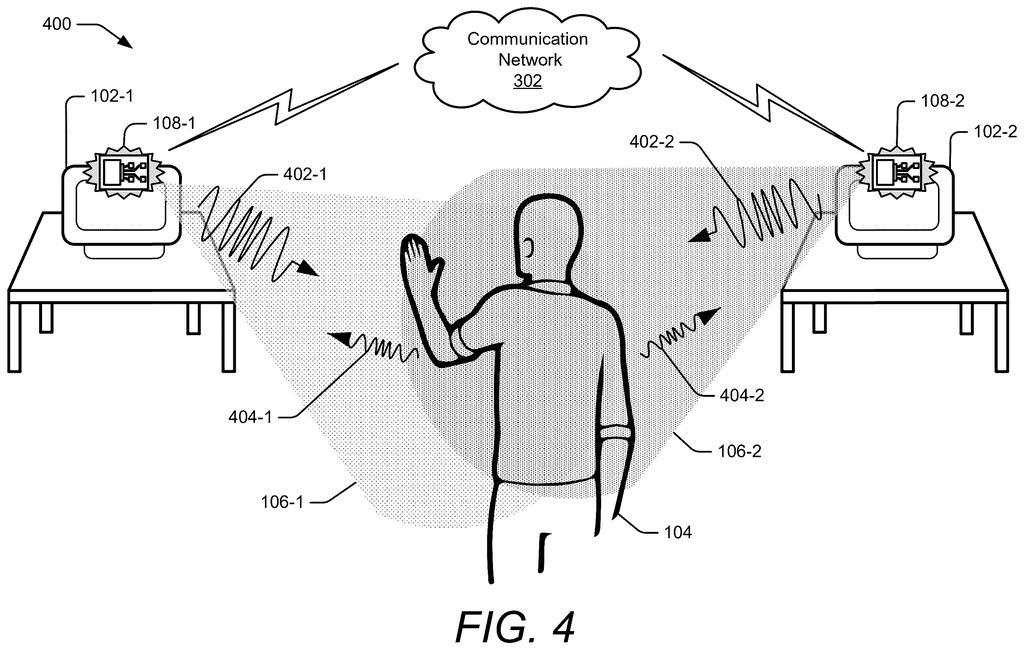
Two smart screens track a person waving between them to recognize touchless hand gestures. Drawing from patent filing US 2026/0329385 A1.
Two smart screens track a person waving between them to recognize touchless hand gestures.
See all 46 drawings from this filing ↓
Publication number US 2026/0329385 A1 US20260329385A1
Applicant Google LLC
Filing date Mar 19, 2025
Publication date Oct 22, 2026
Inventors Will R. Walker, Hideaki Matsui, Lauren Marie Bedal, Eiji Hayashi, Leonardo Giusti, Nicholas Edward Gillian
US classification 345/156
Examiner GYAWALI, BIPIN (Art Unit 2625)
Status when we published Examiner raised objections; the company can respond (Sep 8, 2026)
Parent application is a National Stage Entry of PCTUS2022077437 (filed 2022-09-30)
Document 20 claims

What Google's self-teaching radar gestures do

Imagine you're in the kitchen, hands covered in flour, and you wave your hand in the air to skip a song. Nothing happens. The smart display couldn't tell whether you meant skip, pause, or something else, so you wipe a finger and tap the screen to skip the track yourself.

Google's patent application describes a device that treats that tap as a clue. Because you asked for a skip right after the failed wave, the device guesses your wave was meant to be the skip gesture and saves the radar reading of that motion alongside it.

Next time you wave that same slightly off way, it has a better shot at getting it right. The filing says this happens during normal use, with no separate training session, so the gesture system improves the more you live with it.

From the filing · CLAIM 1
detecting, at a computing device and using a radar system, an ambiguous gesture performed by a user, the ambiguous gesture associated with a radar-signal characteristic; comparing the radar-signal characteristic to one or more stored radar-signal characteristics …

Translation: Radar tracks unclear hand movements and checks them against stored data.

How the device pairs a missed swipe with a command

The device uses a radar system (it sends out radio waves and listens for how they bounce back off your hand) to watch for gestures. Each motion produces a radar-signal characteristic, basically a fingerprint of how the reflection changed over time. The filing's main example is a smart display with radar in the 60 GHz range.

The device compares that fingerprint to stored ones for known gestures such as swipe-left or swipe-right. If the best match falls below the confidence threshold, the motion counts as an ambiguous gesture: probably a gesture, but not clearly which one.

Then the device waits to see what you do next. If you run a command by touch, voice or keyboard, and that command belongs to one of the gestures the ambiguous motion nearly matched, the device stores the fingerprint with that gesture. Dependent claims add optional safeguards:

  • Asking you to confirm the motion was meant as that gesture;
  • Weighting the new sample by how much time passed between the motion and the command;
  • Skipping the save if a different command came in between.

The filing also mentions convolutional neural networks (an AI pattern-matching technique) for detecting gestures, and keeping motions that clearly are not gestures, like walking or a cat crossing the room, as examples to ignore.

From the filing · THE ABSTRACT
When the computing device fails to recognize the ambiguous gesture, the user may perform or request the performance of a command. This command may be determined to be a first command associated with a first gesture of the known gestures with which the ambiguous gesture was associated.

Translation: When the device guesses wrong, your next action teaches it what you actually meant.

Why gestures that adapt to you could stick around

If you have ever given up on waving at a gadget, this filing goes after that frustration: the device learns your version of a gesture from ordinary use. The description names a Google Nest Hub style smart display as an example device and says repeated misses cause people to stop using gestures. Radar also means no camera watching your kitchen. The examiner's first review rejected the claims as filed, which is routine at this stage and usually followed by amendments.

The practical payoff would be gestures that get more reliable the longer you own the device, with nothing to set up. That matters in hands-full moments like cooking, when a voice command can be awkward and touch is off the table. Whether any product uses this is unknown; the filing only describes how the learning step would work.

Google's 20th filing we've tracked since May builds on earlier applications like no-training gesture learning and fading health sensor fixes in our wearables that read your body watchlist.

Editorial take

A gesture control that works most of the time can feel worse than a button, because every miss teaches you to stop trying. The filing says users who get frustrated drift away from gestures, which wastes the radar hardware built into the device.

The answer is modest and fits the size of that problem. Your own corrections, a tap or a spoken request right after a miss, become free training examples, so nobody has to sit through a tutorial. The checks in the dependent claims (a confirmation step, a time gap, no other command in between) matter because a wrong guess would teach the device a bad habit.

The weak spot is the guess itself: a tap on skip for some unrelated reason could file the wrong motion under the wrong gesture. How often that happens decides whether the idea works.

Get our take in your Top Stories

Liked this breakdown? Add Patentlyze as a preferred source on Google, and our plain-English take shows up more often in your Top Stories the next time Google patent news breaks.

There are more where this came from

We read every patent application Big Tech publishes and send you the ones worth knowing. Plain English, free, every week.

The drawings

46 drawing sheets from US 2026/0329385 A1 · click any drawing to enlarge

A living room hub spots a guest using built-in radar, drawing sheet 1 from US 2026/0329385 A1
Sheet 1 A living room hub spots a guest using built-in radar
Smart gadgets that could host the gesture radar, drawing sheet 2 from US 2026/0329385 A1
Sheet 2 Smart gadgets that could host the gesture radar
Connected home devices tracking a person from room to room, drawing sheet 3 from US 2026/0329385 A1
Sheet 3 Connected home devices tracking a person from room to room
Multiple smart displays teaming up to track a hand wave, drawing sheet 4 from US 2026/0329385 A1
Sheet 4 Multiple smart displays teaming up to track a hand wave
Inside parts of the radar setup that catch tiny movements, drawing sheet 5 from US 2026/0329385 A1
Sheet 5 Inside parts of the radar setup that catch tiny movements
Clues the radar uses to tell family members apart, drawing sheet 6 from US 2026/0329385 A1
Sheet 6 Clues the radar uses to tell family members apart
The AI model that identifies who is standing nearby, drawing sheet 7 from US 2026/0329385 A1
Sheet 7 The AI model that identifies who is standing nearby
How the gadget turns raw radar reflections into a command, drawing sheet 8 from US 2026/0329385 A1
Sheet 8 How the gadget turns raw radar reflections into a command
Show the other 38 sheets
How the AI breaks down radar images of hand movements, drawing sheet 9 from US 2026/0329385 A1
Sheet 9 How the AI breaks down radar images of hand movements
Tracking hand motion over time to identify specific gestures, drawing sheet 10 from US 2026/0329385 A1
Sheet 10 Tracking hand motion over time to identify specific gestures
Adding simulated radar data speeds up gesture training, drawing sheet 11 from US 2026/0329385 A1
Sheet 11 Adding simulated radar data speeds up gesture training
Raw radar snapshots capturing a user tapping the air, drawing sheet 12 from US 2026/0329385 A1
Sheet 12 Raw radar snapshots capturing a user tapping the air
Comparing radar signals from taps and swipes, drawing sheet 13 from US 2026/0329385 A1
Sheet 13 Comparing radar signals from taps and swipes
Training the sensor to ignore talking and body motion, drawing sheet 14 from US 2026/0329385 A1
Sheet 14 Training the sensor to ignore talking and body motion
Test results showing high accuracy amid background room motion, drawing sheet 15 from US 2026/0329385 A1
Sheet 15 Test results showing high accuracy amid background room motion
Filtering out accidental motions that resemble real hand gestures, drawing sheet 16 from US 2026/0329385 A1
Sheet 16 Filtering out accidental motions that resemble real hand gestures
Test data shows high accuracy across swipes and taps, drawing sheet 17 from US 2026/0329385 A1
Sheet 17 Test data shows high accuracy across swipes and taps
Recognition rates measured at different ranges and angles, drawing sheet 18 from US 2026/0329385 A1
Sheet 18 Recognition rates measured at different ranges and angles
Using a microphone alongside radar to identify a user, drawing sheet 19 from US 2026/0329385 A1
Sheet 19 Using a microphone alongside radar to identify a user
Switching privacy levels when a guest enters the room, drawing sheet 20 from US 2026/0329385 A1
Sheet 20 Switching privacy levels when a guest enters the room
Tracking an unrecognized guest across multiple smart screens, drawing sheet 21 from US 2026/0329385 A1
Sheet 21 Tracking an unrecognized guest across multiple smart screens
Passing an ongoing news broadcast from bedroom to office, drawing sheet 22 from US 2026/0329385 A1
Sheet 22 Passing an ongoing news broadcast from bedroom to office
Continuing gesture tutorials as you walk into another room, drawing sheet 23 from US 2026/0329385 A1
Sheet 23 Continuing gesture tutorials as you walk into another room
Context clues help clarify a sloppy hand swipe, drawing sheet 24 from US 2026/0329385 A1
Sheet 24 Context clues help clarify a sloppy hand swipe
How the device reads hand shape, timing, and style, drawing sheet 25 from US 2026/0329385 A1
Sheet 25 How the device reads hand shape, timing, and style
Adjusting gesture detection for different rooms in your home, drawing sheet 26 from US 2026/0329385 A1
Sheet 26 Adjusting gesture detection for different rooms in your home
Predicting which family member is waving based on the room, drawing sheet 27 from US 2026/0329385 A1
Sheet 27 Predicting which family member is waving based on the room
Using room location to guess what an unclear wave means, drawing sheet 28 from US 2026/0329385 A1
Sheet 28 Using room location to guess what an unclear wave means
Tracking active tasks across rooms to interpret your wave, drawing sheet 29 from US 2026/0329385 A1
Sheet 29 Tracking active tasks across rooms to interpret your wave
Choosing between open apps when an ambiguous swipe occurs, drawing sheet 30 from US 2026/0329385 A1
Sheet 30 Choosing between open apps when an ambiguous swipe occurs
Learning your daily morning routines to better predict inputs, drawing sheet 31 from US 2026/0329385 A1
Sheet 31 Learning your daily morning routines to better predict inputs
Defaulting to safer actions when a swipe is unclear, drawing sheet 32 from US 2026/0329385 A1
Sheet 32 Defaulting to safer actions when a swipe is unclear
Retrying a gesture teaches the device your personal style, drawing sheet 33 from US 2026/0329385 A1
Sheet 33 Retrying a gesture teaches the device your personal style
Speaking a voice command clarifies an unclear hand wave, drawing sheet 34 from US 2026/0329385 A1
Sheet 34 Speaking a voice command clarifies an unclear hand wave
Pairing a voice command with a motion teaches new controls, drawing sheet 35 from US 2026/0329385 A1
Sheet 35 Pairing a voice command with a motion teaches new controls
Switching primary sensors depending on which room you are in, drawing sheet 36 from US 2026/0329385 A1
Sheet 36 Switching primary sensors depending on which room you are in
Looking at the screen confirms you want to give commands, drawing sheet 37 from US 2026/0329385 A1
Sheet 37 Looking at the screen confirms you want to give commands
Confirming your identity across multiple radar smart devices, drawing sheet 38 from US 2026/0329385 A1
Sheet 38 Confirming your identity across multiple radar smart devices
Resolving sloppy gestures by checking what you are doing, drawing sheet 39 from US 2026/0329385 A1
Sheet 39 Resolving sloppy gestures by checking what you are doing
Saving messy swipe data after a successful second try, drawing sheet 40 from US 2026/0329385 A1
Sheet 40 Saving messy swipe data after a successful second try
Catching gestures with radar even from across the room, drawing sheet 41 from US 2026/0329385 A1
Sheet 41 Catching gestures with radar even from across the room
Learning your sloppy hand motions from your follow-up actions, drawing sheet 42 from US 2026/0329385 A1
Sheet 42 Learning your sloppy hand motions from your follow-up actions
Teaching the device brand-new custom gestures on the fly, drawing sheet 43 from US 2026/0329385 A1
Sheet 43 Teaching the device brand-new custom gestures on the fly
Picking the best sensor for recognizing a hand movement, drawing sheet 44 from US 2026/0329385 A1
Sheet 44 Picking the best sensor for recognizing a hand movement
Defaulting to the safer action when a swipe is unclear, drawing sheet 45 from US 2026/0329385 A1
Sheet 45 Defaulting to the safer action when a swipe is unclear
Adjusting device settings as you approach and face the screen, drawing sheet 46 from US 2026/0329385 A1
Sheet 46 Adjusting device settings as you approach and face the screen
Browse all the drawings 46 drawing sheets
Patent filing page

Source. Full patent text and figures from the official USPTO publication PDF.
Reader comments

Be the first to weigh in

Start the discussion

Real name or a handle, either is fine. Comments are read by a person before they appear, so allow a little time. Keep it about the filing.