
Adobe Files Patent to Fix Video Edits That Slip Off the Object They Follow
Adobe describes a video tracker that checks its own work, then calls in a second AI model to fix its path whenever a point drifts or gets blocked.
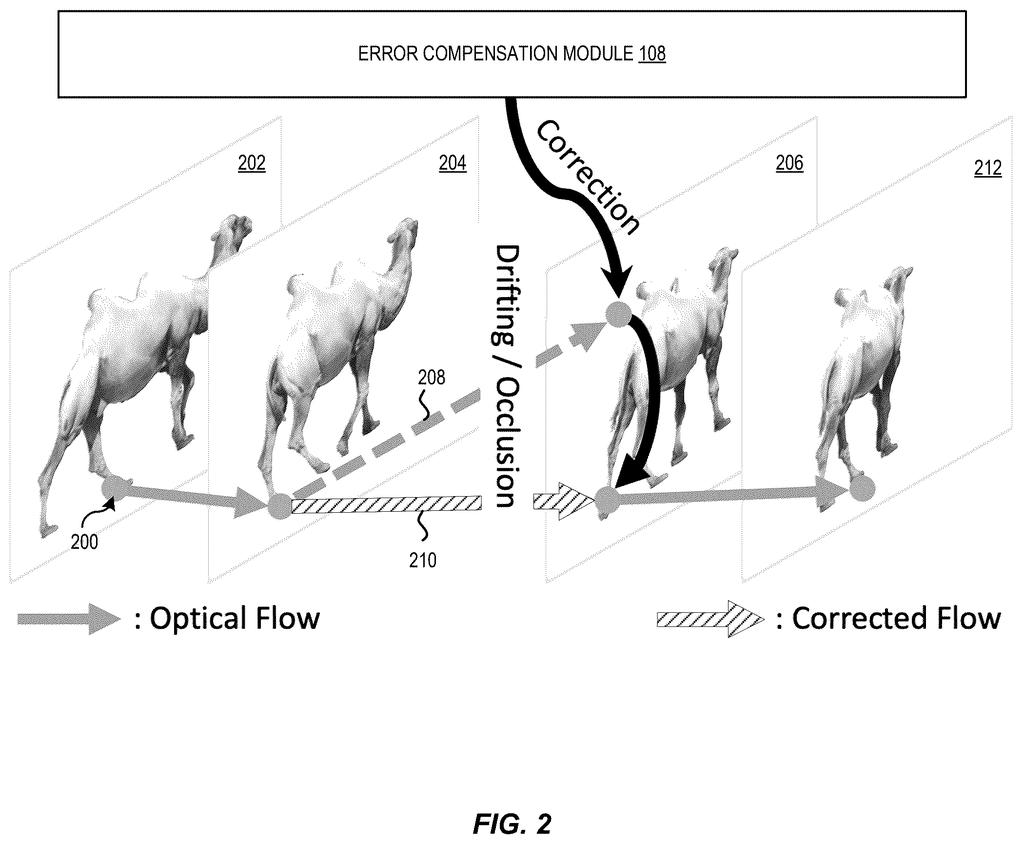
What Adobe's self-correcting video tracker does
Every time you stick a caption, sticker or effect onto a moving video, the software has to remember exactly where that spot is in every frame that follows. If the camera pans or someone walks in front of the spot, the tracking can lose it, and your cat on the wall starts to slide around.
Adobe's patent application describes a tracker that works fast most of the time and checks its own work. It follows points from frame to frame, and when it notices it has drifted off target, it calls in a second model to nudge the path back where it belongs. Then it returns to the fast method.
The goal is edits that stay glued to the right spot without hours of processing for each clip. The filing's example is a cat image added to a graffiti wall behind a roller-skater, with the edit finished in under a minute.
… determining one or more trajectories of the one or more query points across multiple frames of the video data using optical flow; detecting an error in the one or more trajectories; iteratively updating the one or more trajectories using an error compensation module to obtain one or more corrected trajectories; …
Translation: The software tracks object movement across frames, spots tracking mistakes, and automatically fixes them.
How the tracker spots and repairs its own drift
The system starts with query points: pixels in the first frame that you want to follow, such as the spot where you paste a sticker. It then uses optical flow (a standard technique that estimates how each pixel moves between two neighboring frames) and links those short hops together, a step the filing calls flow chaining, to build a path across many frames.
Chained hops pile up small mistakes, and they fail when something blocks the point. So the system runs the flow forward and backward and applies a cycle consistency check (if you follow a point forward and then back, do you land where you started?). If the gap passes a threshold, the path is flagged as an error.
Flagged paths go to an error compensation module, which does three things:
- Extracts a motion prior (how nearby points move, since pixels on the same object tend to move together) and encodes it.
- Builds a local correlation map (a score of how well the tracked point matches pixels around its predicted spot).
- Uses a transformer-based model (an AI model good at spotting patterns across sequences) to predict an error residual, the correction to apply.
The correction repeats a set number of times (four in the example), then the system goes back to the fast method until the next error. One independent claim covers using this to carry a video edit across frames.
When an error is detected in the one or more trajectories, then the one or more trajectories are iteratively updated using an error compensation module to obtain one or more corrected trajectories.
Translation: When the system catches a tracking slip, it repeatedly adjusts the path until the object is locked back in.
Why sticky video edits matter for Adobe's apps
If you edit video on a laptop or phone, tracking is what makes a title, blur or effect stick to a moving person or object. The filing says older approaches either need hours of training for each video or leave edits scattered across frames. This design aims to avoid both, so ordinary devices could handle the job. More reliable tracking could mean fewer fixes by hand, frame by frame.
For Adobe, which sells video and image editing software, the description says the system could live inside a video editing application or an image editing application. It names no specific product, so treat it as a building block for editing tools rather than a feature announcement.
Adobe's 47th filing we've tracked in our AI photo editing race since May adds to a run that includes content-aware fix suggestions and food and scenery swaps for video.
This one sits close to shippable, because it needs no new hardware at all. It is software wrapped around optical flow, a tracking method that already exists, and the filing says off-the-shelf versions will do.
What has to exist first is the trained correction model, and the description spells out a training recipe: a public video dataset, 100,000 training rounds and a small batch size. That is ordinary lab work, and the filing treats the numbers as one example that can be changed.
The shortest route to a product is a tracking tool inside a video editor: you pick a spot, the software follows it, and your edit rides along. The one-minute cat-on-the-wall example suggests speed is within reach, though that is the company's own demo and the paper cannot tell us how it handles messy footage with crowds and fast cuts. That open question decides whether this becomes a feature or stays a research result.
Get our take in your Top Stories
Liked this breakdown? Add Patentlyze as a preferred source on Google, and our plain-English take shows up more often in your Top Stories the next time Adobe patent news breaks.
There are more where this came from
We read every patent application Big Tech publishes and send you the ones worth knowing. Plain English, free, every week.
The drawings
10 drawing sheets from US 2026/0320804 A1 · click any drawing to enlarge


Show the other 2 sheets


Want this weekly breakdown for a company we don't cover? Patentlyze Pro →
Be the first to weigh in