
Google · Filed May 30, 2025 · Published Oct 29, 2026

Google Files Patent to Let You Circle Several Things and Search Them Together

Screen search tools today mostly let you pick one spot at a time. Google's filing lets you circle several, signal which matters most by how you draw it, and search them all together.
A phone user circles multiple items on a screen to combine them into one search query. Drawing from patent filing US 2026/0340027 A1.
A phone user circles multiple items on a screen to combine them into one search query.
See all 35 drawings from this filing ↓
Publication number US 2026/0340027 A1 US20260340027A1
Applicant Google LLC
Filing date May 30, 2025
Publication date Oct 29, 2026
Inventors Ramprasad Sedouram
US classification 382/305
Status when we published Waiting for an examiner (Jun 24, 2025)
Document 20 claims

What Google's multi-circle visual search does

Ever tried to search for two things in the same photo at once? Say a friend sends a picture of a living room, and you want to know about the lamp and the rug. Most screen-search tools let you circle one spot at a time, so you end up running two searches or typing out a clumsy description.

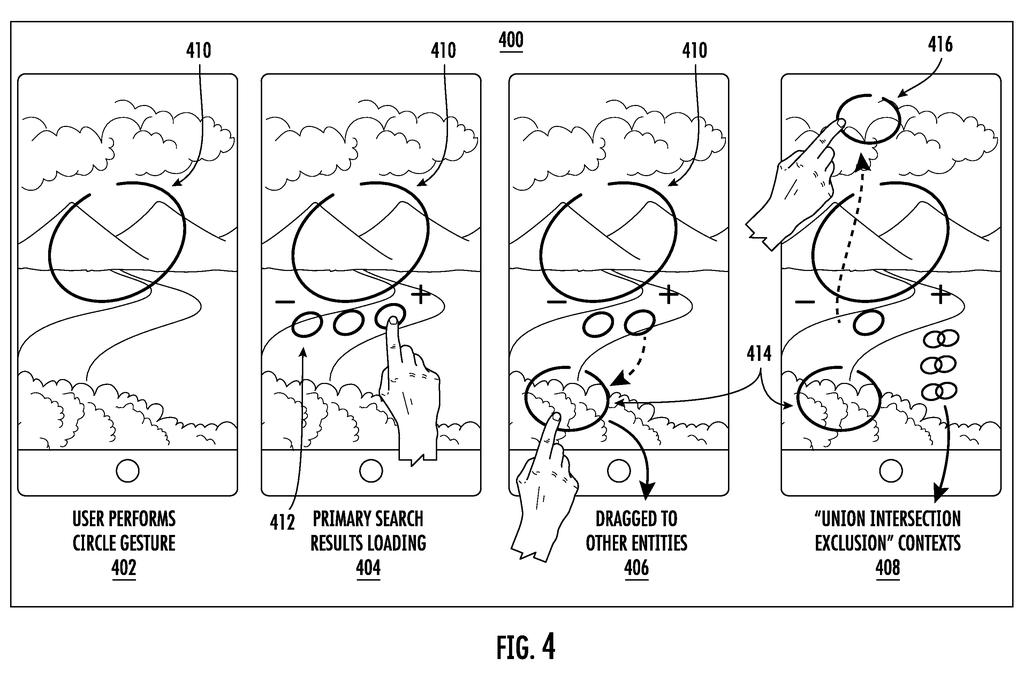
This Google filing describes an overlay that lets you pick several parts of whatever is on your screen. Circle one area, and a marker appears along with little draggable bubbles. Drag a bubble onto a second area, or draw one long looping squiggle that circles several things in a single stroke. Google then cuts out each piece and searches them together.

You can also signal what matters most. The filing describes pressing harder, drawing different shapes, or circling something twice to give that piece more weight in the results.

From the filing · CLAIM 1
… obtaining a first gesture input, wherein the first gesture input selects a first portion of the display content, wherein the first gesture input encloses at least a portion of the first portion of the display content provided within a first shape; …

Translation: The system captures your first circling motion to select an initial item on your screen.

How the loops and bubbles become one search

The patent application describes an overlay interface (a layer that sits on top of whatever app you're in) that captures what is on your screen when you call it up. You draw a shape around one area, and the system puts a visible indicator, an outline of your shape, over it. Then you pick a second area, and a second indicator appears next to the first.

There are two ways to add areas. One is dragging bubbles, which appear after your first circle, onto new spots. The other, covered by a separate claim, is a single continuous gesture with several loops. A model that works out what you meant (an intent determination model) decides which loop covers which object and builds a mask, an outline of just that object.

  • Each selected area is cut out as its own segmented image.
  • Each image is turned into an embedding, a string of numbers that captures what the picture shows so similar things can be matched.
  • The embeddings can be blended into a third one, or weighted, and then used for the search.

Weighting can come from touch pressure, shape, size, or the moment a loop was drawn. In one variation, a hard press on the first circle makes it fetch the candidate results, and the second area filters them. The description also mentions a circle-and-slash gesture to exclude something from the results.

From the filing · THE ABSTRACT
The plurality of portions of the display content can be segmented to generate the plurality of image segments. The plurality of image segments may then be searched to determine one or more search results.

Translation: The circled items are cropped out and combined to run a single unified search.

Why searching two things at once matters

If you've ever screenshotted a photo, cropped it, searched, then repeated the whole routine for a second item, this is aimed at that habit. The filing says searching one portion can miss the full context, searching the whole screen gives too little direction, and typed text lacks the specificity of a visual search. A multi-circle query could mean fewer searches per question.

The description places the interface at the operating system level, so it could work across social media, browsers, photo galleries and even games. It is a patent application, so nothing here says it will ship. It does show where Google is taking visual search: from pointing at one thing to asking a question about several.

This is the 965th Google filing in our Google coverage since May, adding to work like step-by-step AI reasoning and cheaper AI audio.

Editorial take

The problem is small each time but shows up constantly. A photo of a room, an outfit or a plate of food holds several things you might ask about, and single-selection search forces you to split one thought into separate searches or fall back on typing.

The fix matches that size well. Circles and draggable bubbles are things your thumb already knows how to do, and the pressure and double-circle tricks add emphasis without opening a menu.

The risk is a pile of weighting gestures nobody remembers. If shape, size, pressure and timing all mean something, most people will circle twice and hope for the best.

Get our take in your Top Stories

Liked this breakdown? Add Patentlyze as a preferred source on Google, and our plain-English take shows up more often in your Top Stories the next time Google patent news breaks.

There are more where this came from

We read every patent application Big Tech publishes and send you the ones worth knowing. Plain English, free, every week.

The drawings

35 drawing sheets from US 2026/0340027 A1 · click any drawing to enlarge

Combining several circled screen items into a single search query, drawing sheet 1 from US 2026/0340027 A1
Sheet 1 Combining several circled screen items into a single search query
Turning finger gestures into visual search answers, drawing sheet 2 from US 2026/0340027 A1
Sheet 2 Turning finger gestures into visual search answers
Combining two circled items into one search result, drawing sheet 3 from US 2026/0340027 A1
Sheet 3 Combining two circled items into one search result
Circling and dragging between screen items to link them together, drawing sheet 4 from US 2026/0340027 A1
Sheet 4 Circling and dragging between screen items to link them together
Selecting multiple onscreen targets with one continuous looping stroke, drawing sheet 5 from US 2026/0340027 A1
Sheet 5 Selecting multiple onscreen targets with one continuous looping stroke
Using gesture shapes and pressure to refine searches, drawing sheet 6 from US 2026/0340027 A1
Sheet 6 Using gesture shapes and pressure to refine searches
Opening a search overlay to pick multiple items, drawing sheet 7 from US 2026/0340027 A1
Sheet 7 Opening a search overlay to pick multiple items
Converting one continuous looping squiggle into distinct visual searches, drawing sheet 8 from US 2026/0340027 A1
Sheet 8 Converting one continuous looping squiggle into distinct visual searches
Show the other 27 sheets
Turning circled screen items into organized groups using AI, drawing sheet 9 from US 2026/0340027 A1
Sheet 9 Turning circled screen items into organized groups using AI
Tagging and saving screen clips to a searchable database, drawing sheet 10 from US 2026/0340027 A1
Sheet 10 Tagging and saving screen clips to a searchable database
Running the search overlay across any active phone app, drawing sheet 11 from US 2026/0340027 A1
Sheet 11 Running the search overlay across any active phone app
Connecting your phone's screen search to cloud AI tools, drawing sheet 12 from US 2026/0340027 A1
Sheet 12 Connecting your phone's screen search to cloud AI tools
Grouping circled screen items using a generative AI model, drawing sheet 13 from US 2026/0340027 A1
Sheet 13 Grouping circled screen items using a generative AI model
Suggesting past screen grabs based on what you are doing, drawing sheet 14 from US 2026/0340027 A1
Sheet 14 Suggesting past screen grabs based on what you are doing
Sorting new screen grabs into existing collections with AI, drawing sheet 15 from US 2026/0340027 A1
Sheet 15 Sorting new screen grabs into existing collections with AI
Activating the circle search interface over a social media feed, drawing sheet 16 from US 2026/0340027 A1
Sheet 16 Activating the circle search interface over a social media feed
Circling a lamp brings up shopping results and summaries, drawing sheet 17 from US 2026/0340027 A1
Sheet 17 Circling a lamp brings up shopping results and summaries
Tapping a suggested question pulls in AI answers, drawing sheet 18 from US 2026/0340027 A1
Sheet 18 Tapping a suggested question pulls in AI answers
Typing follow-up queries refines the product recommendations, drawing sheet 19 from US 2026/0340027 A1
Sheet 19 Typing follow-up queries refines the product recommendations
How the phone combines local AI with cloud lookups, drawing sheet 20 from US 2026/0340027 A1
Sheet 20 How the phone combines local AI with cloud lookups
Picking relevant apps based on what you circled, drawing sheet 21 from US 2026/0340027 A1
Sheet 21 Picking relevant apps based on what you circled
Generating search suggestions from screen images and text, drawing sheet 22 from US 2026/0340027 A1
Sheet 22 Generating search suggestions from screen images and text
Pulling data across apps to answer a question, drawing sheet 23 from US 2026/0340027 A1
Sheet 23 Pulling data across apps to answer a question
Turning app data into a single AI response, drawing sheet 24 from US 2026/0340027 A1
Sheet 24 Turning app data into a single AI response
Highlighting table parts to focus a shopping search, drawing sheet 25 from US 2026/0340027 A1
Sheet 25 Highlighting table parts to focus a shopping search
Touching grid squares over clothing to refine search results, drawing sheet 26 from US 2026/0340027 A1
Sheet 26 Touching grid squares over clothing to refine search results
Steps for searching using freehand screen selections, drawing sheet 27 from US 2026/0340027 A1
Sheet 27 Steps for searching using freehand screen selections
Combining search matches for an entire item and its details, drawing sheet 28 from US 2026/0340027 A1
Sheet 28 Combining search matches for an entire item and its details
Circling jewelry to save it to your collection, drawing sheet 29 from US 2026/0340027 A1
Sheet 29 Circling jewelry to save it to your collection
Matching your drawn shape to a specific search action, drawing sheet 30 from US 2026/0340027 A1
Sheet 30 Matching your drawn shape to a specific search action
How touchscreen gestures trigger tailored data actions, drawing sheet 31 from US 2026/0340027 A1
Sheet 31 How touchscreen gestures trigger tailored data actions
Creating a saved screen snippet from a recognized gesture, drawing sheet 32 from US 2026/0340027 A1
Sheet 32 Creating a saved screen snippet from a recognized gesture
How the system recognizes and handles two separate onscreen gestures, drawing sheet 33 from US 2026/0340027 A1
Sheet 33 How the system recognizes and handles two separate onscreen gestures
Network connections linking phones, smart glasses, and servers, drawing sheet 34 from US 2026/0340027 A1
Sheet 34 Network connections linking phones, smart glasses, and servers
Software parts that turn your screen selections into search answers, drawing sheet 35 from US 2026/0340027 A1
Sheet 35 Software parts that turn your screen selections into search answers
Browse all the drawings 35 drawing sheets
Patent filing page

Source. Full patent text and figures from the official USPTO publication PDF.
Reader comments

Be the first to weigh in

Start the discussion

Real name or a handle, either is fine. Comments are read by a person before they appear, so allow a little time. Keep it about the filing.