
Google Files Patent for a Tablet Dock That Eases Up When You Tilt It
Most tablet stands are either too stiff or too floppy. Google's patent describes a dock hinge that goes loose while you push the screen and firms up the moment you let go.
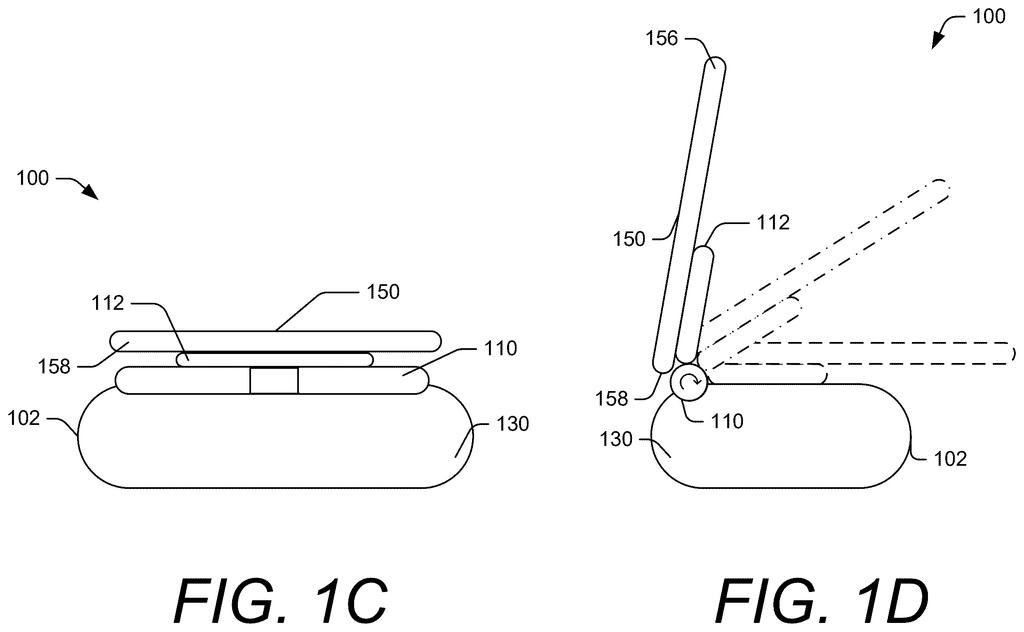
What Google's self-adjusting tablet hinge does
You tip your tablet up on the kitchen counter to read a recipe, and the dock either sags under the weight or fights you like a rusty door hinge. Tablets come in all sizes and weights, so a single fixed hinge can't suit every one of them.
Google's filing describes a dock whose hinge changes how stiff it is on the fly. A sensor notices when your hand starts to tilt the screen, and the hinge goes loose so the tablet moves easily. The moment you let go, the hinge firms up and holds the new angle.
The dock can also work out which tablet is sitting on it, so a big, heavy one gets a firmer hold than a small, light one. It can even give you a little click as you pass angles you've used before.
… determining, utilizing the position sensor data, a user-induced motion to change the angular position of the mobile computing device to a new angular position …
Translation: The dock detects when you start tilting your device.
How the magnetic fluid brake grips and lets go
The core idea in the claims is a dock that controls how hard its hinge is to turn. Hinge torque (the resistance you feel when you rotate it) is set high enough to hold your tablet at its angle against gravity. A position sensor watches the hinge. If the hinge moves while the dock is already applying a holding setting, the dock concludes you are pushing the screen, so it lowers the resistance. When the sensor shows the motion has stopped, it raises the resistance again to lock the new angle.
The dock does this with a magneto-rheological (MR) brake. That is a reservoir of oil filled with tiny iron particles, wrapped by an electromagnet. More electric current makes the particles line up and the fluid thicken almost to a solid, which grips the hinge shaft. Less current, even zero, lets the shaft turn freely.
The filing and its dependent claims add several extras:
- Per-tablet settings: the dock can look up the tablet's ID in a table, take a profile from the tablet, accept your input, or fall back on a default.
- Remembered angles: it briefly stiffens the hinge when you reach an angle you've used before.
- Virtual clicks: short bursts of resistance mimic the notches on a dial (called a detent).
- Lock: you can lock the angle, for example as a child lock.
- Collapse: when the tablet comes off, the hinge relaxes and folds flat.
… changing the hinge torque setting to permit the change in the angular position of the device to the new angular position …
Translation: It temporarily loosens the hinge so it is easy to adjust.
Why one dock for every tablet matters
If this works as described, one dock could suit many tablets. A hinge strong enough to hold a heavy tablet normally feels stiff with a lighter one, and the filing says this approach lets a dock hold heavy models while still moving smoothly. It adds that this could make the dock easier for children and people with disabilities to adjust.
The dock in the drawings is a countertop appliance with a charger and speakers, so the closest everyday fit is a kitchen or bedside tablet stand. The filing names no product, and a patent application does not mean one is on the way.
Google's 26th filing in our Display coverage since May follows earlier applications like a face recognition opt-out camera and cleaner glasses-free 3D screens in the patents we've tracked.
Every fix here costs something. A plain friction hinge needs no power, no sensor and no software, while this one needs an electromagnet, a fluid-filled brake, a sensor and a chip, and it only works while the dock has electricity. The filing says the hinge is meant to collapse to its resting position when power is interrupted, so a power cut could lower your tablet flat.
There is a second soft spot. The dock treats any movement as you pushing, because it is already applying enough current to hold the tablet in place. A hard bump to the countertop could look the same as your hand, and the hinge might go loose for a moment.
Still, the trade reads as worth it for a dock that has to fit tablets of many sizes. A fixed hinge tends to suit some models badly, and this one adjusts to each. For a kitchen or nightstand device that stays plugged in anyway, the extra parts and the reliance on power are a modest price.
Get our take in your Top Stories
Liked this breakdown? Add Patentlyze as a preferred source on Google, and our plain-English take shows up more often in your Top Stories the next time Google patent news breaks.
There are more where this came from
We read every patent application Big Tech publishes and send you the ones worth knowing. Plain English, free, every week.
The drawings
10 drawing sheets from US 2026/0329352 A1 · click any drawing to enlarge


Show the other 2 sheets


Want this weekly breakdown for a company we don't cover? Patentlyze Pro →
Be the first to weigh in