
Google Files Patent to Turn Your Smartwatch Case Into a Button You Tap
Google has filed a patent application for tapping the side of your smartwatch to launch an app, no button required. The catch it has to solve: a watch that listens for taps all day could drain its own battery.
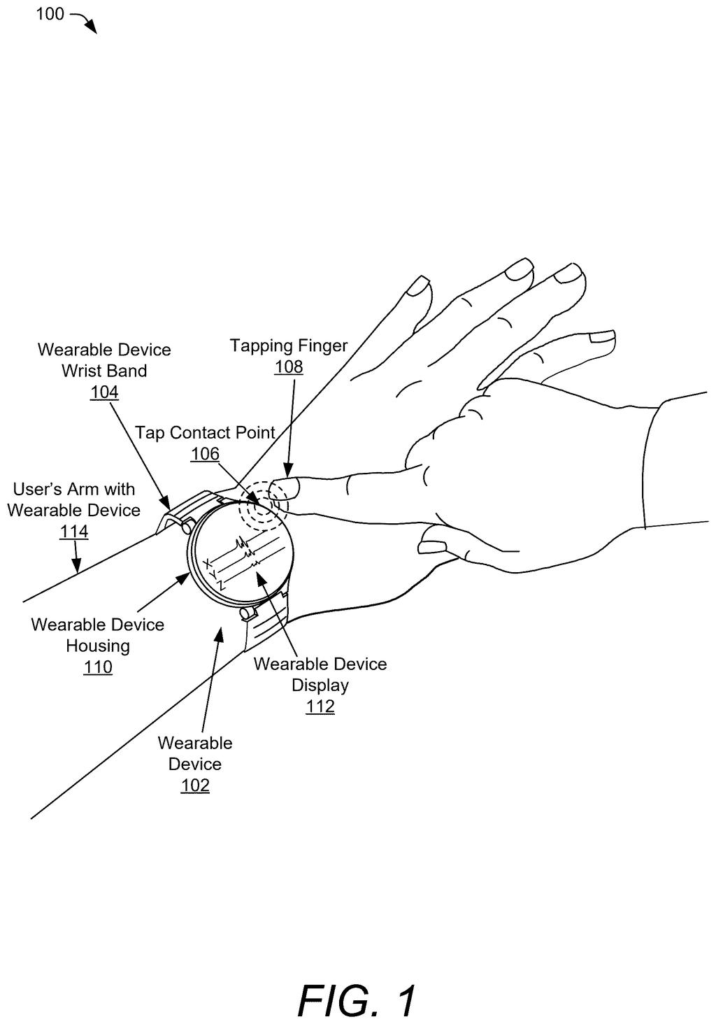
What Google's smartwatch tap shortcut does
Every time you want to start a workout or switch on a flashlight from your wrist, you hunt for a tiny button or poke a small screen. Google's patent application describes another option: tap the side of the watch case with your finger.
The hard part is doing that without wearing down the battery. The watch keeps a low-power chip running that watches the motion sensor. It first checks that your wrist is fairly still, then looks for a sharp jolt. Only after that does it wake the main processor, which decides whether you really tapped or just bumped a doorframe.
A single tap can launch an app or answer a call. A double tap can open a menu where you choose what the tap does.
… classifying, by the at least one processor operating in the second power state, the physical impact as an intentional tap input; and executing an action mapped to the intentional tap input.
Translation: The watch figures out if you meant to tap it and then runs the assigned command.
How the watch decides a tap is on purpose
The filing describes a two-stage power setup. In the first stage, a small low-power chip (a microcontroller) reads the watch's motion sensor at a slow rate, around 50 readings per second in the example. The main processor stays asleep.
The chip applies two gates. First is a stability check: has the watch stayed nearly still, with changes under roughly 0.2 to 0.25 g (a measure of acceleration), for a few hundred milliseconds? Only then does it look for a sharp spike in the motion data, the kind a fingertip hitting the case makes. It may also speed up its sampling when it sees one.
When a spike shows up, the chip saves the recent sensor readings in a short rolling memory and sends a wake-up signal (an interrupt) to the main processor. That processor runs a machine-learned model (software trained on examples) to judge whether the vibration matches a deliberate tap. The filing says the model is trained against things like typing, clapping, jogging and bumping a table.
If it is a tap, the watch runs whatever action is assigned to it. Two taps about 350 to 500 milliseconds apart open a menu for reassigning the shortcut. The filing also mentions an optional microphone to help when you are moving.
Detecting the physical impact triggers a transition of the at least one processor to a second power state that consumes more power than the first power state.
Translation: Noticing the tap wakes the watch processor up to use more battery power for a moment.
Why tap controls could free up watch space
The practical payoff is a watch with fewer physical buttons. Google's filing says that could save space inside the case, leave room for a bigger battery, and make water sealing simpler, since every button is another hole to seal.
For you, it would mean a shortcut you can trigger with one finger while your other hand is busy. The staged design also matters because a watch that wakes its main processor on every bump would eat its own battery. One limit is built in: the system waits for your wrist to be still, so it works best when you are not mid-motion.
Google files its fifth patent in our battery and power coverage since May, building on earlier applications like drone charging pad detection and split wireless charging design.
Watches have a space problem. Every button needs a hole in the case, a seal against water, and room inside, and a watch has very little of any of that to spare. Swapping a button for software is a sensible answer to a real squeeze.
The harder problem is false alarms and battery life. A watch that wakes up for every clap or table bump would annoy you and drain fast. Google's approach of cheap checks first and the expensive one last fits that problem well.
The weak spot is the stillness rule. Quick shortcuts matter most when you are moving, say mid-run, and the filing itself leans on an optional microphone to cover that case. Overall it is a sensible fix for a modest problem.
Get our take in your Top Stories
Liked this breakdown? Add Patentlyze as a preferred source on Google, and our plain-English take shows up more often in your Top Stories the next time Google patent news breaks.
There are more where this came from
We read every patent application Big Tech publishes and send you the ones worth knowing. Plain English, free, every week.
The drawings
6 drawing sheets from US 2026/0329235 A1 · click any drawing to enlarge


Want this weekly breakdown for a company we don't cover? Patentlyze Pro →
Be the first to weigh in