
Microsoft Patents an AI System That Sorts Your Screenshots by What You Were Actually Doing
Microsoft is patenting a way to automatically slice a long stream of screenshots into discrete activity chunks — so instead of a wall of captures, you'd see 'email session,' then 'coding session,' then 'meeting prep' as clean segments. It's the organizational layer that could make AI-powered screen history actually usable.
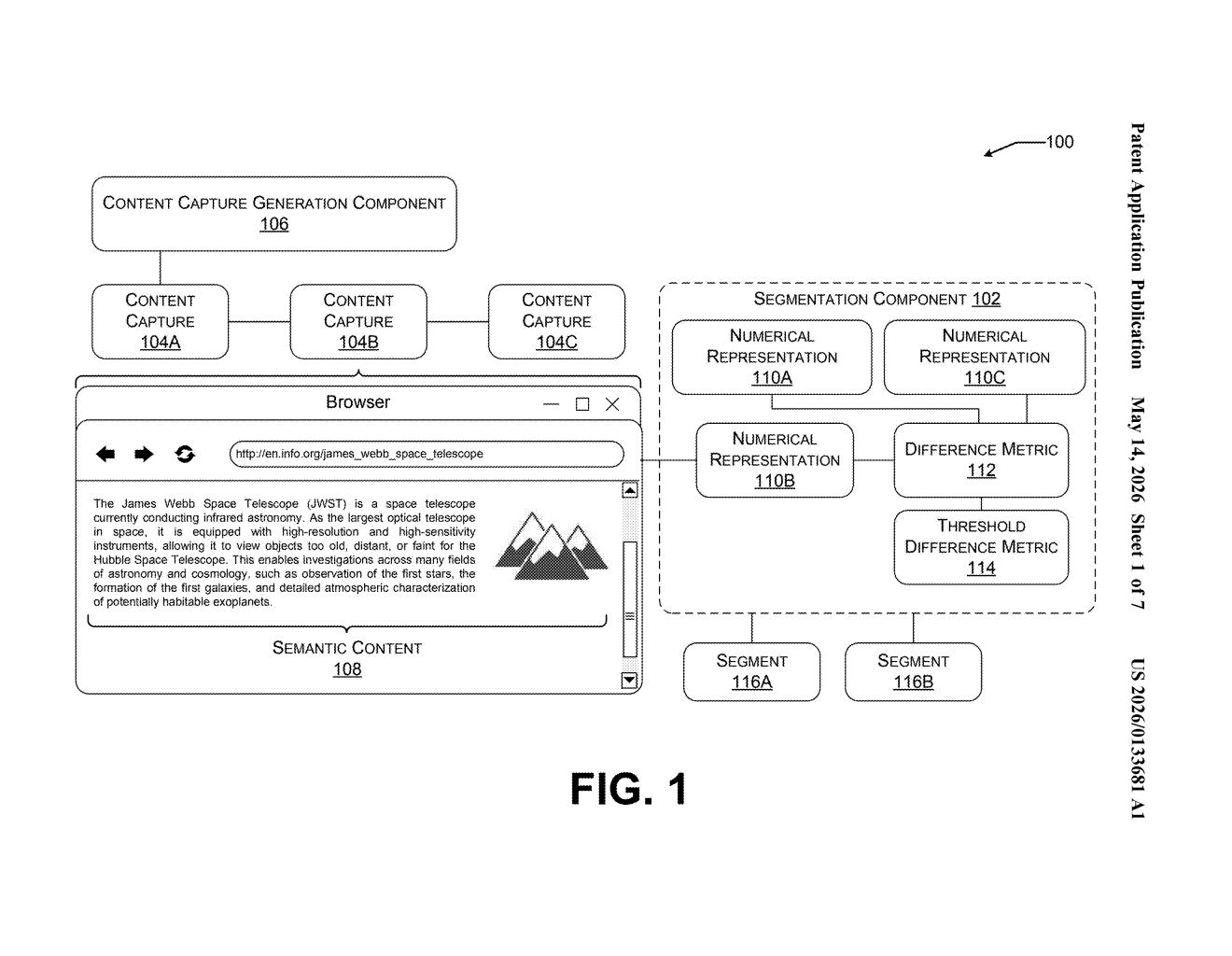
How Microsoft's screenshot segmentation actually works
Imagine your computer has been quietly taking a screenshot every few seconds all day. By 5pm, you have hundreds of them — a chaotic slideshow of everything you touched. Finding the moment you were working on that spreadsheet, or reviewing that PDF, means scrubbing through all of it manually. That's the problem this patent is trying to fix.
Microsoft's idea is to use AI embeddings — basically, numeric fingerprints of what's semantically happening on your screen — to automatically detect when you switched from one task to another. The system compares each screenshot to its neighbors and flags moments where the content changed significantly enough to count as a new activity.
The result is an interactive timeline where your day is already pre-sorted into segments. Instead of scrubbing through raw captures, you'd navigate between labeled chunks: here's when you were in your inbox, here's when you were in your code editor. Less digging, more finding.
How the embedding diff engine splits the timeline
The core of the system is a segmentation component that processes a sequence of content captures — screenshots of a desktop environment taken at regular intervals.
For each individual screenshot, the system does three things:
- Generates a numerical representation (embedding) — a vector that encodes the semantic meaning of what's on screen, not just pixel differences. Think of it as a compact summary of 'what kind of work is happening here.'
- Compares that embedding against the embeddings of the preceding and subsequent screenshots using a difference metric — a score quantifying how much the content changed across that triplet of frames.
- Checks whether the difference metric exceeds a threshold — a configurable cutoff that distinguishes minor UI updates (a new email notification) from substantive activity switches (jumping from a browser to a code editor).
When a screenshot's difference score clears that threshold, the system partitions the sequence at that point, splitting the stream into a first segment and a second segment. This continues across the entire capture history, producing a set of semantically coherent activity blocks.
Those segments are then surfaced in an interactive timeline UI, giving users a structured, navigable view of their session history rather than a flat, unstructured scroll of frames.
What this means for Recall and Windows productivity tools
This patent is clearly adjacent to Windows Recall, Microsoft's controversial AI feature that continuously screenshots your desktop to enable natural-language search over your activity history. Recall's biggest UX challenge isn't capturing — it's organizing. A raw stream of thousands of screenshots is nearly useless without structure, and this segmentation layer is exactly the kind of scaffolding that would make Recall feel less like surveillance and more like a smart notebook.
For you as a user, this could mean the difference between a feature you actually trust and navigate versus one you ignore. Segmented timelines also create natural privacy boundaries — it becomes easier to say 'don't record this segment' or 'share only this segment' — which may help Microsoft address some of the backlash Recall received at launch.
This is unglamorous but genuinely important infrastructure work. The embedding-diff approach is smart — using semantic similarity rather than pixel-level diffs means the system won't get confused by minor UI redraws and will correctly split on meaningful task switches. If Recall ever ships broadly, this kind of segmentation is what separates a useful personal AI assistant from a creepy screenshot archive.
Get our take in your Top Stories
Liked this breakdown? Add Patentlyze as a preferred source on Google, and our plain-English take shows up more often in your Top Stories the next time Microsoft patent news breaks.
There are more where this came from
We read every patent application Big Tech publishes and send you the ones worth knowing. Plain English, free, every week.
Want this weekly breakdown for a company we don't cover? Patentlyze Pro →