
Microsoft Patents a Hidden Screen Refresh That Fights Flicker While Your Laptop Sleeps
Your laptop's screen may be degrading every time it sits in sleep mode. Microsoft's new patent describes a fix that runs invisibly while the lid is closed.
What Microsoft's hidden screen pattern actually fixes
Liquid crystal displays (LCDs) have a known quirk: tiny charged particles inside the screen can pile up over time, causing uneven brightness, flickering, and in bad cases, permanent image burn-in. This tends to get worse when the screen sits idle for long periods.
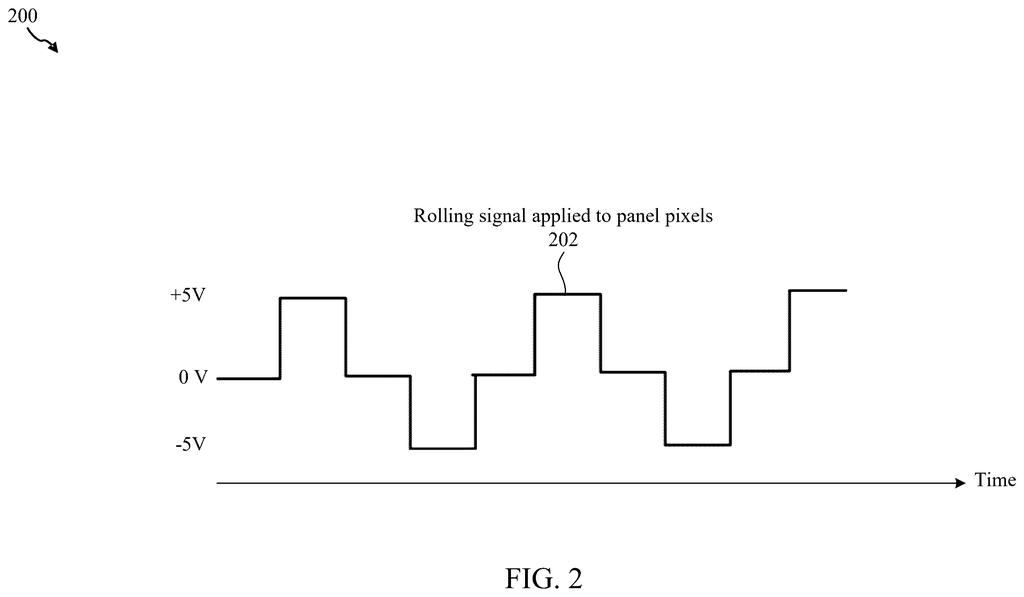
Microsoft's patent describes a way to fight that buildup automatically. When your laptop goes to sleep or you close the lid, the screen's backlight turns off so you see nothing. But behind the scenes, the display panel keeps cycling through a special alternating pattern that essentially shakes those accumulated charges loose.
The system is designed to be invisible. It only runs when the ambient light sensor confirms the room is dark enough, or when the lid is physically closed. The moment you open the lid or wake the laptop, the pattern stops and the screen comes on normally. Think of it like a self-cleaning cycle for your display, running in the background while you're away.
How the rolling pattern runs without you seeing it
The patent describes a system built around three main hardware components working together: the liquid crystal module (LCM), an ambient light sensor (ALS), and a system controller (SCON).
When the device enters a low-power state (sleep, standby, or off), the system controller checks two conditions before starting the cleaning cycle:
- Is the backlight off?
- Is the screen either hidden (lid closed) or in a dark environment (ambient light below a set threshold)?
If both are true, the controller tells the timing controller (TCON) (the chip that drives individual pixels) to apply a rolling pattern across the display. This is an alternating electric field that cycles through the pixels, encouraging mobile ion diffusion (the technical term for releasing built-up electrical charge inside the liquid crystal layer).
The cycle stops automatically if any of the following happen: the device wakes to full power, a timer expires, ambient light rises while the screen could be seen, the power supply is removed, or the battery drops below a threshold. There's also a deliberate delay before the backlight turns back on after wake-up, giving the panel a few frames of black to settle before showing an image.
What this means for laptop LCD longevity
LCD flicker and ion buildup are real, documented problems, especially on laptops that spend long hours in sleep mode or as always-on displays. Most fixes today require the screen to be on and visible, which means either running the process while you're using the device (annoying) or skipping it entirely (bad for the panel long-term). Microsoft's approach threads that needle by using the natural gap when the screen is hidden anyway.
For everyday users, this could mean displays that stay consistent longer, fewer warranty complaints about uneven brightness, and less visible ghosting on panels used for static content. It's particularly relevant for enterprise laptops that sit docked and asleep for hours every day.
This is unglamorous but genuinely useful work. LCD degradation from ion accumulation is a real-world problem that laptop makers typically address with firmware hacks or just ignore. A hardware-aware, sensor-gated solution that runs only when the screen is hidden is a cleaner approach than most, and it's the kind of thing that shows up in a product and just makes it better over time.
Get our take in your Top Stories
Liked this breakdown? Add Patentlyze as a preferred source on Google, and our plain-English take shows up more often in your Top Stories the next time Microsoft patent news breaks.
There are more where this came from
We read every patent application Big Tech publishes and send you the ones worth knowing. Plain English, free, every week.
The drawings
6 drawing sheets from US 2026/0221071 A1 · click any drawing to enlarge


Want this weekly breakdown for a company we don't cover? Patentlyze Pro →