
Microsoft Files Patent for Labels That Tell AI Assistants What Each Website Button Does
Today's AI assistants often squint at screenshots to work out which button to press. Microsoft's filing has an AI write a plain-English label for each button once, so assistants can just read it later.
What Microsoft's button-labeling patent does
Ever tried to talk a relative through a website over the phone? "Click the gray thing in the corner... no, the other one." That is roughly how one common type of AI assistant works. To book or buy something for you, it takes a screenshot of the page, sends it to a big AI model, gets told what to click, and repeats. It works, but it is slow and costly.
Microsoft's filing changes the order. A tool looks at a website once, using both its picture and its underlying code, and writes a plain-language note for every button, link and search box. One example in the filing: "Click this sign in button to navigate to the sign in page." The notes get saved into the site itself.
Later, an assistant reads the notes instead of staring at screenshots, so it can go straight to the right button when you ask it to, say, renew all your library books.
… infer, from the GUI image and the GUI definition, a description of the interactive element, the description including, in natural language, a purpose of the interactive element; …
Translation: The system figures out what a button actually does by looking at its visual design and background code.
How the tool writes and tests each label
The tool takes two inputs from a website or app: its GUI definition (the code that describes the page, such as HTML) and a GUI image (a screenshot, which can be captured in memory without showing anything on screen). It finds each interactive element, meaning a button, link, search box or scrollable area, and matches what it sees in the picture to the matching code.
A generative AI model (the type of AI behind chatbots) then writes a natural-language description of what each element is for. The tool can also test its guesses:
- It performs the action, such as clicking the element.
- It captures the new page code and screenshot.
- The model checks that the result matches the description, and the guess is revised if it does not.
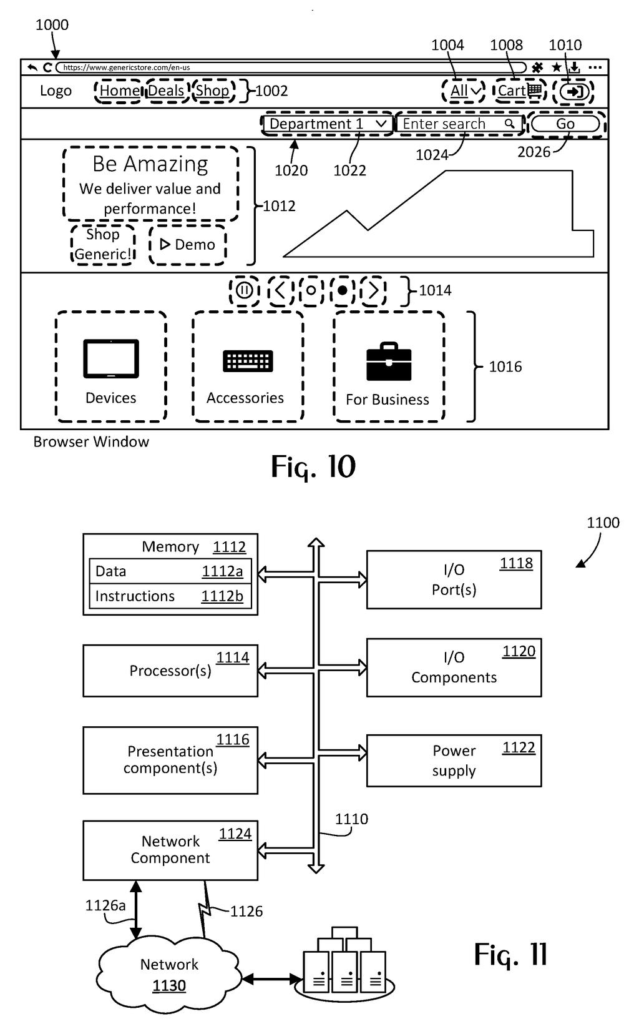
The finished labels are written into the page as custom HTML attributes, such as data-agent-desc for the description and data-agent-id for a unique ID. Browsers ignore these, so the page looks the same to people. Related elements, like a search box with its menu and Go button, can also get a group label. In the filing, the tool sits inside a web code editor with a live preview, where a developer can hover over a button and edit its label.
The claims also cover the assistant side: a user's task goes to the AI model, which returns a plan, reads the labeled page code, picks an action, and sends the instruction to the browser.
… the annotation is used by an artificial intelligence agent for performing actions on the GUI without referring to the GUI image.
Translation: AI assistants can use these text labels to click buttons without needing to visually process the webpage.
What this means for sites and AI assistants
If you have ever asked an AI assistant to handle a chore online and watched it crawl through pages, this is aimed at that wait. According to the filing, skipping the screenshot round trips cuts processing, network use and cost, and speeds things up. The labels also help the assistant pick the right button more reliably than guessing from raw page code.
For website and app makers, the pitch is a way to make a site readable to assistants without rebuilding it: the tool suggests labels, a developer edits them, and the site is republished. The filing also mentions an optional software kit that would let a business add its own branded chat assistant. Whether other sites ever add such labels is a separate question.
That makes this Microsoft's 25th filing we've tracked since July in our AI agents that act for you watchlist, which already includes their nurse coaching agent and plain-language database search.
The shortest path to a product here requires no new hardware at all, just software: a tool that reads a website's underlying code, looks at what appears on screen, and writes plain-language labels explaining what each button or field actually does.
The harder part is getting those labels onto enough websites to matter. Many pages are built on the fly by back-end systems, so labels have to be woven in at the source, and every site owner has to decide it's worth doing. The filing acknowledges a software kit could help businesses get started, but the adoption problem stays open.
The idea becomes most useful, fastest, for whoever already controls both the assistant and the websites it works on, because both ends of the problem sit in one hand.
Get our take in your Top Stories
Liked this breakdown? Add Patentlyze as a preferred source on Google, and our plain-English take shows up more often in your Top Stories the next time Microsoft patent news breaks.
There are more where this came from
We read every patent application Big Tech publishes and send you the ones worth knowing. Plain English, free, every week.
The drawings
9 drawing sheets from US 2026/0340065 A1 · click any drawing to enlarge


Show the other 1 sheets

Want this weekly breakdown for a company we don't cover? Patentlyze Pro →
Be the first to weigh in