
Microsoft Patent Reveals Temporary Folders That Automatically Organize Around Your Current Work
Microsoft has filed a patent for a system that watches what you're working on and automatically builds a temporary folder stocked with the files you probably need, pulling them from wherever they actually live across cloud storage, local drives, or shared servers.
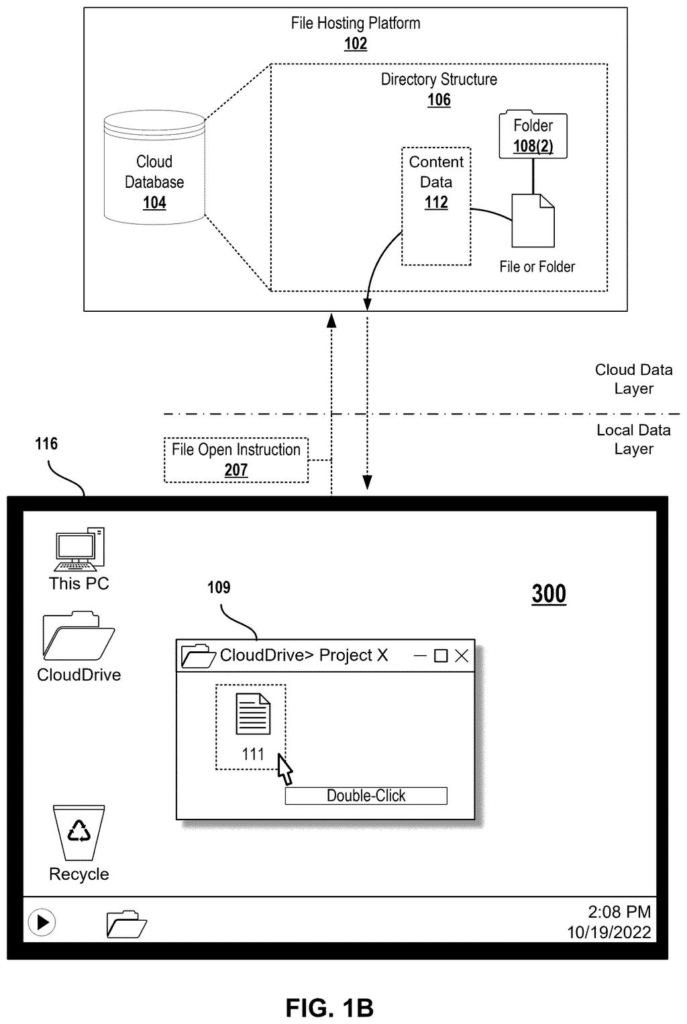
What Microsoft's context-aware placeholder folders actually do
You're jumping into a project meeting and need three documents that live in four different folders across OneDrive, SharePoint, and your desktop. Instead of hunting them down, your computer has already assembled a temporary folder with all of them waiting for you.
That's the idea behind Microsoft's new patent. The system monitors the context of what you're doing, say, a specific meeting, task, or project, and generates a folder that looks and behaves like a real folder but is really a smart shortcut. The files inside aren't fully downloaded yet; they're placeholders that only fetch the actual data when you click on them.
When you make changes to one of those files, the system syncs your edits back to the original storage location automatically. The temporary folder disappears when it's no longer relevant, and your actual file system stays untouched.
… generating, on the file system, a temporary placeholder folder and placeholder files corresponding to the one or more files, wherein a characteristic of the temporary placeholder folder is indicative of the context indicative of the user's computing activity …
Translation: The system automatically creates a custom folder based on what you are currently working on.
How the system maps placeholders to files across storage locations
The patent describes a method for creating temporary placeholder folders that are tied to a detected context of a user's computing activity, such as an active meeting, an open project, or a recent workflow.
Here's how the process works:
- The system receives signals about what the user is currently doing, such as which apps are open, which meeting is active, or which project is in focus.
- Based on those signals, it selects files that cross a relevance threshold for that context and generates placeholder versions of them inside a temporary folder.
- The placeholder files are dehydrated (meaning they appear in the folder listing but have no actual file data stored locally until you open them).
- A mapping table tracks which placeholder corresponds to which real file at which storage location, whether that's OneDrive, SharePoint, a local drive, or a network server.
- When you open a placeholder, it fetches the real file on demand. When you save changes, those changes sync back to the original location through the same mapping.
Critically, the patent specifies that the temporary folder is abstracted from the actual file system hierarchy, meaning it floats above the real folder structure without reorganizing or moving any underlying files. It's a view layer, not a reorganization tool.
A mapping of the placeholder files to underlying files represented by the placeholder files is maintained.
Translation: The system keeps track of where your actual files are stored behind the scenes.
What this means for Windows file management and cloud sync
For anyone who spends time hunting down files before a meeting or context-switching between projects, this kind of automatic file surfacing would be a practical improvement over today's search-and-click workflow. Microsoft already has pieces of this in place, such as the "Recommended" files section in Windows and Microsoft 365, but those are read-only suggestions. This patent describes a writeable, syncable placeholder folder, which is a meaningful step further.
The claim covers a broad slice of behavior: detecting context, generating dehydrated placeholders, maintaining a mapping, fetching on demand, and syncing edits back, all described at the system level rather than tied to any specific product. That breadth, if granted, could give Microsoft ownership over a fairly wide category of context-driven virtual folders in a distributed file system. The newest Big Tech patents in the cloud-storage and file-management space show several companies circling similar ideas, which makes the scope of claim 1 here worth watching as it moves through examination.
That makes this Microsoft's 13th filing we've tracked since June in our AI assistants that remember you watchlist, following a three-layer memory design and building profiles from browsing data.
Claim 1 is written broadly. It doesn't specify a particular operating system, cloud platform, or type of context signal. Any system that detects user activity, generates dehydrated placeholder files mapped to remote storage, and syncs edits back through that mapping could fall inside its boundaries. That's a wide net.
In practice, the most commercially interesting part is the combination of relevance-based file selection and two-way sync through a placeholder layer. That combination, as described, goes beyond simple file shortcuts or recent-files lists. It describes something closer to a fully functional temporary workspace assembled by the system on your behalf.
Whether the patent examiner finds prior art in existing cloud-sync systems, such as OneDrive's own dehydration model or macOS's similar approach, will determine how much of that broad claim survives. The underlying idea is useful. The claim's final breadth is the open question.
Get our take in your Top Stories
Liked this breakdown? Add Patentlyze as a preferred source on Google, and our plain-English take shows up more often in your Top Stories the next time Microsoft patent news breaks.
There are more where this came from
We read every patent application Big Tech publishes and send you the ones worth knowing. Plain English, free, every week.
The drawings
5 drawing sheets from US 2026/0252534 A1 · click any drawing to enlarge


Want this weekly breakdown for a company we don't cover? Patentlyze Pro →
Be the first to weigh in