
Samsung · Filed Jun 2, 2026 · Published Oct 15, 2026

Samsung Files Patent for a Lock Screen Widget That Stretches Over Your Shortcuts

Samsung's patent application gives the small info panel on your lock screen a new trick: when a call comes in, it stretches sideways over one of your shortcut icons, and the icon on the other side turns into a hang-up button.
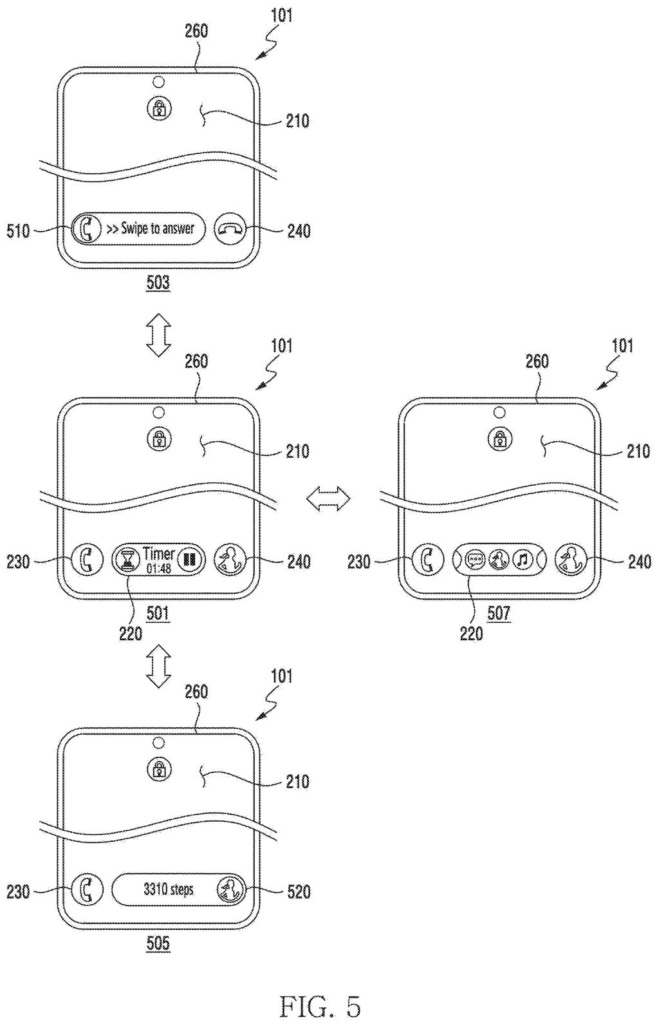
A phone display expands a mini control bar across the bottom to show call alerts or fitness stats over existing corner icons. Drawing from patent filing US 2026/0319636 A1.
A phone display expands a mini control bar across the bottom to show call alerts or fitness stats over existing corner icons.
See all 91 drawings from this filing ↓
Publication number US 2026/0319636 A1 US20260319636A1
Applicant Samsung Electronics Co., Ltd.
Filing date Jun 2, 2026
Publication date Oct 15, 2026
Inventors Jiyoung HAN, Eunhae PARK
US classification 715/765
Status when we published Waiting for an examiner (Jul 27, 2026)
Parent application is a Continuation of PCTKR2024016568 (filed 2024-10-28)
Document 20 claims

What Samsung's shape-shifting lock screen widget does

Every time your phone rings while it's locked, you have to work out what to tap, and fast. The alert and the buttons can end up far apart, and the shortcut icons at the bottom just sit there doing nothing.

Samsung's patent application describes a lock screen with a small information panel (a widget) sitting between two shortcut icons near the bottom, say a phone app and an exercise app. When a call arrives, the panel stretches sideways over the phone shortcut to show who's calling, and the icon on the other side turns into a hang-up button.

A notification from some unrelated app doesn't rearrange anything. It simply appears inside the panel at its normal size. Tap the panel and it grows bigger. Tap anywhere else and it shrinks back.

From the filing · CLAIM 1
display, in a lock state of the electronic device, a lock screen comprising a widget located between a first icon and a second icon through the display, display, through the widget, information corresponding to a first application, obtain, while displaying the lock screen, a notification from a second application …

Translation: The phone shows a widget between shortcut icons on the lock screen while waiting for app alerts.

How the widget decides which icon to cover

The lock screen in the filing has three pieces along the bottom: a widget (a small live panel from an app, such as a timer or music player) flanked by two icons (shortcuts to apps, with a phone app and an exercise app as the examples). The widget normally shows information from one app.

The claims center on a sorting rule for incoming notifications:

  • If the app that sent the notification is tied to the first icon, the widget expands over that icon's spot and shows the notification there.
  • If the sender is tied to neither icon, the notification appears inside the widget without resizing it.

Other claims add detail. Tapping the widget enlarges it sideways toward both icons and upward, and tapping outside it shrinks it back. For a call request, the second icon changes into a graphic for ending a call. You answer through the expanded widget, which then shows call information. When the call ends, the icon goes back to the app it showed before.

The description lists extras the claims don't center on. You can swipe the widget to cycle through apps. The wallpaper can change to match what the widget shows, possibly made by an on-device generative AI model (a program that creates images). The widget can also switch based on connected gear, such as music for earbuds or a battery gauge for a charger.

From the filing · THE ABSTRACT
… based at least in part on determining that the second application is associated with the first icon, expand the widget to a location of the first icon and display the notification through the widget …

Translation: When an alert matches a shortcut icon, the widget stretches over that icon to show the message.

What this means for calls on a locked phone

The lock screen is the part of your phone you see more than any other, and the filing is mostly about making it easier to use one-handed. Samsung says the widget sits where it's convenient to reach while you hold the phone, and that it stays out of the center of the display so it doesn't cover your wallpaper. Putting call controls in the same band as your shortcuts means your thumb travels less.

The filing is a patent application, not a product announcement, and the claims cover the notification rule rather than every idea in the description. The wider description, with its modes, connected-device triggers and wallpaper changes, shows Samsung treating the lock screen as a place for live, context-aware information instead of a static clock.

Samsung's 1486th filing in our Samsung coverage since May follows applications like calendar events from screenshots and app tile resize previews, showing continued focus on small but practical phone interactions.

Editorial take

You would notice this the next time your phone rings while it's locked, on a desk or in your hand. The call controls land at the bottom of the screen where your thumb already rests, instead of in a banner at the top you have to stretch for.

The benefit for you is fewer misfires. When the second shortcut turns into a hang-up button, you can't accidentally open the exercise app when you meant to end the call, and after the call everything snaps back to normal.

The core idea is small: a rule about which notifications get to push the widget around. You would feel it as a lock screen that behaves predictably, with notifications from unrelated apps showing up in place without moving anything. It is a modest change to the screen you look at more than any other.

Get our take in your Top Stories

Liked this breakdown? Add Patentlyze as a preferred source on Google, and our plain-English take shows up more often in your Top Stories the next time Samsung patent news breaks.

There are more where this came from

We read every patent application Big Tech publishes and send you the ones worth knowing. Plain English, free, every week.

The drawings

91 drawing sheets from US 2026/0319636 A1 · click any drawing to enlarge

Smartphone parts and wireless networks, drawing sheet 1 from US 2026/0319636 A1
Sheet 1 Smartphone parts and wireless networks
Display layout options for phones, drawing sheet 2 from US 2026/0319636 A1
Sheet 2 Display layout options for phones
Display panels of different sizes, drawing sheet 3 from US 2026/0319636 A1
Sheet 3 Display panels of different sizes
Bottom control bar sliding upward, drawing sheet 4 from US 2026/0319636 A1
Sheet 4 Bottom control bar sliding upward
Bottom bar covering corner icons, drawing sheet 5 from US 2026/0319636 A1
Sheet 5 Bottom bar covering corner icons
Dark and bright display styles, drawing sheet 6 from US 2026/0319636 A1
Sheet 6 Dark and bright display styles
List of phone display alerts, drawing sheet 7 from US 2026/0319636 A1
Sheet 7 List of phone display alerts
Phone display showing a timer, drawing sheet 8 from US 2026/0319636 A1
Sheet 8 Phone display showing a timer
Show the other 52 sheets
Samsung Files Patent for a Lock Screen Widget That Stretches Over Your Shortcuts patent drawing, sheet 9
Sheet 9
Samsung Files Patent for a Lock Screen Widget That Stretches Over Your Shortcuts patent drawing, sheet 10
Sheet 10
Samsung Files Patent for a Lock Screen Widget That Stretches Over Your Shortcuts patent drawing, sheet 11
Sheet 11
Samsung Files Patent for a Lock Screen Widget That Stretches Over Your Shortcuts patent drawing, sheet 12
Sheet 12
Samsung Files Patent for a Lock Screen Widget That Stretches Over Your Shortcuts patent drawing, sheet 13
Sheet 13
Samsung Files Patent for a Lock Screen Widget That Stretches Over Your Shortcuts patent drawing, sheet 14
Sheet 14
Samsung Files Patent for a Lock Screen Widget That Stretches Over Your Shortcuts patent drawing, sheet 15
Sheet 15
Samsung Files Patent for a Lock Screen Widget That Stretches Over Your Shortcuts patent drawing, sheet 16
Sheet 16
Samsung Files Patent for a Lock Screen Widget That Stretches Over Your Shortcuts patent drawing, sheet 17
Sheet 17
Samsung Files Patent for a Lock Screen Widget That Stretches Over Your Shortcuts patent drawing, sheet 18
Sheet 18
Samsung Files Patent for a Lock Screen Widget That Stretches Over Your Shortcuts patent drawing, sheet 19
Sheet 19
Samsung Files Patent for a Lock Screen Widget That Stretches Over Your Shortcuts patent drawing, sheet 20
Sheet 20
Samsung Files Patent for a Lock Screen Widget That Stretches Over Your Shortcuts patent drawing, sheet 21
Sheet 21
Samsung Files Patent for a Lock Screen Widget That Stretches Over Your Shortcuts patent drawing, sheet 22
Sheet 22
Samsung Files Patent for a Lock Screen Widget That Stretches Over Your Shortcuts patent drawing, sheet 23
Sheet 23
Samsung Files Patent for a Lock Screen Widget That Stretches Over Your Shortcuts patent drawing, sheet 24
Sheet 24
Samsung Files Patent for a Lock Screen Widget That Stretches Over Your Shortcuts patent drawing, sheet 25
Sheet 25
Samsung Files Patent for a Lock Screen Widget That Stretches Over Your Shortcuts patent drawing, sheet 26
Sheet 26
Samsung Files Patent for a Lock Screen Widget That Stretches Over Your Shortcuts patent drawing, sheet 27
Sheet 27
Samsung Files Patent for a Lock Screen Widget That Stretches Over Your Shortcuts patent drawing, sheet 28
Sheet 28
Samsung Files Patent for a Lock Screen Widget That Stretches Over Your Shortcuts patent drawing, sheet 29
Sheet 29
Samsung Files Patent for a Lock Screen Widget That Stretches Over Your Shortcuts patent drawing, sheet 30
Sheet 30
Samsung Files Patent for a Lock Screen Widget That Stretches Over Your Shortcuts patent drawing, sheet 31
Sheet 31
Samsung Files Patent for a Lock Screen Widget That Stretches Over Your Shortcuts patent drawing, sheet 32
Sheet 32
Samsung Files Patent for a Lock Screen Widget That Stretches Over Your Shortcuts patent drawing, sheet 33
Sheet 33
Samsung Files Patent for a Lock Screen Widget That Stretches Over Your Shortcuts patent drawing, sheet 34
Sheet 34
Samsung Files Patent for a Lock Screen Widget That Stretches Over Your Shortcuts patent drawing, sheet 35
Sheet 35
Samsung Files Patent for a Lock Screen Widget That Stretches Over Your Shortcuts patent drawing, sheet 36
Sheet 36
Samsung Files Patent for a Lock Screen Widget That Stretches Over Your Shortcuts patent drawing, sheet 37
Sheet 37
Samsung Files Patent for a Lock Screen Widget That Stretches Over Your Shortcuts patent drawing, sheet 38
Sheet 38
Samsung Files Patent for a Lock Screen Widget That Stretches Over Your Shortcuts patent drawing, sheet 39
Sheet 39
Samsung Files Patent for a Lock Screen Widget That Stretches Over Your Shortcuts patent drawing, sheet 40
Sheet 40
Samsung Files Patent for a Lock Screen Widget That Stretches Over Your Shortcuts patent drawing, sheet 41
Sheet 41
Samsung Files Patent for a Lock Screen Widget That Stretches Over Your Shortcuts patent drawing, sheet 42
Sheet 42
Samsung Files Patent for a Lock Screen Widget That Stretches Over Your Shortcuts patent drawing, sheet 43
Sheet 43
Samsung Files Patent for a Lock Screen Widget That Stretches Over Your Shortcuts patent drawing, sheet 44
Sheet 44
Samsung Files Patent for a Lock Screen Widget That Stretches Over Your Shortcuts patent drawing, sheet 45
Sheet 45
Samsung Files Patent for a Lock Screen Widget That Stretches Over Your Shortcuts patent drawing, sheet 46
Sheet 46
Samsung Files Patent for a Lock Screen Widget That Stretches Over Your Shortcuts patent drawing, sheet 47
Sheet 47
Samsung Files Patent for a Lock Screen Widget That Stretches Over Your Shortcuts patent drawing, sheet 48
Sheet 48
Samsung Files Patent for a Lock Screen Widget That Stretches Over Your Shortcuts patent drawing, sheet 49
Sheet 49
Samsung Files Patent for a Lock Screen Widget That Stretches Over Your Shortcuts patent drawing, sheet 50
Sheet 50
Samsung Files Patent for a Lock Screen Widget That Stretches Over Your Shortcuts patent drawing, sheet 51
Sheet 51
Samsung Files Patent for a Lock Screen Widget That Stretches Over Your Shortcuts patent drawing, sheet 52
Sheet 52
Samsung Files Patent for a Lock Screen Widget That Stretches Over Your Shortcuts patent drawing, sheet 53
Sheet 53
Samsung Files Patent for a Lock Screen Widget That Stretches Over Your Shortcuts patent drawing, sheet 54
Sheet 54
Samsung Files Patent for a Lock Screen Widget That Stretches Over Your Shortcuts patent drawing, sheet 55
Sheet 55
Samsung Files Patent for a Lock Screen Widget That Stretches Over Your Shortcuts patent drawing, sheet 56
Sheet 56
Samsung Files Patent for a Lock Screen Widget That Stretches Over Your Shortcuts patent drawing, sheet 57
Sheet 57
Samsung Files Patent for a Lock Screen Widget That Stretches Over Your Shortcuts patent drawing, sheet 58
Sheet 58
Samsung Files Patent for a Lock Screen Widget That Stretches Over Your Shortcuts patent drawing, sheet 59
Sheet 59
Samsung Files Patent for a Lock Screen Widget That Stretches Over Your Shortcuts patent drawing, sheet 60
Sheet 60

Sheets 61 to 91 are in the full USPTO filing.

Browse all the drawings 91 drawing sheets
Patent filing page

Source. Full patent text and figures from the official USPTO publication PDF.
Reader comments

Be the first to weigh in

Start the discussion

Real name or a handle, either is fine. Comments are read by a person before they appear, so allow a little time. Keep it about the filing.