
Samsung Files Patent for Outline Previews When Resizing Home Screen App Tiles
Resizing a widget means your phone has to redraw it at every size along the way. Samsung's patent swaps in a simple outline until you let go.
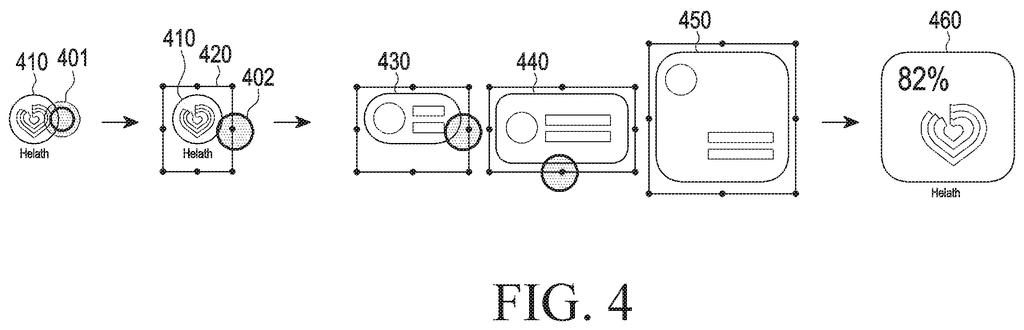
What Samsung's widget resize preview does
You're holding your finger on a weather widget on your home screen, dragging a corner to make it bigger. Every inch you drag, the phone has to work out what the widget should look like at that exact size, and that takes effort.
Samsung's patent skips that effort while your finger is down. Instead of redrawing the real widget, the phone shows a simple outline: shapes marking where the temperature, the icon and the other details will land. Some pieces, like small icons, stay the same size, while the bigger blocks stretch along with your drag.
Lift your finger and the real widget appears at the new size, with its information arranged to match the outline. Drag it down to a tiny size and the outline drops away, leaving just a plain shape that shows how big the widget will be.
… display a preview image corresponding to the size adjusted by the second input instead of the first widget until the second input is released …
Translation: Dragging the resize handle shows a live preview of the widget's new layout before you let go.
How the outline stretches as you drag
The filing covers a touch screen device that handles widget resizing in three steps. A long press on a widget (the first input) brings up a handler: a line around the widget with dots placed on the sides where it can still grow. Dragging a dot (the second input) starts the resize.
While you drag, the device shows a template layout in place of the real widget until you release. A template layout is a pre-stored picture made of simple shapes that mark where an app's information will go. Because it is already saved on the phone, the device doesn't have to load and render the live widget at every size, which the filing says can overload the processor.
The shapes behave in two ways:
- Fixed-size objects (the filing gives circles and squares as examples) stay the same size as you drag.
- Stretchy objects (rectangles and rounded rectangles) grow or shrink with the widget.
Templates come in a set number of sizes based on grid cells, such as 1 by 1, 2 by 1, 2 by 2 and 4 by 2. Below a certain size, the preview shows no template at all.
The filing also describes sets of layouts for the home screen, lock screen, cover screen and watch face. It adds a fix for third-party widgets that don't fit the grid: the device can extend the widget's image or fill the empty space with its main color.
… at least one first object among the plurality of objects is displayed at a fixed size, and wherein at least one second object among the plurality of objects changed in size based on the second input …
Translation: Some parts of the widget stay the same size while others scale up or down during resizing.
What this means for your home screen
If you've ever resized a widget and watched it stutter or jump, this targets that moment. A light outline that follows your finger should feel steadier, and it would look the same every time you resize, whichever app the widget comes from.
The bigger idea is consistency. The filing describes one widget showing the same information on a home screen, lock screen, foldable-style cover screen and round watch face, with only the size, shape and colors adapting. It also describes padding out odd-sized widgets from other developers so they line up with the rest. For you, that could mean a tidier screen with less fiddling.
Samsung's 1484th filing we've tracked since May in our Samsung coverage follows the touch-reactive band and the projector keyboard.
You would notice this the moment you resize a widget: an outline follows your finger without stutter, and it looks the same every time. The benefit is small but daily, since most people only resize widgets a few times while setting up a screen.
The feature most likely to matter is the fix for odd-sized widgets from other developers. Instead of one mismatched tile that spoils an otherwise tidy grid, you would get a padded one that lines up with its neighbors.
The filing does not say how much faster any of this is, so treat it as routine polish for the home screen. If it works as described, you will rarely think about it, and that is usually the sign a small interface fix is doing its job.
Get our take in your Top Stories
Liked this breakdown? Add Patentlyze as a preferred source on Google, and our plain-English take shows up more often in your Top Stories the next time Samsung patent news breaks.
There are more where this came from
We read every patent application Big Tech publishes and send you the ones worth knowing. Plain English, free, every week.
The drawings
22 drawing sheets from US 2026/0319648 A1 · click any drawing to enlarge


Show the other 14 sheets


Want this weekly breakdown for a company we don't cover? Patentlyze Pro →
Be the first to weigh in