
Samsung Files Patent for Using Your Phone's Fingerprint Sensor to Approve Desktop Payments
Your desktop and your smart TV have no fingerprint reader, but your phone does, and Samsung's patent application would let the phone vouch for you across the room.
What Samsung's phone-as-fingerprint-reader does
Every time you pay for something on a desktop computer or a smart TV, you type in a code, a password or a pattern. That's because those devices usually have no fingerprint reader, which makes them a weaker lock than your phone.
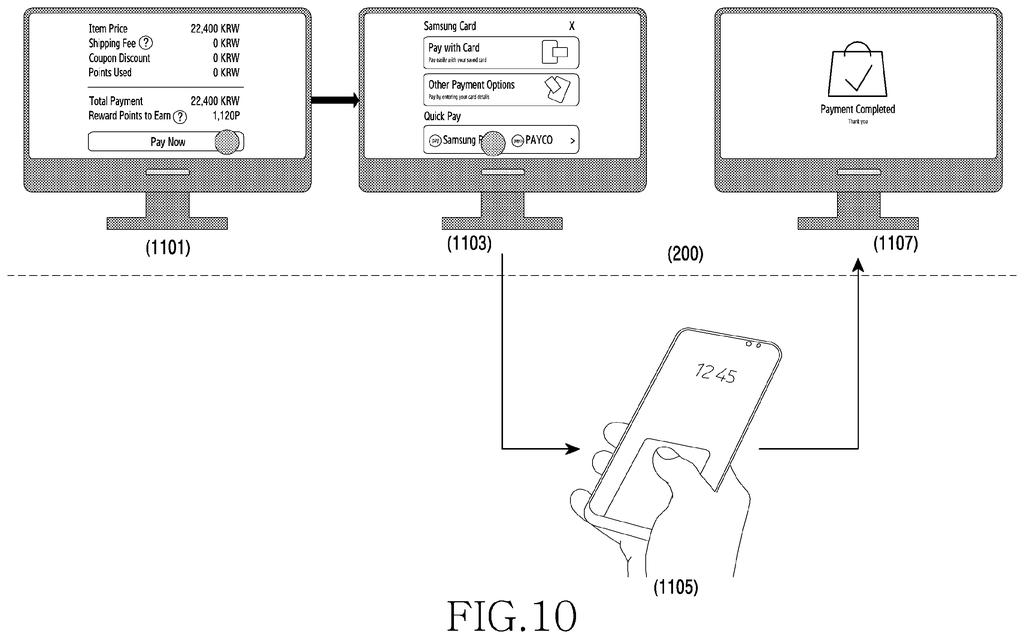
Samsung's patent application has the two devices team up. You pair your phone with the computer once, and the phone shares a labeled record of your registered fingerprints. Later, when you start a payment in an app, the computer sends that record back to your phone. The phone checks that it still matches, then asks for your finger. If your finger passes, the computer goes ahead.
The check matters because of one nasty scenario: someone adds their own fingerprint to your phone. The system is built to notice that change and turn the request down, so the old record can't be used to approve things on your behalf.
the electronic device provides the external device with a biometric data template obtained from the biometric recognition module, the external device stores a remote authentication template obtained by assigning a plurality of attributes to the biometric data template …
Translation: The phone shares fingerprint data with the computer so it can recognize you later.
How the phone checks your saved fingerprint record
The setup has two roles. The electronic device (think a phone with a fingerprint or iris sensor) holds your biometric data. The external device (a desktop, a TV, or even a refrigerator, according to the filing) has no such sensor. Over a wireless link such as Bluetooth, the phone hands over a biometric data template (its stored fingerprint or iris record), and the external device turns it into a remote authentication template by sorting the information into labeled attributes.
The filing's example attributes are:
- UUID: a unique ID for the phone
- DisplayName: a friendly label, such as the example 'S21 of user A'
- Authenticator ID: a random value (a 64-byte random number in one example) that changes whenever new biometrics are registered
- Enrollments: an index of which fingerprints or irises are registered
When you open an app that needs authentication, the external device sends the template to the phone. The phone compares the Authenticator ID and Enrollments against its own records. If they match, the template is valid and the phone shows a prompt for your finger or iris. The external device can display a message like 'Please input a fingerprint on the connected smartphone.' If they don't match, the external device says biometric login is unavailable and can guide you to register again.
The filing also describes extras: several phones connected to one device, with a pop-up showing which can authenticate; an attribute for security level, so a payment app can ask only for strong methods like fingerprint or iris; one phone serving several devices; and a video see-through headset worn by a guest.
… the external device transmits the remote authentication template to the electronic device in response to an application execution request from a user, the electronic device checks a validity of the remote authentication template, based on a comparison between the remote authentication template and the biometric data template …
Translation: When you open an app on your computer, it asks your phone to verify your identity against the saved data.
Why a PC or TV could skip the password
The practical upshot is that a desktop or TV could ask for the same fingerprint approval your phone uses, without you buying a separate fingerprint reader or installing extra compatibility software. The filing names exactly those costs as the drawback of existing add-on readers. It uses a payment app (Samsung Pay) as a main example.
The headset scenario shows the everyday angle. If a friend tries on your headset and the app needs your approval, you don't have to take the headset back. You confirm on your phone while they keep wearing it. The same attribute-based approach could let a device tell which of your phones is ready, which one has changed its fingerprints, and which has disconnected.
Samsung's 1440th filing in our Samsung coverage since May adds to a run that includes the foldable ring charger and the holographic glasses.
The shortest route to a product is short. Phones already have the sensor, and PCs and TVs already have wireless links, so the filing needs no new hardware. It needs software on both sides: a background service on the PC or TV to store the record, and a prompt on the phone.
What has to exist first is the harder part. The phone and the other device need a trusted pairing, and payment or banking apps must accept an approval relayed through another device. The neatest first version would live inside a single company's phones and TVs, where one maker controls both ends.
The check for changed fingerprints is a sensible detail, because it answers the obvious worry of someone adding their own finger to your phone. This is a practical, incremental filing that could arrive as a software update, with timing set by app partners and Samsung's own software teams.
Get our take in your Top Stories
Liked this breakdown? Add Patentlyze as a preferred source on Google, and our plain-English take shows up more often in your Top Stories the next time Samsung patent news breaks.
There are more where this came from
We read every patent application Big Tech publishes and send you the ones worth knowing. Plain English, free, every week.
The drawings
13 drawing sheets from US 2026/0322809 A1 · click any drawing to enlarge


Show the other 5 sheets


Want this weekly breakdown for a company we don't cover? Patentlyze Pro →
Be the first to weigh in