
Apple Patents a Search Interface That Remembers Where You Left Off
Tapping a search result only to immediately dismiss it is a small but genuinely annoying experience on any phone. Apple has patented a system that decides, based on how quickly you bail, whether to drop you back into your search or send you home.
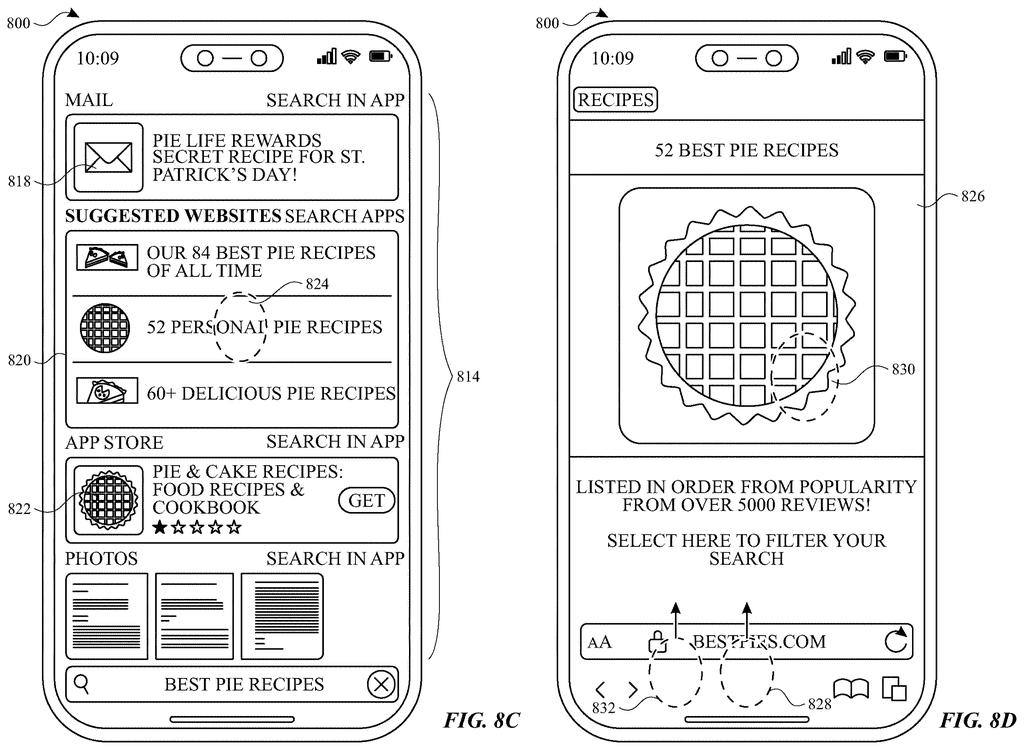
What Apple's search-to-app back-navigation actually does
You're searching for a restaurant on your iPhone, tap a result, glance at the app for a second, and then swipe away. Right now, you'd land back on the home screen and have to start over. Apple's new patent wants to fix exactly that.
The idea is a timing system built into the transition between search and apps. If you dismiss an app quickly after arriving from a search, your iPhone recognizes that as "I wasn't done yet" and returns you to your search results, right where you left off. If you've been in the app for a while or done something else, it assumes you're finished and takes you home instead.
The patent also describes a related behavior: dismissing a small preview card that pops up inside an app (think a Quick Look panel) could show you all the other search results at once, so you can browse without re-typing anything. It's a small change that could make search feel much less repetitive.
… in response to detecting the input dismissing the user interface object associated with the selected result, displaying a plurality of user interface objects associated with a plurality of results of the search request …
Translation: When you close a specific search result, the device automatically shows you the other results from your original search.
How Apple's timing threshold decides what to show next
The patent describes two connected behaviors layered on top of iOS search.
First, there is a time-threshold system that watches what you do after tapping a search result. If you dismiss the app you landed in before a set time limit, the device routes you back to the search interface in the same state you left it, including the query and the highlighted result you tapped. If you dismiss the app after that threshold, or after taking another action inside the app, the device assumes the search session is over and shows the home screen instead.
Second, the patent covers a result-expansion behavior tied to in-app overlay objects. When you tap a search result, an app can display a focused panel (a UI object, like a product card or map pin detail) tied to that specific result. If you then dismiss that panel, the app is instructed to display all the other results from the original search query at the same time, so you can compare without going back to the search bar.
The mechanics rely on:
- The search interface passing result data to the receiving app at launch
- A timer running from the moment the app opens
- The OS monitoring for a specific dismissal input type to trigger the branching logic
This is entirely a software and interaction design patent. No new sensors or hardware components are described.
in accordance with a determination that the input is detected before a time threshold, displaying the search user interface with a state corresponding to the detection of the input selecting the result …
Translation: If you act quickly enough, the device returns you to your search results exactly as you left them.
What this means for everyday iPhone search behavior
For everyday iPhone users, this patent addresses a friction point that most people have silently accepted: search on mobile often forces you to repeat yourself. The current model treats every app launch as a hard break from whatever you were doing before. Apple's proposed system treats search as a session, one with a beginning, a middle, and a natural end point determined by your own behavior rather than by a rigid screen hierarchy.
The system described here is close to shippable. It requires no new hardware, no new sensors, and fits within how iOS already manages transitions between the home screen and apps. The engineering lift appears low enough that this could surface in a near-term OS update, and you can track similar UI-layer thinking across the latest Big Tech patents covering how companies are rethinking search as a persistent state rather than a one-shot lookup.
Apple's 359th filing in our Apple coverage since May adds to a memory theme that includes a light-based memory idea and a self-clearing chip concept.
From a shipping standpoint, this is about as ready as a patent description gets. It is pure software behavior layered on existing phone infrastructure, and the logic is simple enough to describe in a paragraph. Apple's engineers could build a testable version of the timing threshold without touching a single piece of hardware.
The harder question is whether that timing threshold can be tuned well. A time limit that works for one person's browsing pace will annoy another, and if Apple ships this, calibrating that cutoff will matter far more than the idea itself.
The result-expansion behavior is the more interesting half of the filing. Automatically surfacing all search results inside an app when you step back from a detail view sounds obvious once described, and that is usually a sign it will actually get used.
Get our take in your Top Stories
Liked this breakdown? Add Patentlyze as a preferred source on Google, and our plain-English take shows up more often in your Top Stories the next time Apple patent news breaks.
There are more where this came from
We read every patent application Big Tech publishes and send you the ones worth knowing. Plain English, free, every week.
The drawings
20 drawing sheets from US 2026/0252219 A1 · click any drawing to enlarge


Want this weekly breakdown for a company we don't cover? Patentlyze Pro →
Be the first to weigh in