
Microsoft Patents AI That Turns a Text Prompt Into Finished Layered Artwork
Describing a graphic design in plain text and getting back a properly layered, editable file sounds like a long way off. Microsoft's new patent suggests it is closer than you might think.
What Microsoft's layered AI design system actually does
Every time a graphic designer starts a new project, they first sketch where things go: a background, a headline, a product image, maybe a logo. That layout step alone can eat hours before any real art gets made.
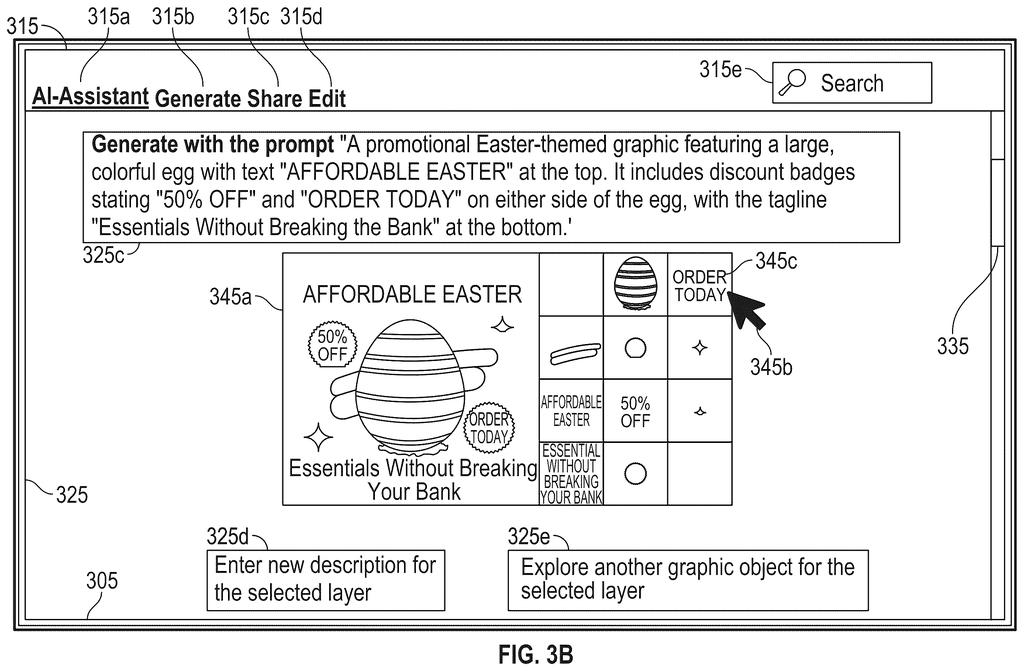
Microsoft's patent describes a system that handles that entire flow from a single typed sentence. You describe what you want, and the AI figures out roughly where each element should sit, then draws the background and every foreground object at the same time, each on its own separate, see-through layer, just like a professional design file.
The key word is layered. Instead of handing you one flat image you can't edit, the system produces something closer to a Photoshop or Figma file, where each element lives on its own level and can be moved or swapped independently.
… predicting, by a first generative model based on the text prompt, a layout including a plurality of anonymous regions each defined by a bounding box without content or region-wise prompt annotations; …
Translation: The system maps out where design elements should go before drawing them.
How the layout prediction and diffusion steps fit together
The system works in four stages that run in tight sequence.
First, a layout prediction model reads your text prompt and decides how many distinct regions the final design needs and where each one roughly sits on the canvas. Crucially, these regions are called anonymous because the model does not yet decide what goes inside them or label them with separate text descriptions. It is sketching a floor plan without furniture.
Second, a diffusion transformer (an AI model that starts from pure visual noise and gradually sculpts an image) takes that layout and your original prompt and generates everything at once: a global reference image showing the whole composition, a background layer, and one transparent foreground layer per anonymous region. Running all of these in parallel means the layers are visually consistent with each other from the start, rather than generated separately and pasted together.
Third, a vision transformer (a model that interprets and reconstructs images in chunks called patches) decodes those rough internal representations into actual pixel layers: the background and each foreground cutout with transparency intact.
Finally, the system composites those layers into a finished image, sends it to your device, and displays it. The underlying layers are preserved, so a designer can still move, resize, or replace individual elements.
… concurrently generating, by a diffusion transformer, multilayer image latents of a global reference image, a background layer, and transparent foreground layers using a Gaussian noise conditioned on the layout and the text prompt, …
Translation: An AI model builds the background and transparent foreground layers all at once.
What this means for everyday design tools
For anyone who uses design tools professionally, the painful part of AI-generated images has always been that they arrive as a single, flat picture. Swapping out the background or repositioning a logo means starting over. This patent describes a workflow where the output is already structured the way a designer would build it, which means AI assistance could slot into real production work rather than sitting one step removed from it.
Microsoft's run of AI creative-tools filings points toward tighter integration between systems like this and products such as Designer or Copilot. If the quality holds up, the person who gains the most is not a professional designer but the non-designer who currently spends an afternoon in Canva trying to make a passable event poster.
That makes this Microsoft's 50th filing we've tracked in Language AI since May, a group that includes one on AI writing chart code and one on focusing on key document parts.
The real shift happens at the end of the process. Instead of a flat image you have to rebuild by hand in separate software, you get a file with the pieces already separated: background here, text layer there, graphic element on top. That saves the step most people abandon.
The system decides where things should sit on the canvas before it figures out what those things look like, which is a reasonable way to work. The risk is that the arrangement feels too safe or too centered, what a nervous beginner might produce. If that happens, you still have the layers, so adjusting one element does not mean redoing everything.
For anyone who needs a presentable poster, a social card, or a slide header without a design background, this closes a real gap: the difference between an image you admire and a file you can actually use.
Get our take in your Top Stories
Liked this breakdown? Add Patentlyze as a preferred source on Google, and our plain-English take shows up more often in your Top Stories the next time Microsoft patent news breaks.
There are more where this came from
We read every patent application Big Tech publishes and send you the ones worth knowing. Plain English, free, every week.
The drawings
17 drawing sheets from US 2026/0260392 A1 · click any drawing to enlarge


Show the other 9 sheets


Want this weekly breakdown for a company we don't cover? Patentlyze Pro →
Be the first to weigh in