
Microsoft Patents a Context-Aware Copy-Paste Tool That Auto-Transforms Your Content
Copy-paste is one of the oldest tricks in computing — and Microsoft thinks it's overdue for an upgrade. A new patent describes a system that doesn't just move content between apps, but automatically reshapes it to fit wherever it lands.
What Microsoft's context-aware paste actually does
Imagine you copy a data table from Excel and paste it into a Teams message or a Word document. Right now, you get a mess — misaligned columns, raw numbers with no labels, or a wall of comma-separated text. You have to manually reformat everything. Microsoft's new patent wants to fix that.
The idea is to make copy-paste context-aware. When you copy something, the system quietly grabs not just the content but also information about where it came from — what app, what format, what the data means. When you paste, it grabs context from the destination app too. Then it auto-generates code to bridge the gap and transforms your content before it ever appears on screen.
The result is that what you paste already looks right for the target app — whether that means reformatting a chart, restructuring a list, or stripping metadata that doesn't belong. You get smart pasting without doing the cleanup yourself.
How the system captures context and generates transform code
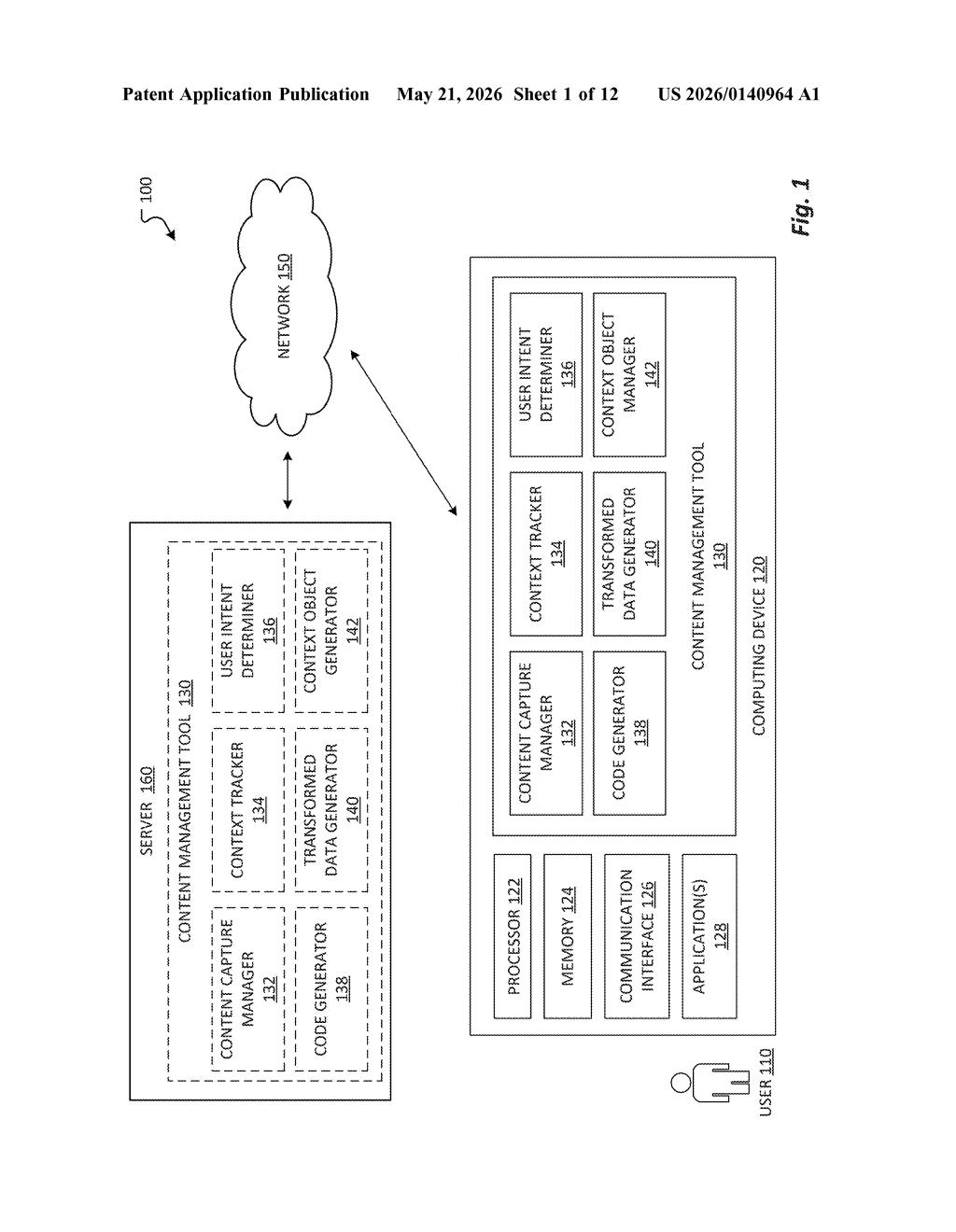
The patent describes a Content Management Tool that hooks into a computing device and monitors two key moments: when you trigger a capture request (copy) and when you trigger a paste request.
At copy time, the system grabs both the raw content and a source context object — structured metadata about the originating application, the data's format, and how it's being used. At paste time, it captures a destination context object from the target application in the same way.
With both context objects in hand, a code generator (almost certainly an LLM-based component, given the inventors' backgrounds) produces transformation instructions on the fly. Those instructions then go through a multi-step pipeline:
- Obtain the raw data of the copied content
- Parse that raw data to extract structured data (e.g., table rows, JSON fields)
- Extract metadata based on the raw data and any user instruction
- Apply one or more transformations across the raw data, structured data, and/or metadata
A User Intent Determiner component also appears in the architecture diagram, suggesting the system can factor in what you're trying to do — not just what you copied — when deciding how to transform content.
What this means for cross-app workflows in Microsoft 365
For anyone who lives in Microsoft 365, this is genuinely useful territory. The friction of moving data between Excel, Word, Outlook, Teams, PowerPoint, and Copilot is a daily annoyance — content almost never lands cleanly. A system that uses destination context to auto-reformat pasted content could quietly eliminate a huge class of manual cleanup tasks.
The deeper play here is that this positions the clipboard itself as an AI-powered layer. If Microsoft ships this — and the roster of researchers involved suggests it's more than a thought experiment — it could make cross-app workflows significantly less painful for knowledge workers without requiring any new UI habits. You still just copy and paste; the transformation happens invisibly.
This is a well-scoped, practical idea from a team that clearly understands enterprise workflows — the inventors include researchers from Microsoft's PROSE (Program Synthesis) and data visualization groups, so the code-generation angle isn't hand-waving. It's not a flashy AI demo; it's the kind of friction-reduction feature that, if it works reliably, quietly becomes indispensable. The main risk is accuracy: auto-transforming content incorrectly is worse than doing nothing, so the real test is whether the code generator is reliable enough to trust without a review step.
There are more where this came from
We read every patent application Big Tech publishes and send you the ones worth knowing. Plain English, free, every week.
Want this weekly breakdown for a company we don't cover? Patentlyze Pro →