
Samsung Patents a One-Tap Way to Swap What Your Home Screen Widgets Show
Changing what a home screen widget displays usually means digging into app settings. Samsung's new patent describes a faster path: one tap on the widget itself opens a control panel where you can swap or adjust the content right then and there.
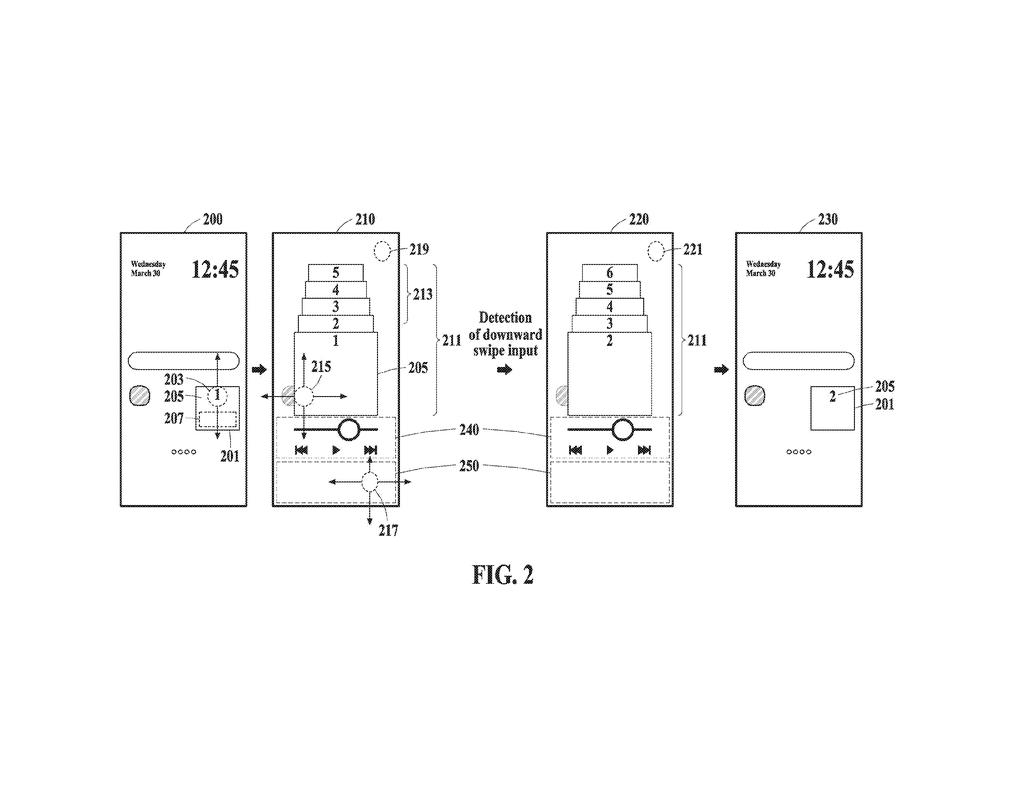
What Samsung's interactive widget control actually does
Right now, if you want a home screen widget to show a different playlist, a different calendar, or a different to-do list, you typically have to long-press, find an edit option, hunt through settings, and confirm your choice. It's more steps than it should be. Samsung wants to cut that down to almost nothing.
The patent describes a system where tapping a widget once brings up a small control screen. That screen shows the item the widget is currently displaying alongside other options you could switch to. A second tap picks the one you want, and the widget updates immediately.
The key detail is that every option in that list comes from the same app the widget is tied to. So if your music widget is showing one album, the list might show your other recent ones. You never have to leave the home screen to make the change.
detect a first touch input with respect to a widget icon displaying a target item on a home screen, display, in response to detecting the first touch input, a control screen providing control over a widget …
Translation: Tapping a widget on your home screen opens a menu to manage it.
How the tap-to-control screen manages widget item swaps
The patent covers a two-step interaction model for phone home screen widgets. On the first touch, the device detects a tap on the widget icon and immediately displays what the patent calls a control screen, a pop-up or overlay layer tied to that widget.
That control screen shows an item list: the target item (whatever the widget is currently set to display) plus one or more candidate items (other options sourced from the same linked app). The claim is explicit that every item on that list must provide at least part of the app's own functionality, not just be a label or a shortcut.
A second touch on the control screen then tells the device which item to act on. The system can either replace the target item outright with a candidate, or it can control (adjust, activate, or configure) an existing item. The winning choice then becomes what the widget icon displays on the home screen going forward.
- Touch 1: tap the widget icon, control screen appears
- Touch 2: pick from the item list on the control screen
- Result: widget updates to the chosen item, no app navigation needed
… the item list including the target item and one or more candidate items associated with the widget, control, based on the second touch input, at least one of the target item or the one or more candidate items of the item list.
Translation: You can choose from a list of options to swap what the widget displays.
What this means for everyday phone home screen habits
For everyday phone use, this is the kind of fix you don't think about until someone shows you it's possible. Widgets are supposed to give you instant access to app content, but changing what they show has always required more friction than the widget itself saves. If this interaction model shipped in Samsung's One UI, you could rotate between playlists, reminders, or contacts on your home screen without opening a single app.
The broader bet here is that home screens should be more interactive surfaces and less static dashboards. Whether Samsung builds this into Galaxy phones or folds it into something like Good Lock (its home screen customization tool) remains to be seen, but the core idea is practical and addresses a real daily annoyance.
Samsung's 1295th filing we've tracked since May in our Samsung coverage continues its memory reliability work, building on self-correcting storage and conflict-based rerouting.
Switching what a widget shows you currently means hunting through menus that weren't designed for speed. Samsung's patent cuts that down to two taps: one to open a small control screen directly from the widget, one to pick the new item you want displayed.
The person who benefits is anyone who uses a widget to track something that changes, a calendar event, a playlist, a contact. Instead of abandoning the home screen entirely, you stay in place and make the swap in a few seconds.
You would only notice this improvement on the day you first use it, and then it would disappear into the background as normal behavior. That quiet disappearance is exactly what good home screen design is supposed to accomplish.
Get our take in your Top Stories
Liked this breakdown? Add Patentlyze as a preferred source on Google, and our plain-English take shows up more often in your Top Stories the next time Samsung patent news breaks.
There are more where this came from
We read every patent application Big Tech publishes and send you the ones worth knowing. Plain English, free, every week.
The drawings
10 drawing sheets from US 2026/0277430 A1 · click any drawing to enlarge


Show the other 2 sheets


Want this weekly breakdown for a company we don't cover? Patentlyze Pro →
Be the first to weigh in