
Samsung Patents a Home Screen That Switches Between Fine and Coarse App Grids
Rearranging apps on a phone is either too clunky or too fiddly. Samsung's new patent tries to solve both complaints at once by letting the home screen flip between two different grid systems on demand.
What Samsung's switchable app grid actually does for you
Ever tried to perfectly line up your app icons and ended up with an awkward gap you just can't close? Samsung's patent describes a home screen that offers two different grid modes, each with a different cell size, so you can switch between loose, easy-grab positioning and tight, precise placement.
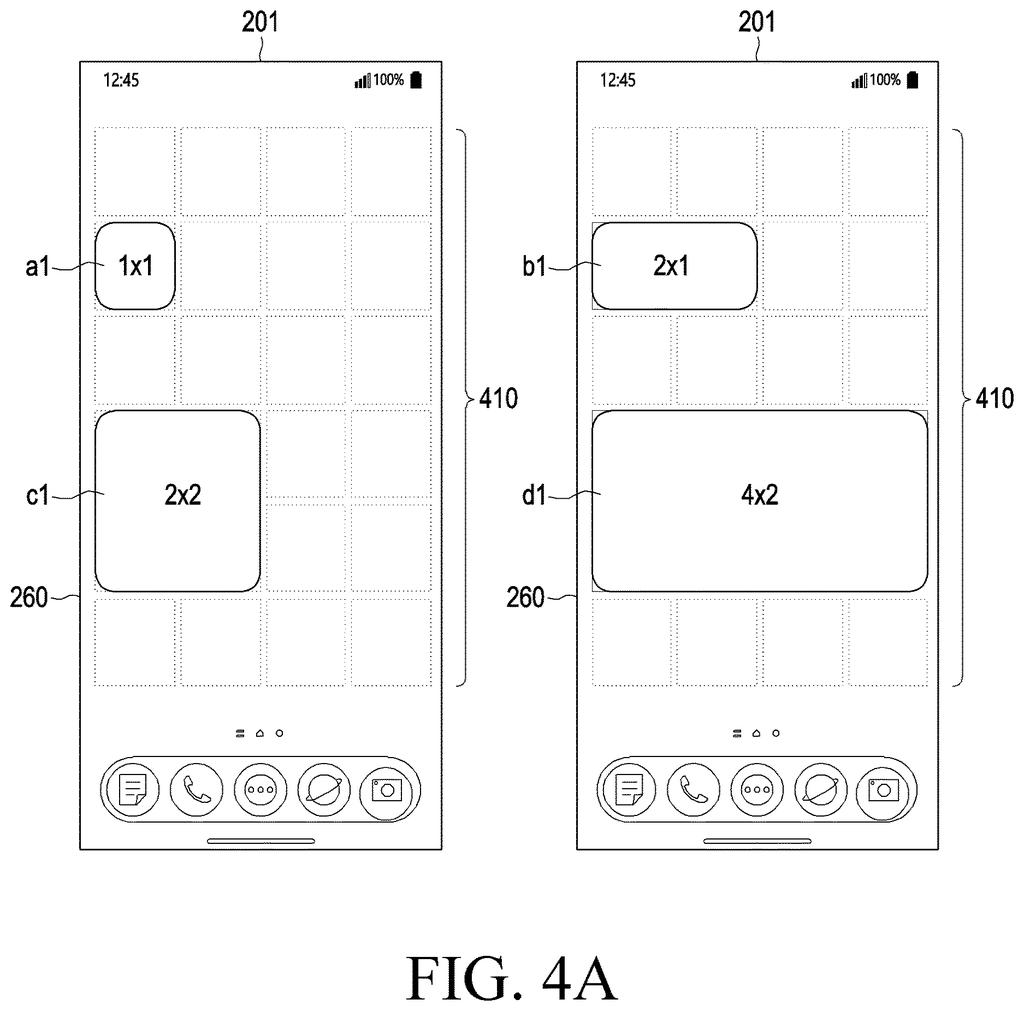
In the first, coarser mode, your apps snap to big squares. That makes grabbing and dropping icons quick and low-effort. Switch to the second, finer mode and the grid shrinks to smaller squares, giving you tighter control over exactly where each icon or widget lands. An app that occupied, say, four big cells in the first mode would then occupy a corresponding number of smaller cells in the second, keeping it roughly in the same spot.
Think of it like switching between a ruler marked in inches and one marked in millimeters. Both tools measure the same surface, but one gives you much more room to be precise. Samsung is essentially putting both rulers in your pocket.
display, through the display, a plurality of first cells based on entering a first grid mode among a plurality of editing modes of a home screen, each of the first cells having a first size …
Translation: The device shows a grid of app spaces on the home screen when you enter one of the layout modes.
How the two grid modes reposition icons on screen
The patent describes an electronic device, presumably a smartphone or tablet, with a home screen that can operate in at least two distinct grid modes.
In the first grid mode, the screen is divided into larger cells. Any app icon or widget you place on screen occupies a certain number of those large cells, and when you drag it around, it snaps from one large cell to the next. In the second grid mode, the same screen is divided into smaller cells. The device recalculates how many of the new, smaller cells the same object should occupy so that it looks roughly the same size, and movement then snaps in smaller increments.
The key technical detail is that the two modes are independent editing states, not just a zoom feature. The device enters one or the other mode explicitly, and the snap-to-grid behavior changes accordingly. The patent specifies:
- First (coarse) cell size is larger than the second (fine) cell size
- Object size is recalculated in terms of the new cell count when switching modes
- Movement is always in whole-cell increments, preserving clean alignment in either mode
This means the underlying layout engine has to translate object positions between two coordinate systems when the user switches modes, rather than simply rescaling everything visually.
… set a plurality of second cells based on entering a second grid mode of the home screen, wherein each of the second cells has a second size different from the first size …
Translation: It switches to a different grid layout with cells of a totally separate size when you pick another mode.
What this means for Android home screen customization
Home screen layouts on Android phones have been more or less the same since the early 2010s: a fixed grid, a long-press to unlock editing, then drag-and-drop. The grid size is usually set once in settings and rarely touched. This patent points toward a home screen where the editing experience itself is more deliberately layered, with quick rough placement and fine-grained precision available as separate modes.
For most people, the practical payoff would be in widget placement. Large widgets are easy to drop into rough position with a coarse grid, but nudging them into exact alignment currently requires multiple small moves. A switchable fine grid would remove that friction. Whether Samsung ships this as a feature or keeps it as a patent is a separate question, but the filing suggests the company sees the current fixed-grid experience as something worth rethinking.
Samsung's 1388th filing in our Samsung coverage since May continues its object-aware streaming work, building on moving objects to a second screen and physical objects triggering audio.
Two grid modes means two mental models, and switching between them asks you to relearn how far a single drag moves your icons. That disorientation cost is small but real.
The patent says nothing about how the switch actually happens, which is where this design earns its keep or fails. A visible toggle that works during editing could make the whole thing feel natural; anything buried in settings probably means most people never touch it.
The underlying tradeoff reads as worth it because coarse-and-fine control works well in everyday tools like volume knobs and camera focus rings, and applying it to screen layout solves a real frustration. The cost is added mental effort; the gain is precision that currently does not exist.
There are more where this came from
We read every patent application Big Tech publishes and send you the ones worth knowing. Plain English, free, every week.
The drawings
32 drawing sheets from US 2026/0299761 A1 · click any drawing to enlarge


Want this weekly breakdown for a company we don't cover? Patentlyze Pro →
Be the first to weigh in