
Adobe Patents AI Video Editing That Rewrites Every Frame From a Single Photo
Changing one object across hundreds of video frames is one of the most tedious jobs in post-production. Adobe is patenting a system that does it automatically, guided by nothing more than a photo of the replacement object and a short text description.
What Adobe's reference-photo video swap actually does
Every time a film editor needs to swap a product label, change a character's outfit, or replace one car with another across a whole clip, they face the same painful reality: video has dozens of frames per second, and each one needs individual attention. That's hours of work for a few seconds of footage.
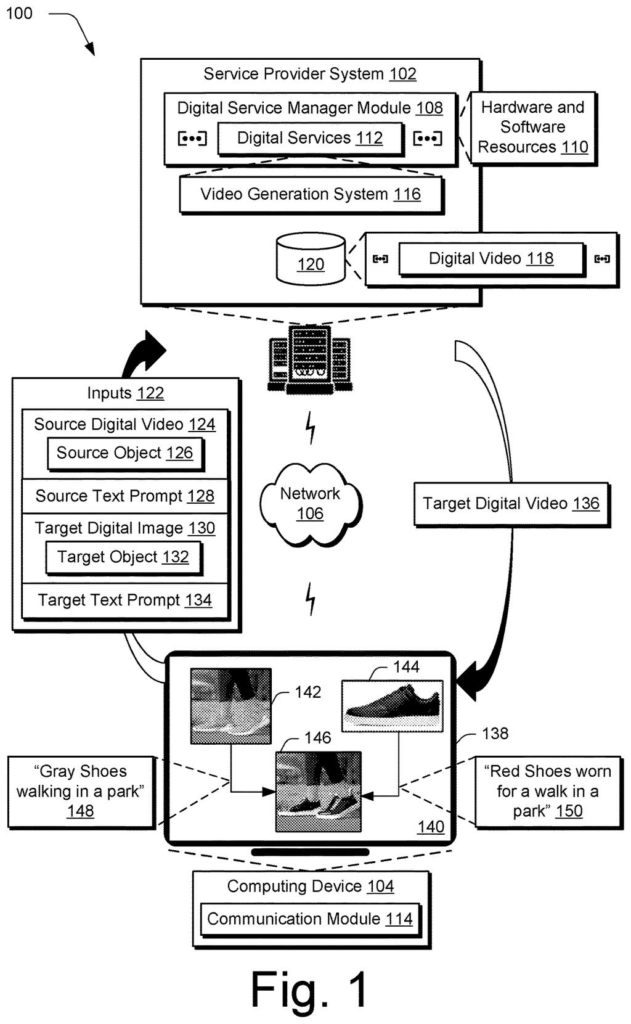
Adobe's patent describes a system where you hand it three things: a video with the object you want to replace, a photo of what you want instead, and a short written description of the new object. The system then figures out, on its own, where the original object lives in every single frame and replaces it with the one from your photo.
The key detail is that the system isn't just copying and pasting. It studies the difference between how it would normally process the video versus how it should process the replacement, and uses that gap to figure out exactly which pixels belong to the target object in each frame. The result is a new video where the replacement looks like it was always there.
processing, by a processing device, a plurality of frames of a source digital video using a diffusion model comprising a source denoising branch and a target denoising branch …
Translation: The system uses two AI pathways to analyze every single frame of your original video at the same time.
How the dual-branch diffusion model finds and replaces objects
The patent describes a pipeline built around a diffusion model (the same class of AI that powers image generators like Stable Diffusion) with a split structure Adobe calls a source denoising branch and a target denoising branch.
Here's how the split works:
- The source branch processes the original video as-is, learning how the AI would normally describe and reconstruct each frame.
- The target branch processes the same frames but also takes in the reference photo and a text prompt describing the replacement object.
- The system then compares the noise differences (the mathematical gap between what each branch predicts, across multiple processing steps called timesteps) to pinpoint which areas of each frame correspond to the object being replaced.
Those differences produce masks, which are essentially outlines drawn around the relevant region in each frame. Once the system knows what to replace and where, a generative model fills in the replacement object, frame by frame, guided by the reference photo.
A separate text prompt describing the original video also feeds into the process, giving the model enough context to keep lighting, perspective, and scene continuity consistent across the edit.
A plurality of frames of a target digital video are generated as having the target object using a generative machine-learning model.
Translation: The AI builds a brand new video frame by frame so the replacement object fits naturally into every scene.
What this means for video editors and content creators
For anyone who edits video professionally, or even casually, the amount of manual labor that goes into object replacement is genuinely disproportionate to how small the change looks on screen. A five-second product shot might take hours to retouch frame by frame in current tools.
If Adobe builds this into Premiere Pro or After Effects, it could collapse that workflow into minutes. Adobe's track record in AI video and image editing patents suggests this fits a longer arc of integrating generative tools directly into production software, rather than keeping them separate experimental features. For creators without a full post-production team, that shift would be significant.
Adobe's 40th filing we've tracked in our AI photo editing race since May follows work like the dark border fix and the two-pass cutout system.
The problem this patent attacks is real and genuinely underserved. Object replacement in video has always been harder than it looks because consistency across frames is brutal to maintain manually, and most AI tools that exist today are designed for single images, not moving sequences.
What's interesting about the approach is that the system generates its own spatial map of the target object by comparing two versions of the same AI process rather than asking the user to draw a selection or mark anything up. That's a meaningful usability bet: the burden of identifying the object shifts from the human to the model.
The open question is how well this holds up on real-world footage with motion blur, partial occlusion, or fast camera movement. Diffusion models are not naturally great at frame-to-frame consistency. If Adobe has a solid answer to that, this is a meaningful piece of the puzzle. If not, it joins a long list of impressive demos that struggle in production.
There are more where this came from
We read every patent application Big Tech publishes and send you the ones worth knowing. Plain English, free, every week.
The drawings
8 drawing sheets from US 2026/0289872 A1 · click any drawing to enlarge


Want this weekly breakdown for a company we don't cover? Patentlyze Pro →
Be the first to weigh in