
OpenAI Patents On-Screen Cues That Show When Its AI Voice Mode Is Listening
Talking to an AI is awkward when the screen gives no sign it heard you. OpenAI's patent application covers on-screen cues for each step: listening, hearing you, and answering.
What OpenAI's voice-mode status cues actually do
A man asks an AI a question out loud, then stares at a silent phone. Did it hear him? Is it working on an answer? Did the app freeze? With no sign back, talking to a machine feels like talking into a void.
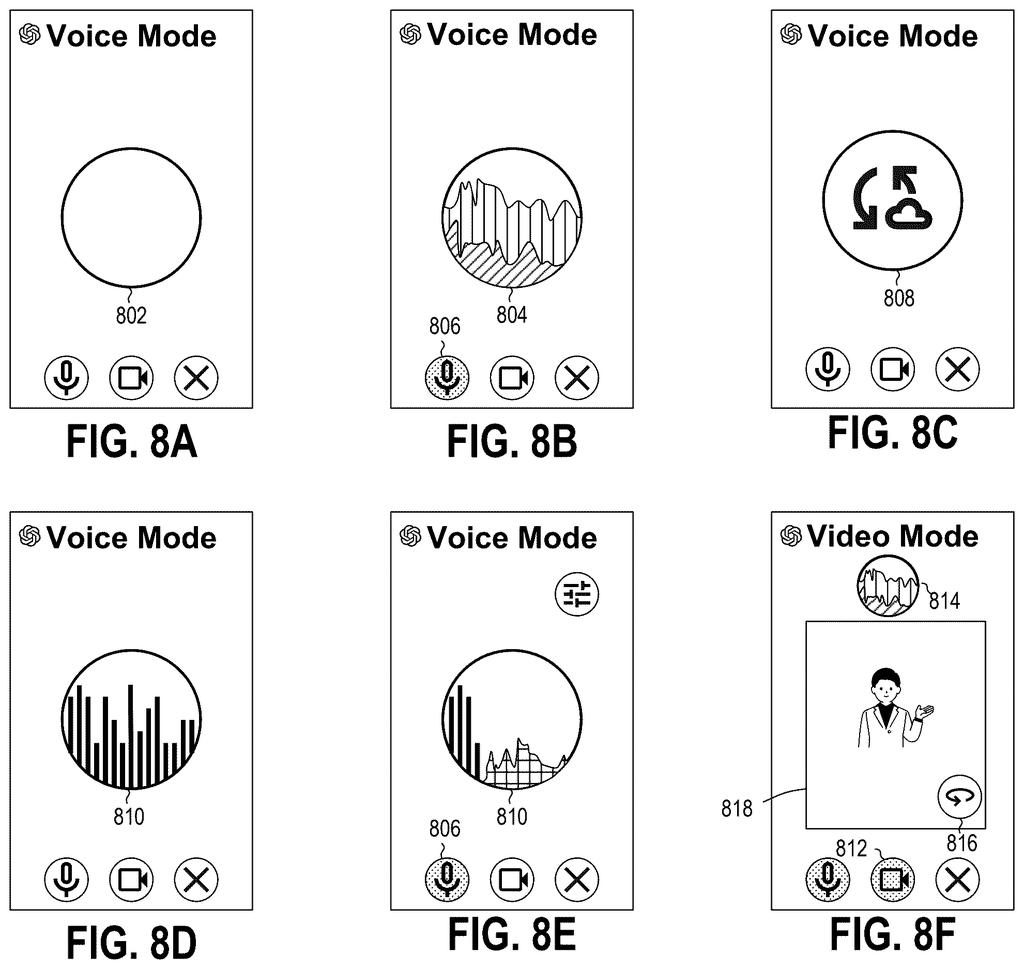
OpenAI's patent application covers a voice mode where the screen changes with each stage of the conversation. It shows when the AI is listening, reacts the moment it picks up your voice, and animates while the AI talks back. The filing describes a pulsing circle that swells with the loudness of whoever is speaking.
It also covers what happens when you cut in. If you start talking while the answer is playing, the audio pauses. If it was only a stray noise, the answer picks up again. If it was real speech, the rest of the answer is thrown away and the screen goes back to listening for you.
… visually demonstrating, in the real-time voice mode, that the first audio has been detected …
Translation: The interface shows you right away that the system heard your voice.
How the screen tracks listening, hearing, answering
The patent describes the app side of a voice conversation with an AI model. The filing calls the AI a "generative response engine," meaning software that writes or speaks answers on request. The app is the "front end," the part you see and touch. The main claim walks through a loop:
- You start real-time voice mode, and the screen shows that it is in a listening state.
- When your speech is detected, the screen visibly reacts. The description gives an example of an emblem that pulses with the volume of your voice.
- Your audio is streamed to the AI while you talk, so it can run inference (work out its answer) without waiting for you to finish.
- The reply comes back as streamed audio frames (small slices of sound), is played as it arrives, and the screen shows that the app is speaking.
Dependent claims add interruption handling. If you speak during playback, the reply pauses. If the new sound is not speech, playback resumes. If it is speech, the unplayed audio is discarded and the screen returns to listening.
The filing also describes an optional camera view. Video frames can be sent to the AI at a reduced rate, about 3 frames per second while you speak and 1 per second otherwise. The description explains why: video costs far more AI "tokens" (chunks of data the model reads) than audio, roughly 1,950 per second against 100.
Why a silent AI feels broken, and what OpenAI tries
If you have used a voice mode on your phone, the most irritating moments are the dead ones: not knowing whether it heard you, or talking over it and getting a muddle. A screen that clearly shows each state, plus a reply that stops when you cut in, makes a voice chat easier to trust.
The filing also shows the cost side. Video is expensive for an AI to read, so the system sends fewer camera frames when you are quiet. For you, that could mean a voice assistant that can also look at what your camera sees without slowing down. As with any patent application, nothing here says a product will ship.
OpenAI's fifth filing we've tracked since October in Voice & speech AI adds to one about talking over yourself and one about detecting speech pauses.
Anyone who has talked to a voice assistant knows the problem. You pause to think and it jumps in, or you speak and get silence back and wonder whether to repeat yourself. That doubt is a big reason talking to a computer still feels awkward, and it hits every user of voice AI.
The claims go after a modest slice of it: a screen that shows listening, heard you, and speaking. That fits the everyday annoyance, though it is a basic idea any voice app could want. The harder work, deciding when you have finished a thought and keeping a reply close to a natural 300 millisecond gap, sits in the long description rather than the claims shown here.
The interruption claims reach a little further, since discarding the part of an answer you never heard keeps the AI's memory of the chat accurate. Still, the problem is bigger than a pulsing circle can solve alone.
Get our take in your Top Stories
Liked this breakdown? Add Patentlyze as a preferred source on Google, and our plain-English take shows up more often in your Top Stories the next time OpenAI patent news breaks.
There are more where this came from
We read every patent application Big Tech publishes and send you the ones worth knowing. Plain English, free, every week.
The drawings
17 drawing sheets from US 2026/0311676 A1 · click any drawing to enlarge


Show the other 9 sheets


Want this weekly breakdown for a company we don't cover? Patentlyze Pro →
Be the first to weigh in