
OpenAI Files Patent for a Slider That Lets You Decide How Hard the AI Thinks
OpenAI's filing gives you a slider to tell its AI to think less for a fast answer or think more for a deeper one. A time estimate updates as you move it.
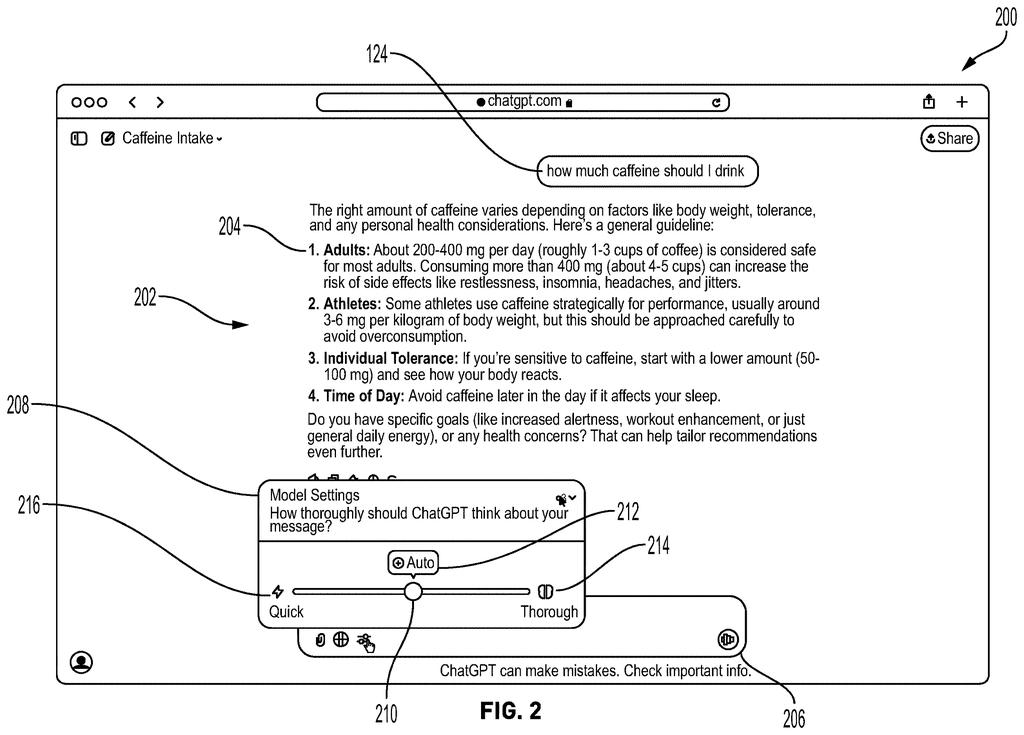
What OpenAI's think-less, think-more slider does
You're typing a quick question into a chatbot, just a simple fact, and the AI chews on it for a full minute. A few minutes later you ask something truly hard and wish it would slow down and dig deeper. Today, the speed of the answer is mostly out of your hands.
OpenAI's patent application describes a small control right next to where you type. Tap an icon and a slider appears, with a middle default, a "think less" side and a "think more" side. While you type, a prediction tool guesses how long the answer will take, and the time estimate updates as you move the slider.
Slide toward "more" and the AI gets room to write longer and reason through the problem. Slide toward "less" and you get a faster, tighter reply. Your pick can also stay put for the rest of the conversation, so you don't have to keep setting it.
… a selector object that is configured to be manipulated by a pointer device to indicate a compute allocation setting selected from the two or more selectable compute allocation settings that include a default compute allocation setting, at least one greater compute allocation setting, or at least one lesser compute allocation setting …
Translation: Users drag a slider to choose between normal, higher, or lower processing effort.
How the time estimate changes as you slide
The filing covers a control built into the box where you type your prompt (the question or instruction you give the AI). An icon opens a panel, either a drop-down or a pop-up, with a selector you move using a mouse or similar pointer. It offers a default setting plus at least one greater and one lesser setting for compute allocation (how much processing effort the AI spends on your request).
The setting controls how many tokens (small chunks of text the AI reads and writes) the model may generate. A greater setting uses more tokens than the default, and a lesser one uses fewer. The claims say this includes tokens produced while the model is reasoning, so the setting can cap how long the AI thinks.
- A duration prediction model (an AI trained to guess how long a response will take) reads your prompt and shows an estimate.
- It can also route you to a more efficient or more capable version of the AI, preferring the efficient one until it predicts the prompt needs more.
- Moving the slider updates the estimate. The description's examples run from about 1 second to 10-15 minutes.
Your choice can carry through the rest of the conversation, and the system can adjust it when a follow-up question is simpler. The filing also describes sending the setting to a data center's load balancer (the traffic director that spreads requests across servers) so it can factor your preference into how work is assigned.
Responses based on the selected setting and estimates processing durations using a predictive model are generated. Users can adjust allocations and receive updated duration estimates.
Translation: The system predicts how long the response will take based on your chosen effort level.
Why a thinking dial could change your chatbot waits
If this reaches a product, you would get a say over how long you wait. A quick lookup could come back in about a second, while a hard question could get a long stretch of reasoning, and you would see the estimate before committing. The filing also describes sending your setting to the data center, which gives OpenAI a way to spread work across its servers based on how much effort each request needs.
The patent office has approved this application, and once OpenAI pays the final fee it should be issued as a granted patent. A patent says nothing about launch timing, so nothing here tells you when or whether you will see the slider in a chatbot.
OpenAI's fourth filing in the Enterprise AI patents we cover since May follows one on two models compared side by side and one on catching AI cheating.
A slider costs simplicity. Chatbots caught on partly because there is one box and nothing to configure, and a dial adds a decision to every question. Tucking the control behind an icon and keeping a default in the middle softens that cost, and it looks like the right call.
The bigger risk is the time estimate. A guess of 10 to 15 minutes that turns into 25 will annoy people more than no number at all, so the whole design leans on a prediction model that has to be right most of the time.
More thinking also does not promise a better answer, so a "think more" setting can burn your minutes for little gain. A say over the wait beats a one-speed assistant, so the trade looks worth making.
Get our take in your Top Stories
Liked this breakdown? Add Patentlyze as a preferred source on Google, and our plain-English take shows up more often in your Top Stories the next time OpenAI patent news breaks.
There are more where this came from
We read every patent application Big Tech publishes and send you the ones worth knowing. Plain English, free, every week.
The drawings
12 drawing sheets from US 2026/0319862 A1 · click any drawing to enlarge


Show the other 4 sheets


Want this weekly breakdown for a company we don't cover? Patentlyze Pro →
Be the first to weigh in