
Samsung Files Patent for a Headset That Picks Your App by Where You Stand
Samsung's headset would scan your living room, split the safe floor space into zones, and start the right app depending on where you stand. Sofa for movies, desk for video calls, open floor for games.
What Samsung's room-zone headset actually does
When a headset covers your eyes, you can't see the bookshelf behind you or the sofa next to you. So these devices mark off a safe patch of floor, and that patch is treated as one big play space.
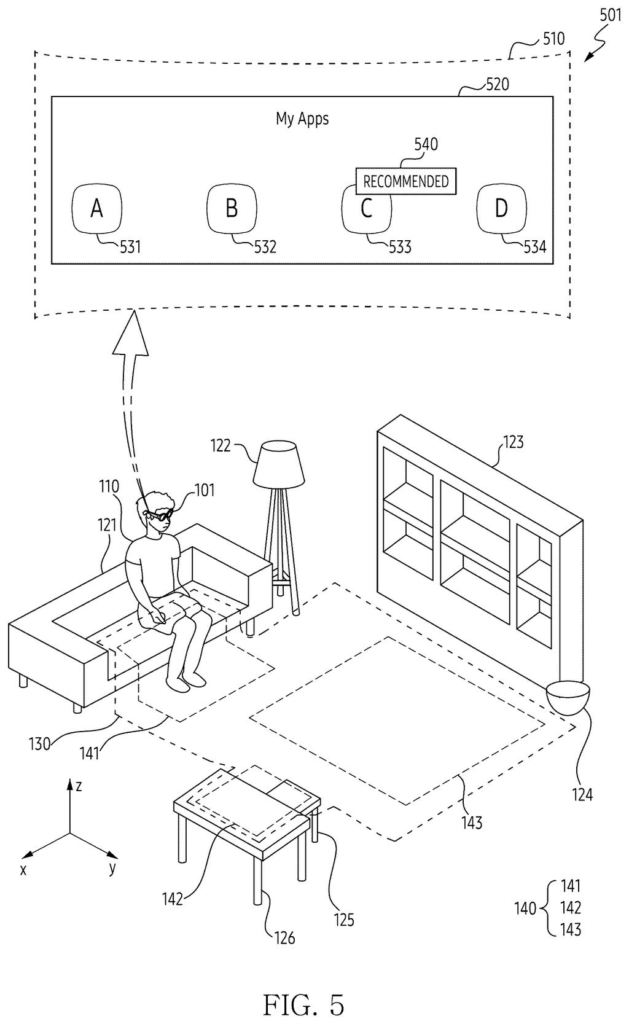
Samsung's filing slices that safe patch into smaller zones. The headset scans your room, spots things like the sofa, the desk and the open floor, and links each zone to an app that suits it. Think video on the sofa, a video call at the desk, a fitness game in the clear space.
Step into a zone and the matching app can start. Wander out of it and the headset shows you the real room again, then asks whether you want to keep going or stop.
define a region including a plurality of areas based on a scanning of a physical space, identify, based on sensor data obtained from the one or more sensors, a position of the wearable device with respect to the region …
Translation: The headset scans the room to map out different zones and tracks your exact spot within them.
How the headset carves a room into app zones
The headset first scans the room with its cameras and sensors, then picks out a region: the part of the room where you are least likely to bump into something. It then divides that region into several areas. In the filing's example, one area covers the sofa, one covers a desk and chair, and one is the empty floor.
Each installed app gets matched to an area by its category and size. Apps carry a minimum space they need, so a game that needs room to move goes to the largest area, while a video call goes to the desk. When your position (tracked by cameras and motion sensors) lands inside an area, the headset runs the linked app in virtual reality. It can also just highlight a "Recommended" badge on that app's icon.
If you ask for an app while standing in the wrong place, the headset shows a camera view of the room with a virtual fence or floor line marking where to go.
- Step outside the area and the headset switches to a see-through view, and noise cancellation pauses.
- A prompt asks whether to continue the app. Choosing yes can enlarge the area to include where you now stand.
- Leave the whole region and the app stops. How quickly this happens is stricter for games than for a word processor.
- A dog or robot vacuum entering the area can also pause the app.
… display, by executing a software application associated with the first area, a screen provided by the software application on the display to provide a virtual reality.
Translation: Walking into a specific zone automatically opens the app tied to that location.
Why your living room could become a launcher
Headsets and smart glasses still struggle with the physical side of use: where you stand, what's around you, and when a virtual world should step aside. This filing treats your room as something the device understands and uses, not just a boundary to avoid. If it ships, you could sit on the sofa and get your video app, or step onto the open floor and get your workout game, with no menu hunting.
It also points at a practical safety habit. The headset keeps showing you where the right zone is and lets the real room back in when you drift. Any maker of room-scale headsets has the same problem, so how Samsung's version feels in a cluttered apartment will matter more than the patent's wording.
Samsung's 65th filing we've tracked in the AR glasses race since May adds to a run that includes drift-proof holographic glasses and a headset fit dial.
Claim 1 is short. It covers a wearable with sensors and a display that scans a space, defines a region split into areas, works out where you are, and runs the app tied to the area you are in, shown in virtual reality. Nothing in that claim mentions safety, furniture, sofas, game categories or the fence graphics. Those details sit in later claims, so the first claim reaches well beyond Samsung's own examples.
If granted as written, that breadth would put a lot of location-triggered app launching in headsets under one umbrella, because any "zone linked to an app" design would fit the wording. Claim 2 adds the see-through switch when you leave the area, and claim 17 adds the guide screen that points you back to the right zone. Those are the narrower, more distinctive pieces.
The idea itself is sensible and easy to picture. How much it matters depends on how a patent examiner treats such a wide first claim.
Get our take in your Top Stories
Liked this breakdown? Add Patentlyze as a preferred source on Google, and our plain-English take shows up more often in your Top Stories the next time Samsung patent news breaks.
There are more where this came from
We read every patent application Big Tech publishes and send you the ones worth knowing. Plain English, free, every week.
The drawings
20 drawing sheets from US 2026/0320961 A1 · click any drawing to enlarge


Show the other 12 sheets


Want this weekly breakdown for a company we don't cover? Patentlyze Pro →
Be the first to weigh in