
Samsung Files Patent for a Folding Phone That Moves Apps Away From the Fold Line
On a phone that folds twice, an even split-screen would run a crease straight through one of your apps. Samsung's patent application sizes the windows so the dividing line sits on the fold instead.
What Samsung's tri-fold app dragging does
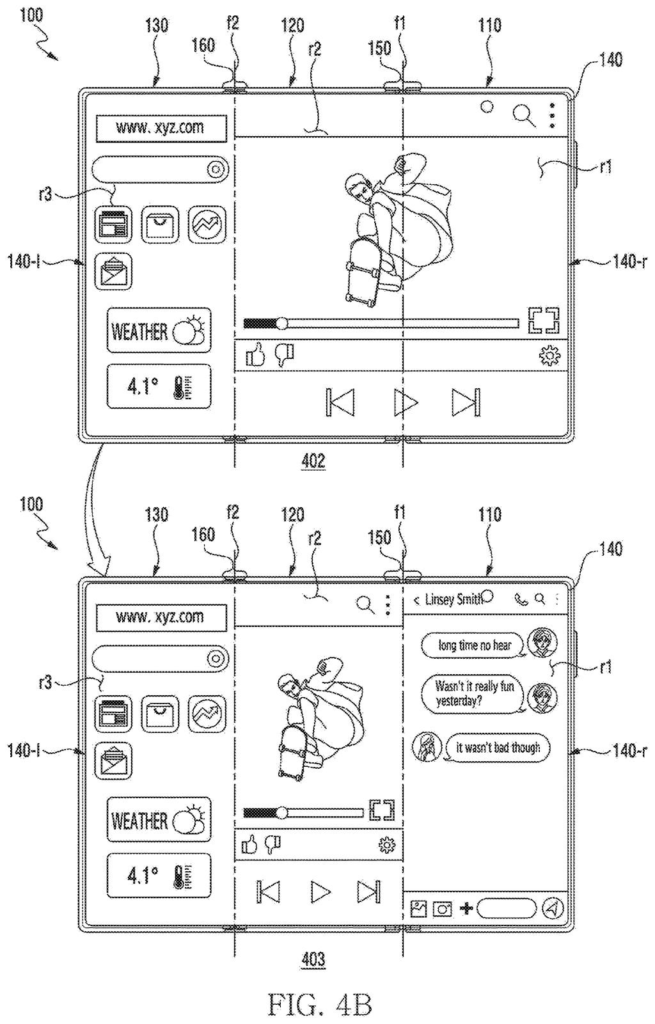
A phone that folds into three panels lies open on a table with a web page stretched across the whole screen. You want a video playing next to it, so you drag a video app's icon up from a tray at the bottom. The web page slides to one side and the video takes the rest.
Here is the catch with a screen that folds twice: it has two creases, and they sit a third of the way in from each edge. Split the screen evenly and a crease runs through the middle of one of your windows. Samsung's filing sizes the windows so the dividing line lands on a crease.
The phone also decides how much room each app gets. A video app takes two of the three panels, while a messaging app or web browser takes one. You get a clean, sensible layout without dragging anything around by hand.
… display a second execution screen associated with the at least one application in the defined portion of the flexible display and display the first execution screen associated with the first application by moving to a left side or a right side of the second execution screen.
Translation: The phone shifts your active apps aside to make room when you open a new app.
How the screen split finds the hinge
The device in the filing has three rigid housings joined by two hinges, with one flexible display stretched across the front of all three. A pair of sensors measures the angle at each hinge. When both angles fall within a range around 180° (flat), the phone treats itself as fully unfolded and allows the multi-app layout.
The flow looks like this:
- One app's screen fills the whole display.
- A tray of app icons appears in one area of the display.
- You drag an icon to a defined spot whose boundary sits on one of the hinge assemblies (the hinge mechanisms), while a translucent box previews the new window.
- The new app opens there, and the first app's screen moves to the left or right of it.
Sizing depends on a category. Apps in a first category (video players, camera, notes, photo and video editors) take two of the three panels. Apps in a second category (web browsers, messengers) take one. The phone learns the category from a tag in the app's manifest file (a small settings file bundled with the app) or from a white-list (an approved list of app names kept by the system).
In landscape orientation the new screen takes at least two panels. Rotate the phone to portrait and the two screens switch to equal sizes.
… receive an input for moving the at least one icon to a defined area of the flexible display; display a second execution screen related to the at least one application in the defined area of the flexible display based on receiving the input …
Translation: Dragging an app icon to a specific spot tells the phone to open that app there.
Why a crease-aware layout matters on a tri-fold
If you carry a phone that opens to a tablet-sized screen, one of the first things you will do is run two apps side by side. On a three-panel screen that is harder than on a single-fold phone, because an even split would put a crease through the middle of a window. The filing's answer is to size windows to the hinges, so your video and your chat each get a clean panel.
For Samsung, the layout rules decide whether the extra screen space feels useful. Rules like "videos get two thirds" are simple to write and easy to notice in daily use. As with any patent application, nothing here says a product will ship with this behavior.
Samsung's 89th filing we've tracked since May in our foldable phone patents watchlist follows ideas like resting the screen on the battery and charging a smart ring.
If you ever own a phone that folds twice, you will notice the creases quickly, and you will notice they don't sit where a normal split-screen line would. Samsung's fix is easy to picture: the dividing line between two apps lands on a crease, so no sentence or face gets cut by a fold.
The part you would feel day to day is the automatic sizing. Open a video app next to a messenger and the video gets the bigger share without you resizing anything. That saves a few fiddly adjustments, and the filing also describes a menu of six layouts for when you want something different.
The sizing rule leans on app categories, so an app that gets the small slot may not be the one you wanted big. It is a useful, narrow fix, and a good layout is one you stop noticing within a day.
Get our take in your Top Stories
Liked this breakdown? Add Patentlyze as a preferred source on Google, and our plain-English take shows up more often in your Top Stories the next time Samsung patent news breaks.
There are more where this came from
We read every patent application Big Tech publishes and send you the ones worth knowing. Plain English, free, every week.
The drawings
34 drawing sheets from US 2026/0319551 A1 · click any drawing to enlarge


Show the other 26 sheets


Want this weekly breakdown for a company we don't cover? Patentlyze Pro →
Be the first to weigh in