
Samsung Files Patent for a Phone Controller That Reshapes Itself for Each TV App
Samsung's patent application has your TV look at the app you just opened, then send your phone a set of on-screen buttons built for that app. A movie gets simple arrows, and a game gets a controller layout.
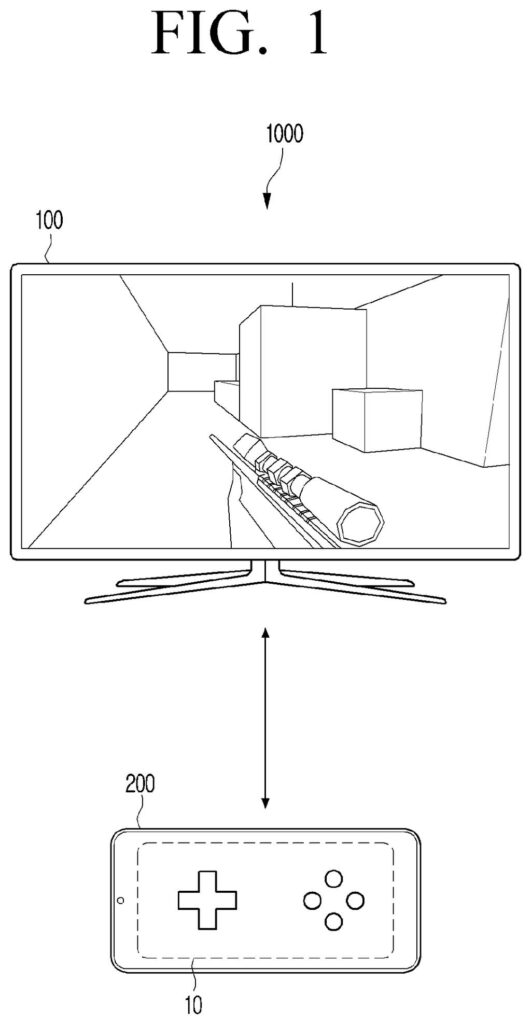
What Samsung's phone-as-controller idea does
Every time you flip your smart TV from a movie to a video game, the remote in your hand stops being the right tool. Movies want arrows, a select button, and a back button. Games want a full controller, and that is usually a separate gadget.
Samsung's patent application describes a TV that looks at what's on its own screen and works out what kind of app you opened. If it sees menus and thumbnails, it assumes you're picking something to watch. If it sees characters or cars moving around, it assumes a game. Then it sends a matching set of on-screen buttons to your phone, which becomes the controller.
The layout can also adapt over time. The TV can watch which buttons you press most and make those bigger and easier to hit, or rearrange the buttons when you tilt the phone.
… identify, based on the type associated with the application, key information associated with controlling the application; generate, based on the key information, an operation user interface …
Translation: The system figures out what buttons are needed and creates a custom control layout for that specific app.
How the TV guesses whether you're gaming
The setup has a TV or similar device (the patent calls it the electronic apparatus) and a phone or tablet (the terminal apparatus). When you pick an app, the TV grabs its screen information, including image frames (single snapshots of what is on screen), and looks for objects in them.
From those objects it sorts the app into a type. A selectable object (a preset shape, such as a rectangle at least 10 pixels each way, like a menu tile) points to a content viewing app. A movable object (a person, animal, ball or vehicle whose position changes with your key presses) points to a game. The filing also describes a default type for when neither shows up.
Each type gets a key structure, the basic set of buttons:
- Content viewing: a navigation key, a select key and a cancel key.
- Game: a navigation key plus function keys with no job assigned yet.
- Default: a navigation key and a select key.
Game buttons get their jobs from operation guide information (data describing the app's regular physical controller) or log information (a record of which keys were pressed). Frequently used keys can be made larger or placed lower on the screen. The filing also describes switching a key from tap to swipe, tuning touch sensitivity, shifting the layout when a gyroscope senses the phone tilting, and pairing the phone by scanning a QR code on the TV.
obtain, based on a user input selecting an application, screen information provided by the application; identify, based on the screen information, a type associated with the application …
Translation: When you open an app on the TV, the system looks at what is on the screen to figure out what kind of app it is.
Why your phone could replace the remote pile
If you play games on a smart TV, the usual answer is a separate controller you have to buy, charge and keep track of. A phone that draws the right buttons for whichever app is open could cover casual play and everyday viewing with something you already carry. Streaming games from a server is also described in the filing, which fits TVs that run apps without a console.
The filing is a patent application, so it shows what Samsung wants to cover, not a feature you can use. The details matter most for comfort: bigger buttons where your thumbs land, a layout that shifts when you lay the phone flat, and a short on-screen setup that checks where you actually touch.
Samsung's 1497th filing in our Samsung coverage since May joins work like the camera magnet spacing patent and the smart TV game menu.
The problem here is small but familiar. Anyone who has hunted for the right remote, or tried to play a TV game with a clicker built for channel surfing, knows the annoyance. It costs you a minute of fumbling at most, and Samsung's answer is sized to match.
Your phone is already in your hand, so asking it to draw the right buttons costs you nothing extra. The riskiest step is the guess itself. Deciding movie versus game by looking at the screen can go wrong, since a cartoon on screen might look a lot like a game.
A glass screen has no buttons to feel, and that limits how good any phone controller can be. The filing adds touch tuning and a calibration routine to help, but nothing gives your thumbs something to press. It is a sensible fix for a minor problem.
Get our take in your Top Stories
Liked this breakdown? Add Patentlyze as a preferred source on Google, and our plain-English take shows up more often in your Top Stories the next time Samsung patent news breaks.
There are more where this came from
We read every patent application Big Tech publishes and send you the ones worth knowing. Plain English, free, every week.
The drawings
30 drawing sheets from US 2026/0315921 A1 · click any drawing to enlarge


Show the other 22 sheets


Want this weekly breakdown for a company we don't cover? Patentlyze Pro →
Be the first to weigh in